Latitude 3420 and 3520 Audio Device Configuration in Microsoft Teams
Summary: This article provides information about the audio device configuration in Microsoft Teams software.
This article applies to
This article does not apply to
This article is not tied to any specific product.
Not all product versions are identified in this article.
Symptoms
The "PC MIC and Speakers" setting in Microsoft teams enabling both the microphone and speakers in one setting is unavailable.
Unlike other Latitude models, the combined "PC Mic and Speakers" option in Microsoft Teams is not available for Latitude 3420 and Latitude 3520. The Latitudes 3420 and 3520 only display the "Custom Setup" option in Teams audio settings and require manual configuration of the audio settings.
Cause
The Intel Platform Controller Hub (PCH) directly controls the microphone input while the Realtek Audio CODEC controls the speaker output. These audio devices are displayed in Device Manager individually. (Figure.1) 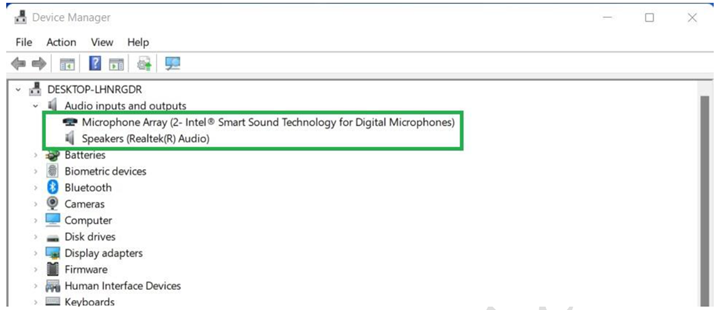
Figure.1 Individual enumeration of the Microphone and Speakers in Device Manager
Resolution
When multiple audio devices are connected to the system, use the custom Microsoft Teams audio device settings to select the speakers and the microphone that is used in the application. (Figure.2)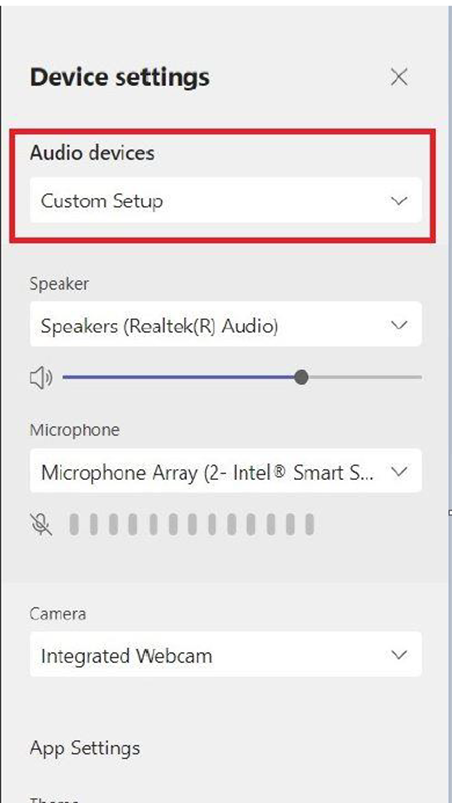
Figure.2 Custom audio device configuration in Microsoft Teams
Affected Products
Latitude 3420, Latitude 3520Article Properties
Article Number: 000200381
Article Type: Solution
Last Modified: 16 Apr 2025
Version: 6
Find answers to your questions from other Dell users
Support Services
Check if your device is covered by Support Services.