PowerEdge: Upgrade and Conversion Options for Windows Server after Making Hardware Changes
Summary: The article is a solution to fixing the issue of the system asking for eh product key after making a hardware change.
This article applies to
This article does not apply to
This article is not tied to any specific product.
Not all product versions are identified in this article.
Symptoms
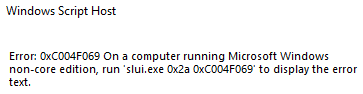
When making a hardware change to the server, and reinstalling the Windows server and comes across an activation error: run 'slui.exe 0x2a 0xC004F069'.
Screenshot of the full error:
Cause
When a hardware change is made on the server.
Resolution
-
To check what is the edition of the operating system run the following
DISM /online /Get-CurrentEdition -
Run the following, this applies to the generic volume license key
DISM /online /Set-Edition:<edition ID> /ProductKey:XXXXX-XXXXX-XXXXX-XXXXX-XXXXX /AcceptEulaNote: Make sure to use the generic key from: https://learn.microsoft.com/en-us/windows-server/get-started/kms-client-activation-keysEx:
DISM /online /Set-Edition:ServerDatacenter /ProductKey:XXXXX-XXXXX-XXXXX-XXXXX-XXXXX /AcceptEula -
Run the following command
slmgr.vbs /ipk XXXXX-XXXXX-XXXXX-XXXXX-XXXXX, at this stage you use your own product key and this replaces the generic key with your own product key, but does not activate the operating system. - To activate your operating system, you must run command
slmgr /atoto activate the license

TIP
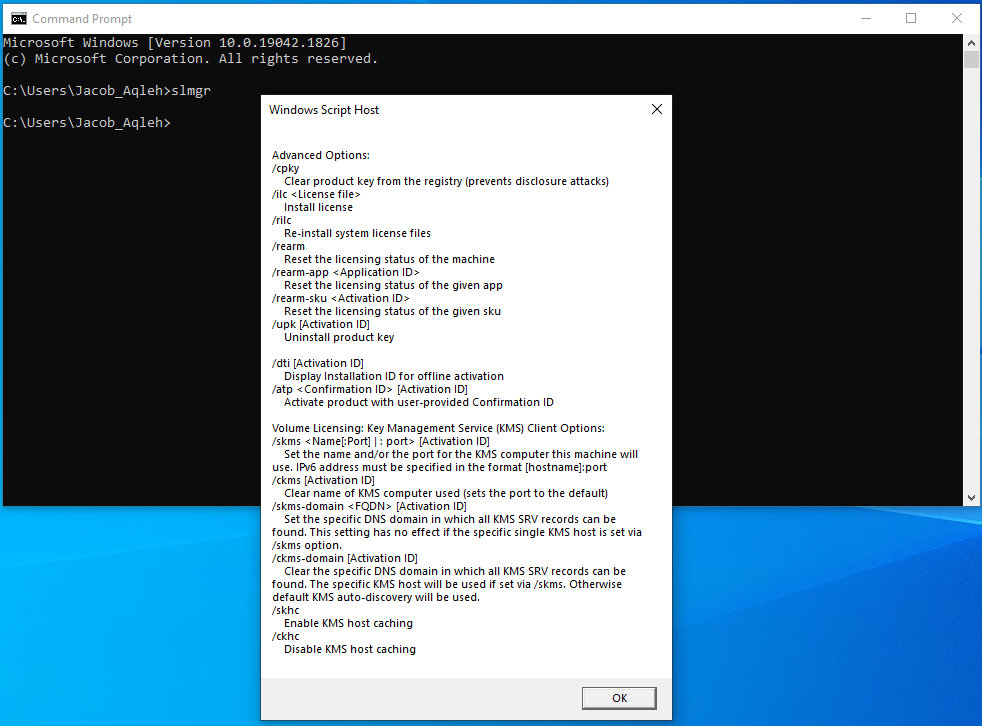
If you run in command prompt slmgr, a "windows script host" window appears.
If you press OK at the bottom, it shows you all the slmgr commands/ switches that can be used.
Affected Products
Microsoft Windows Server 2022Products
C Series, HS Series, Modular Infrastructure, Rack Servers, Tower Servers, XE Servers, XR Servers, OEM Server SolutionsArticle Properties
Article Number: 000201865
Article Type: Solution
Last Modified: 13 May 2026
Version: 5
Find answers to your questions from other Dell users
Support Services
Check if your device is covered by Support Services.