Avamar:Cannot browse backup log “Client failed to response to a request for its log.”(客户端无法响应其日志请求)。
Summary: 尝试浏览 Avamar 备份日志失败,并显示“客户端无法响应其日志请求”。
This article applies to
This article does not apply to
This article is not tied to any specific product.
Not all product versions are identified in this article.
Symptoms
尝试在 Avamar UI Activity 屏幕中浏览备份作业日志时,操作超时。
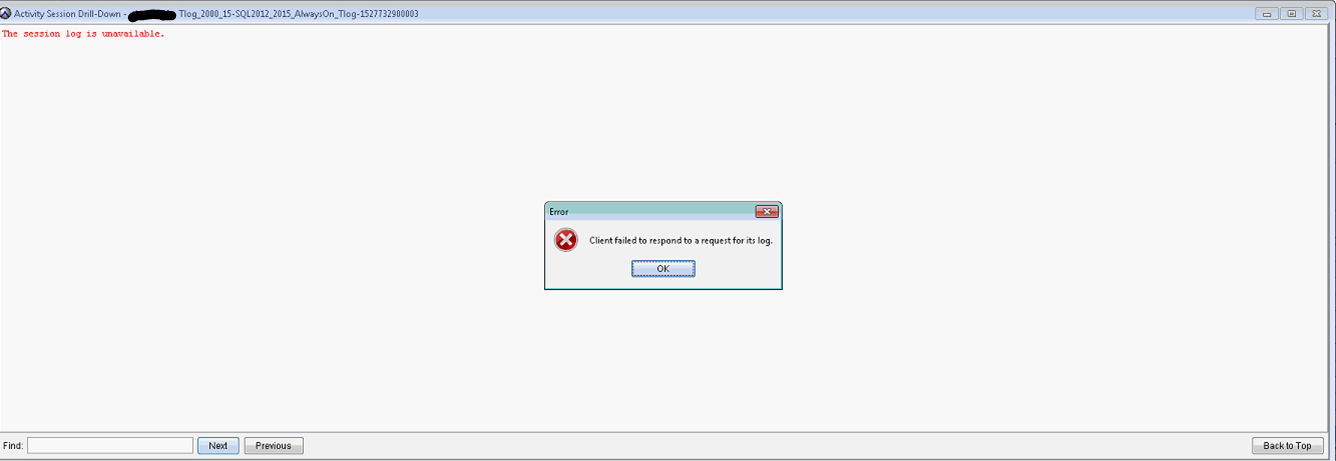
“Activity Session Drill-Down”窗口显示“The session log is unavailable”。
错误是“Client failed to respond to a request for its log.”(客户端无法响应其日志请求)。
执行操作并启用调试时,avagent.log 显示以下内容:
有关更多详细信息,请参阅 Avamar:如何收集日志文件以对 Avamar Client 备份和恢复问题进行故障排除
分页没有问题。客户端可在 备份/还原 屏幕中浏览(Windows 文件系统)。
“Activity Session Drill-Down”窗口显示“The session log is unavailable”。
错误是“Client failed to respond to a request for its log.”(客户端无法响应其日志请求)。
执行操作并启用调试时,avagent.log 显示以下内容:
有关更多详细信息,请参阅 Avamar:如何收集日志文件以对 Avamar Client 备份和恢复问题进行故障排除
2018/05/31-17:12:33.04699 [agent_listenworker:33276:39:]  agent_commands::browse_workorder timeout 9 seconds
2018/05/31-17:12:40.01300 [agent_listenworker:33276:39:]  filecollector::find_files found 'Tlog_2000_15-SQL2012_2015_AlwaysOn_Tlog-1527725700151-3006-SQL.alg'
2018/05/31-17:12:40.02500 [agent_listenworker:33276:39:]  filecollector::find_files found 'Tlog_2000_15-SQL2012_2015_AlwaysOn_Tlog-1527725700151-3006-SQL.log'
2018/05/31-17:12:40.03600 [agent_listenworker:33276:39:]  filecollector::find_files found 'Tlog_2000_15-SQL2012_2015_AlwaysOn_Tlog-1527725700151#1-3006-SQL.avtar.log'
2018/05/31-17:12:40.04800 [agent_listenworker:33276:39:]  filecollector::find_files found 'Tlog_2000_15-SQL2012_2015_AlwaysOn_Tlog-1527725700151#0-3006-SQL.avtar.log'
2018/05/31-17:12:49.66599 [agent_listenworker:33276:39:]  agent_commands::browse_workorder timed out
2018/05/31-17:12:49.66799 [agent_listenworker:33276:39:]  agent_message::sendp  server->isclosed:0, ssl:0, listenfirst_flag:1, listenfirst:0
2018/05/31-17:12:49.66899 [agent_listenworker:33276:39:]  agent_message::sendp about to send xmlsize:127 filerefsize:125
2018/05/31-17:12:49.67100 [agent_listenworker:33276:39:]  agent_message::sendp
分页没有问题。客户端可在 备份/还原 屏幕中浏览(Windows 文件系统)。
Cause
默认浏览超时响应时间为 10 秒。这不足以检索大型日志。
要检查当前的“浏览超时”设置,请使用 SSH 以管理员身份登录 Avamar Server 并运行 。
例如:
检查设置:
要检查当前的“浏览超时”设置,请使用 SSH 以管理员身份登录 Avamar Server 并运行 。
mccli client show --name=
例如:
mccli client show --name=/clients/client-1.domain.com
检查设置:
Browse Timeout 10 seconds
Resolution
- 将“Browse Timeout”(浏览超时)增加到60秒或更多。
重新启动客户端上的“Backup Agent”服务。
mccli client edit --name=/clients/client-1.domain.com --timeout=60
重新启动客户端上的“Backup Agent”服务。
Additional Information
要在 avagent.log 中启用调试:
在客户端上的 Avamar 的 VAR 文件夹中创建 avagent.cmd 文件。默认位置为 c:\Program Files\avs\var。
- 将 --debug 添加到 avagent.cmd。
重新启动 Back Agent 服务。
在客户端上的 Avamar 的 VAR 文件夹中创建 avagent.cmd 文件。默认位置为 c:\Program Files\avs\var。
- 将 --debug 添加到 avagent.cmd。
重新启动 Back Agent 服务。
Affected Products
AvamarArticle Properties
Article Number: 000202240
Article Type: Solution
Last Modified: 20 Jul 2023
Version: 2
Find answers to your questions from other Dell users
Support Services
Check if your device is covered by Support Services.