Avamar: Impossibile sfogliare il registro di backup "Client failed to respond to a request for its log".
Summary: Il tentativo di sfogliare un registro di backup Avamar non riesce con il messaggio "Client failed to respond to a request for its log".
This article applies to
This article does not apply to
This article is not tied to any specific product.
Not all product versions are identified in this article.
Symptoms
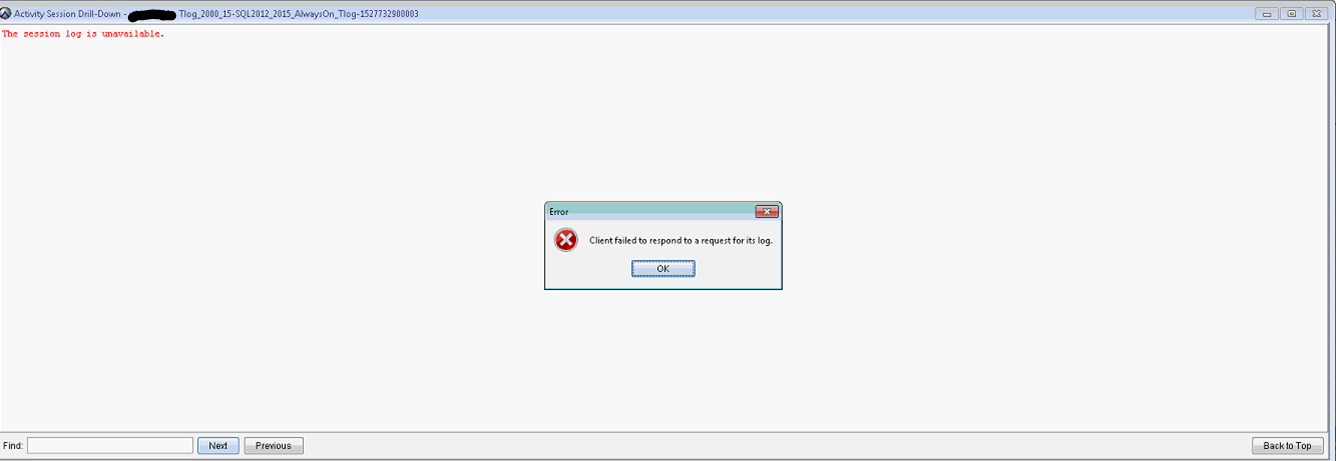
Quando si tenta di sfogliare un registro del processo di backup nella schermata Attività dell'interfaccia utente di Avamar, l'operazione si verifica il timeout.
La finestra "Activity Session Drill-Down" mostra "The session log is unavailable".
L'errore è "Client failed to respond to a request for its log".
Il file avagent.log mostra quanto segue quando l'operazione viene eseguita ed è abilitato per il debug:
Per ulteriori dettagli, vedere Avamar: Come raccogliere i file di registro per la risoluzione dei problemi di backup e ripristino del client Avamar
Non vi è alcun problema con il paging. Il client è esplorabile (file system Windows) nella schermata Backup/Restore .
La finestra "Activity Session Drill-Down" mostra "The session log is unavailable".
L'errore è "Client failed to respond to a request for its log".
Il file avagent.log mostra quanto segue quando l'operazione viene eseguita ed è abilitato per il debug:
Per ulteriori dettagli, vedere Avamar: Come raccogliere i file di registro per la risoluzione dei problemi di backup e ripristino del client Avamar
2018/05/31-17:12:33.04699 [agent_listenworker:33276:39:]  agent_commands::browse_workorder timeout 9 seconds
2018/05/31-17:12:40.01300 [agent_listenworker:33276:39:]  filecollector::find_files found 'Tlog_2000_15-SQL2012_2015_AlwaysOn_Tlog-1527725700151-3006-SQL.alg'
2018/05/31-17:12:40.02500 [agent_listenworker:33276:39:]  filecollector::find_files found 'Tlog_2000_15-SQL2012_2015_AlwaysOn_Tlog-1527725700151-3006-SQL.log'
2018/05/31-17:12:40.03600 [agent_listenworker:33276:39:]  filecollector::find_files found 'Tlog_2000_15-SQL2012_2015_AlwaysOn_Tlog-1527725700151#1-3006-SQL.avtar.log'
2018/05/31-17:12:40.04800 [agent_listenworker:33276:39:]  filecollector::find_files found 'Tlog_2000_15-SQL2012_2015_AlwaysOn_Tlog-1527725700151#0-3006-SQL.avtar.log'
2018/05/31-17:12:49.66599 [agent_listenworker:33276:39:]  agent_commands::browse_workorder timed out
2018/05/31-17:12:49.66799 [agent_listenworker:33276:39:]  agent_message::sendp  server->isclosed:0, ssl:0, listenfirst_flag:1, listenfirst:0
2018/05/31-17:12:49.66899 [agent_listenworker:33276:39:]  agent_message::sendp about to send xmlsize:127 filerefsize:125
2018/05/31-17:12:49.67100 [agent_listenworker:33276:39:]  agent_message::sendp
Non vi è alcun problema con il paging. Il client è esplorabile (file system Windows) nella schermata Backup/Restore .
Cause
Il tempo di risposta del timeout di ricerca predefinito è 10. Non è sufficiente per recuperare i registri di grandi dimensioni.
Per verificare l'impostazione "Browse Time-out" corrente, accedere ad Avamar Server come amministratore, utilizzando SSH ed eseguire.
Ad esempio:
Controllare le impostazioni:
Per verificare l'impostazione "Browse Time-out" corrente, accedere ad Avamar Server come amministratore, utilizzando SSH ed eseguire.
mccli client show --name=
Ad esempio:
mccli client show --name=/clients/client-1.domain.com
Controllare le impostazioni:
Browse Timeout 10 seconds
Resolution
- Aumentare "Browse Timeout" a 60 o più.
Riavviare il servizio "Backup Agent" sul client.
mccli client edit --name=/clients/client-1.domain.com --timeout=60
Riavviare il servizio "Backup Agent" sul client.
Additional Information
Per abilitare il debug in avagent.log:
Creare il file avagent.cmd nella cartella VAR di Avamar sul client. Il percorso predefinito è c:\Program Files\avs\var.
- Aggiungere --debug a avagent.cmd.
Riavviare il servizio Back Agent.
Creare il file avagent.cmd nella cartella VAR di Avamar sul client. Il percorso predefinito è c:\Program Files\avs\var.
- Aggiungere --debug a avagent.cmd.
Riavviare il servizio Back Agent.
Affected Products
AvamarArticle Properties
Article Number: 000202240
Article Type: Solution
Last Modified: 20 Jul 2023
Version: 2
Find answers to your questions from other Dell users
Support Services
Check if your device is covered by Support Services.