Avamar: 백업 로그 "Client failed to respond to a request for its log"를 찾아볼 수 없습니다.
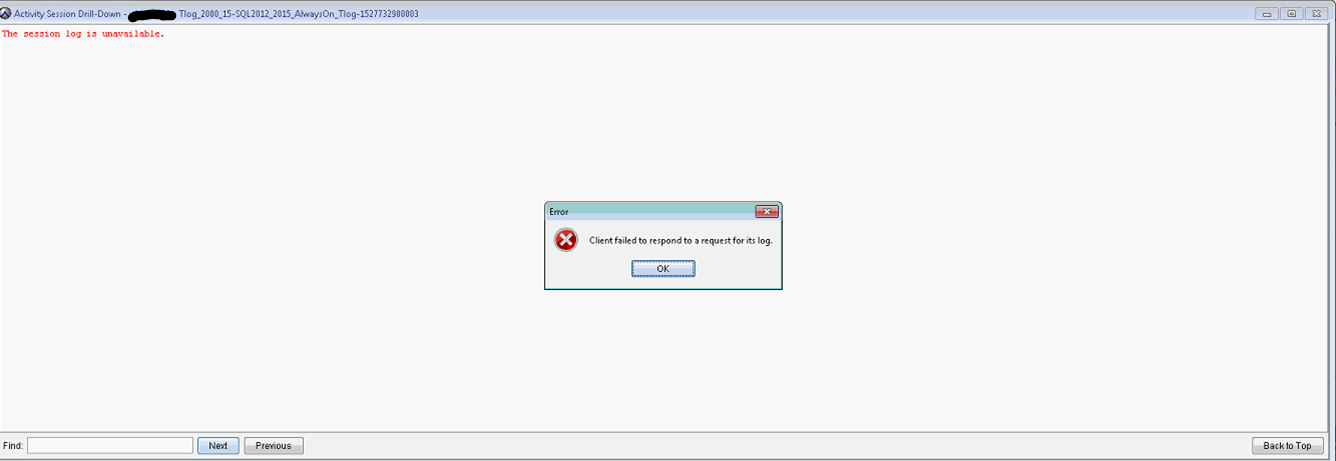
Summary: Avamar 백업 로그를 탐색하려고 시도하면 "Client failed to respond to a request for its log"가 실패합니다.
This article applies to
This article does not apply to
This article is not tied to any specific product.
Not all product versions are identified in this article.
Symptoms
Avamar UI 활동 화면에서 백업 작업 로그를 탐색하려고 하면 작업이 시간 초과됩니다.
"Activity Session Drill-Down" 창에 "The session log is unavailable"이 표시됩니다.
오류는 "Client failed to respond to a request for its log"입니다.
avagent.log에는 작업이 수행되고 디버그가 활성화된 경우 다음이 표시됩니다.
자세한 내용은 Avamar를 참조하십시오. Avamar 클라이언트 백업 및 복원 문제 해결을 위해 로그 파일을 수집하는 방법
페이징에는 문제가 없습니다. 백업 /복원 화면에서 클라이언트를 탐색할 수 있습니다(Windows 파일 시스템).
"Activity Session Drill-Down" 창에 "The session log is unavailable"이 표시됩니다.
오류는 "Client failed to respond to a request for its log"입니다.
avagent.log에는 작업이 수행되고 디버그가 활성화된 경우 다음이 표시됩니다.
자세한 내용은 Avamar를 참조하십시오. Avamar 클라이언트 백업 및 복원 문제 해결을 위해 로그 파일을 수집하는 방법
2018/05/31-17:12:33.04699 [agent_listenworker:33276:39:]  agent_commands::browse_workorder timeout 9 seconds
2018/05/31-17:12:40.01300 [agent_listenworker:33276:39:]  filecollector::find_files found 'Tlog_2000_15-SQL2012_2015_AlwaysOn_Tlog-1527725700151-3006-SQL.alg'
2018/05/31-17:12:40.02500 [agent_listenworker:33276:39:]  filecollector::find_files found 'Tlog_2000_15-SQL2012_2015_AlwaysOn_Tlog-1527725700151-3006-SQL.log'
2018/05/31-17:12:40.03600 [agent_listenworker:33276:39:]  filecollector::find_files found 'Tlog_2000_15-SQL2012_2015_AlwaysOn_Tlog-1527725700151#1-3006-SQL.avtar.log'
2018/05/31-17:12:40.04800 [agent_listenworker:33276:39:]  filecollector::find_files found 'Tlog_2000_15-SQL2012_2015_AlwaysOn_Tlog-1527725700151#0-3006-SQL.avtar.log'
2018/05/31-17:12:49.66599 [agent_listenworker:33276:39:]  agent_commands::browse_workorder timed out
2018/05/31-17:12:49.66799 [agent_listenworker:33276:39:]  agent_message::sendp  server->isclosed:0, ssl:0, listenfirst_flag:1, listenfirst:0
2018/05/31-17:12:49.66899 [agent_listenworker:33276:39:]  agent_message::sendp about to send xmlsize:127 filerefsize:125
2018/05/31-17:12:49.67100 [agent_listenworker:33276:39:]  agent_message::sendp
페이징에는 문제가 없습니다. 백업 /복원 화면에서 클라이언트를 탐색할 수 있습니다(Windows 파일 시스템).
Cause
기본 찾아보기 시간 초과 응답 시간은 10s입니다. 대용량 로그를 검색하는 것만으로는 충분하지 않습니다.
현재 "Browse Time-out" 설정을 확인하려면 SSH를 사용하여 Avamar Server에 관리자로 로그인하고 실행합니다.
예:
설정을 확인합니다.
현재 "Browse Time-out" 설정을 확인하려면 SSH를 사용하여 Avamar Server에 관리자로 로그인하고 실행합니다.
mccli client show --name=
예:
mccli client show --name=/clients/client-1.domain.com
설정을 확인합니다.
Browse Timeout 10 seconds
Resolution
- "Browse Timeout"을 60s 이상으로 늘입니다.
클라이언트에서 "Backup Agent" 서비스를 다시 시작합니다.
mccli client edit --name=/clients/client-1.domain.com --timeout=60
클라이언트에서 "Backup Agent" 서비스를 다시 시작합니다.
Additional Information
avagent.log에서 디버그를 활성화하려면:
클라이언트에 있는 Avamar의 VAR 폴더에 avagent.cmd 파일을 생성합니다. 기본 위치는 c:\Program Files\avs\var입니다.
- avagent.cmd에 --debug를 추가합니다.
Back Agent 서비스를 다시 시작합니다.
클라이언트에 있는 Avamar의 VAR 폴더에 avagent.cmd 파일을 생성합니다. 기본 위치는 c:\Program Files\avs\var입니다.
- avagent.cmd에 --debug를 추가합니다.
Back Agent 서비스를 다시 시작합니다.
Affected Products
AvamarArticle Properties
Article Number: 000202240
Article Type: Solution
Last Modified: 20 Jul 2023
Version: 2
Find answers to your questions from other Dell users
Support Services
Check if your device is covered by Support Services.