NetWorker: VMware View Refresh Fails "Dispatcher Request Timed Out"
Summary: Error fetching vCenter information for ESXi vCenter hostname: Reason Dispatcher Request timed out NetWorker
This article applies to
This article does not apply to
This article is not tied to any specific product.
Not all product versions are identified in this article.
Symptoms
The NetWorker Management Console's (NMC) VMware View times out with the following error.
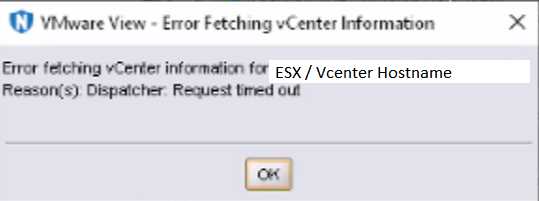
Figure 1: NetWorker Management Console Time Out Error Message
A similar error may be observed when performing a VMware recovery from the NMC's recover wizard. The error appears during the step to select a target vCenter.
The NetWorker server's daemon.raw reports:
Inventory session returned err: Inventory session status returned with a failure.
Error: 'Failed to load inventory from 'VMWARE-HYPERVISOR-FQDN'. Failed to load Category/Tagging metadata.
- Linux: /nsr/logs/daemon.raw
- Windows: C:\Program Files\EMC NetWorker\nsr\logs\daemon.raw
Cause
- The vCenter inventory operation is exceeding the max Java heap size (default 2 GB) on the NMC client.
- Default timeout parameters used by NetWorker processes are exceeded.
NOTE: There are other causes for this type of issue. This KB focuses on symptoms that only seem to impact the NMC functions. Such as the VMware View refresh and NMC recovery wizard. Typically VMware backup operations are not impacted. The settings outlined in this KB may be beneficial; however, for other potential causes, see the Additional Info section.
Resolution
NetWorker Management Console Heap Size:
Increase the Java heap size of the NetWorker Management Console.
- Open the gconsole.jnlp file from the NMC installation folder. Default:
Windows: C:\Program Files\EMC NetWorker\Management\GST\web\gconsole.jnlp
Linux: /opt/lgtonmc/web/gconsole.jnlp
Linux: /opt/lgtonmc/web/gconsole.jnlp
- The max heap setting is identifiable by -Xmx, for example:
<j2se version="1.8+" java-vm-args="-Djava.locale.providers=COMPAT -XX:+IgnoreUnrecognizedVMOptions --add-modules=java.se.ee -Xms256m -Xmx2048m"/>
NOTE: In this example the max heap size is 2048m (2 GB). This means that the NMC client (host accessing the NMC) will only allocate 2 GB to the NMC's "Java(TM) Web Launcher" process. In larger environments, or when querying large amounts of data, it is possible to exceed the default 2 GB limit.
- Increase the max heap size to 4096m (4 GB):
<j2se version="1.8+" java-vm-args="-Djava.locale.providers=COMPAT -XX:+IgnoreUnrecognizedVMOptions --add-modules=java.se.ee -Xms256m -Xmx4096m"/>
- Save the file.
- Restart the NMC server service. This will forcibly close any NMC sessions which remain open:
Windows:
net stop gstd
net start gstd
Linux:
systemctl restart gst
- Relaunch the NMC.
- Perform a VMware View refresh and monitor for completion.
NOTE: Open Task Manager and monitor "Java(TM) Web Launcher" memory usage. If it exceeds 4 GB, wait for inventory refresh to complete before increasing heap size further.
Environment Variables:
Add the following two system variables on NetWorker server:
GST_VBA_TIMEOUT=7200
NSR_HYPERVISOR_QUERY_REQUEST_TIMEOUT=3600
NOTE: If the NetWorker Management Console (NMC) server is installed on a separate host, the settings must be applied on the stand-alone NMC server as well.
For Windows:
- From the dashboard, select Server Manager > Local Server.
- Click the hyperlink for the Computer Name.
- Select System Properties > Advanced > Environment Variables > New.
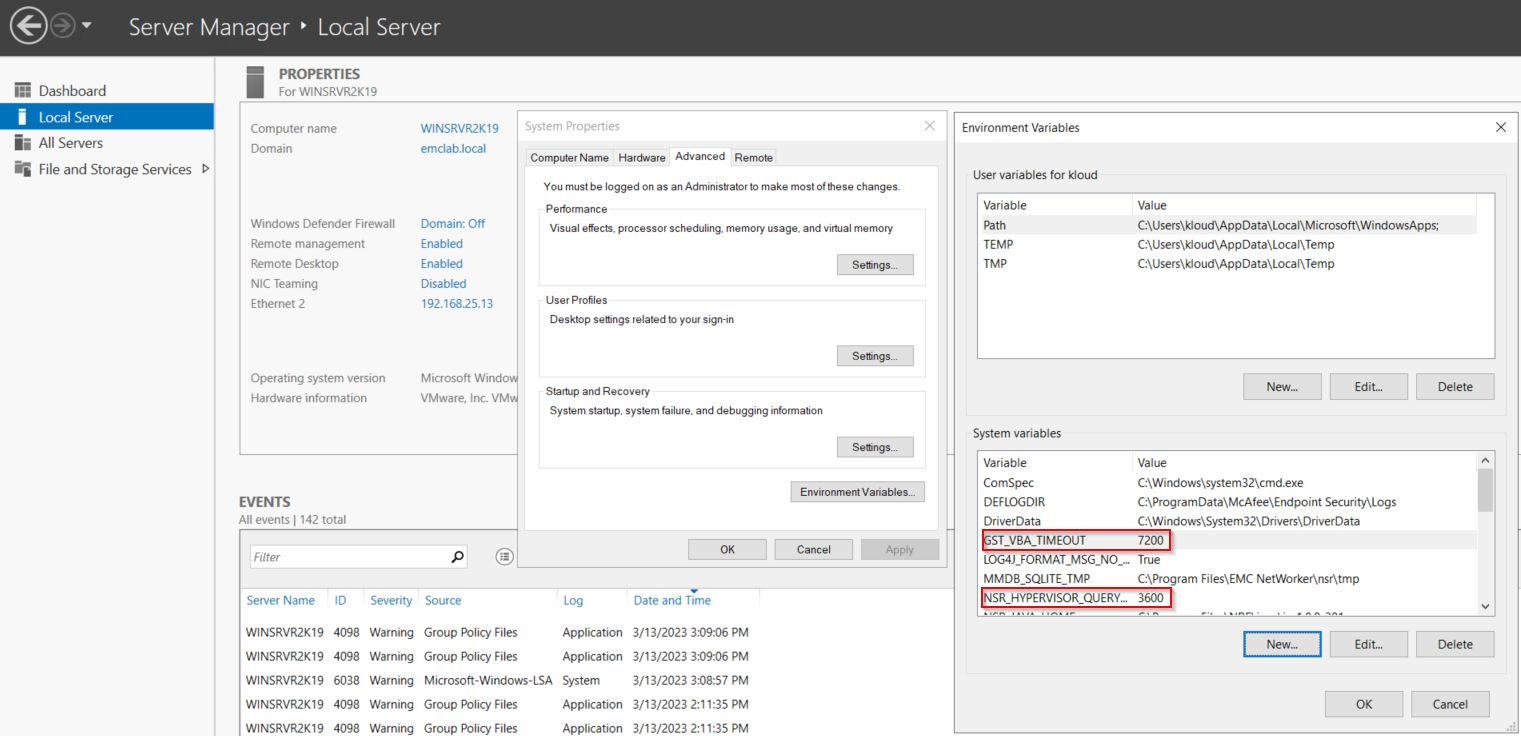
Figure 2: Server Manager Dashboard for Windows
- Reboot the NetWorker server operating system.
For Linux:
- Create or edit the /nsr/nsrrc file using a text editor:
vi /nsr/nsrrc
NOTE: The /nsrrc file is a variable file used by NetWorker processes, the variables are applied during NetWorker daemon startup.
- Add the following lines:
GST_VBA_TIMEOUT=7200
export GST_VBA_TIMEOUT
NSR_HYPERVISOR_QUERY_REQUEST_TIMEOUT=3600
export NSR_HYPERVISOR_QUERY_REQUEST_TIMEOUT
- The finished changes should look similar to:
[root@networker]:~# cat /nsr/nsrrc
JAVA_HOME=/opt/nre/java/latest/
export JAVA_HOME
GST_VBA_TIMEOUT=7200
export GST_VBA_TIMEOUT
NSR_HYPERVISOR_QUERY_REQUEST_TIMEOUT=3600
export NSR_HYPERVISOR_QUERY_REQUEST_TIMEOUT
- Restart the NetWorker services:
systemctl restart networker
systemctl restart gst
Additional Information
If the issue persists after applying the environment variables defined in this KB, see:
Affected Products
NetWorkerProducts
NetWorker Family, NetWorker SeriesArticle Properties
Article Number: 000211688
Article Type: Solution
Last Modified: 22 Jan 2025
Version: 10
Find answers to your questions from other Dell users
Support Services
Check if your device is covered by Support Services.