NetWorker:擷取 ESXi vCenter 主機名稱的 vCenter 資訊時發生錯誤:原因派送程式要求逾時
Summary: 擷取 ESXi vCenter 主機名稱的 vCenter 資訊時發生錯誤:原因分派員要求逾時 NetWorker 19.7.0.3。
This article applies to
This article does not apply to
This article is not tied to any specific product.
Not all product versions are identified in this article.
Symptoms
在 NetWorker 管理主控台 (NMC) 中重新整理 VMware 檢視會逾時,並顯示下列錯誤。
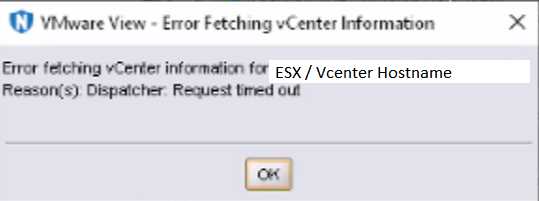
圖 1:NetWorker 管理主控台逾時錯誤訊息
NetWorker 伺服器已升級至 19.7.0.x。
這會影響 ESXi 和 vCenter NSR Hypervisor。
NetWorker 伺服器的 daemon.raw 報告:
圖 1:NetWorker 管理主控台逾時錯誤訊息
NetWorker 伺服器已升級至 19.7.0.x。
這會影響 ESXi 和 vCenter NSR Hypervisor。
NetWorker 伺服器的 daemon.raw 報告:
Inventory session returned err: Inventory session status returned with a failure.
Error: 'Failed to load inventory from 'ESX-FQDN'. Failed to load Category/Tagging metadata.
- Linux:/nsr/logs/daemon.raw
- Windows:C:\Program Files\EMC NetWorker\nsr\logs\daemon.raw
- 知識庫文章 22793:NetWorker:如何使用nsr_render_log
- 知識庫文章 23670:NetWorker:如何即時自動將 daemon.raw 呈現至 daemon.log
Cause
NetWorker 19.7 版推出全新更新,使其在重試 VISD 連線時速度變慢。
Resolution
解決方案:
NetWorker 19.8 包含此問題的修正。NetWorker 19.8 可從 Dell 支援下載,網址為:HTTPs://www.dell.com/support/home/product-support/product/networker/。因應措施:
在 NetWorker 伺服器上新增下列兩個系統變數:GST_VBA_TIMEOUT=7200 NSR_HYPERVISOR_QUERY_REQUEST_TIMEOUT=3600
若為 Windows:
- 從儀表板中,選取「 Server Manager」> 本機伺服器。
- 按一下「電腦名稱稱」的超連結。
- 選取「進階>環境變數>系統內容>新變量。
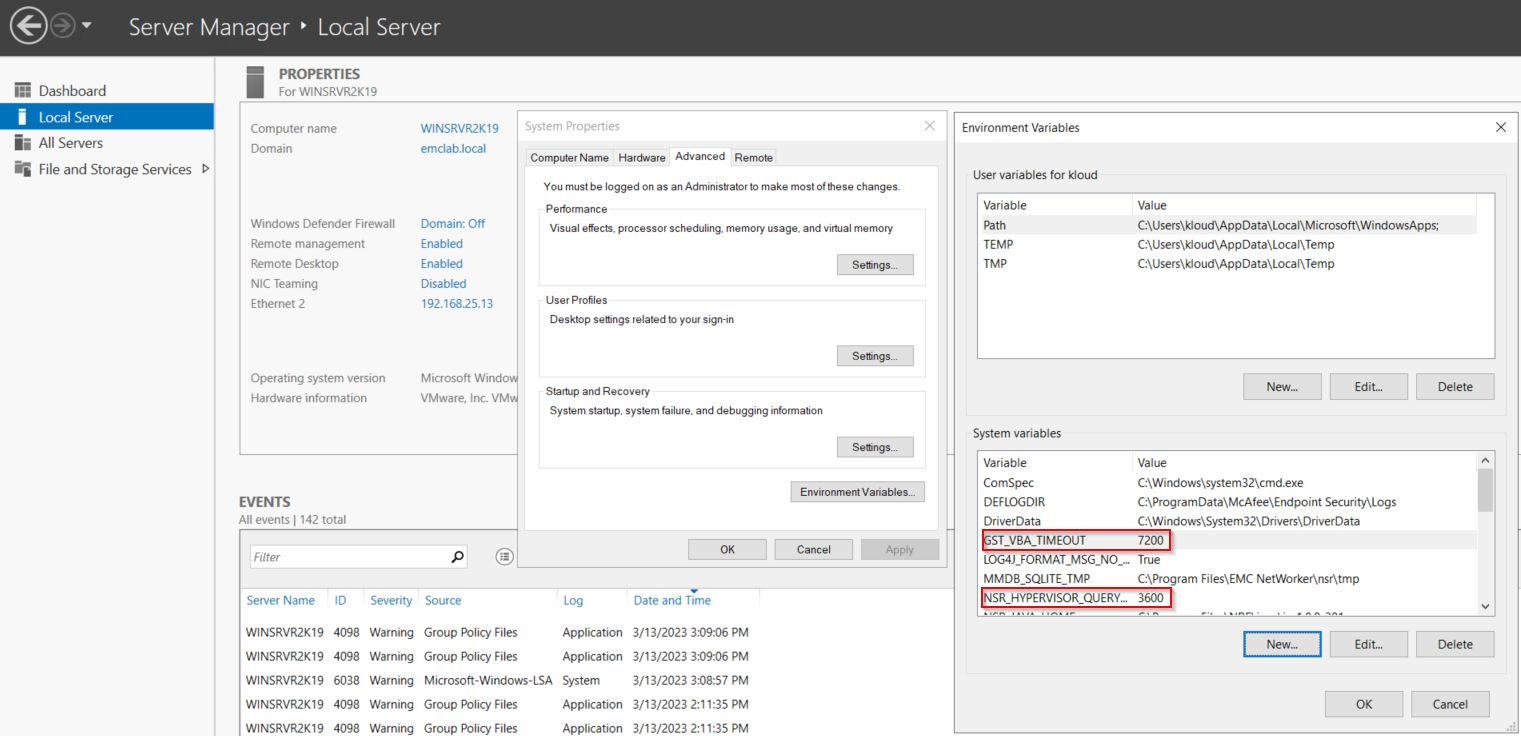
圖 2:Windows 適用的 Server Manager 儀表板
- 重新開機 NetWorker 伺服器作業系統。
若為 Linux:
- 使用文字編輯器建立或編輯 /nsr/nsrrc 檔案:
vi /nsr/nsrrc
注意:/nsrrc 檔案是 NetWorker 程式使用的變數檔案,此檔案會載入,並在 NetWorker 精靈啟動期間套用變數。
- 新增下列行:
GST_VBA_TIMEOUT=7200
export GST_VBA_TIMEOUT
NSR_HYPERVISOR_QUERY_REQUEST_TIMEOUT=3600
export NSR_HYPERVISOR_QUERY_REQUEST_TIMEOUT
- 完成的變更應類似:
[root@networker-mc]:~# cat /nsr/nsrrc
JAVA_HOME=/opt/nre/java/latest/
export JAVA_HOME
GST_VBA_TIMEOUT=7200
export GST_VBA_TIMEOUT
NSR_HYPERVISOR_QUERY_REQUEST_TIMEOUT=3600
export NSR_HYPERVISOR_QUERY_REQUEST_TIMEOUT
- 重新開機 NetWorker 服務:
systemctl restart networker
systemctl restart gst
Affected Products
NetWorkerProducts
NetWorker Family, NetWorker SeriesArticle Properties
Article Number: 000211688
Article Type: Solution
Last Modified: 22 Jan 2025
Version: 10
Find answers to your questions from other Dell users
Support Services
Check if your device is covered by Support Services.