NVP vProxy: Unable to log in using root credentials, root access lost
Summary: Root account access through the vProxy appliance is lost.
This article applies to
This article does not apply to
This article is not tied to any specific product.
Not all product versions are identified in this article.
Symptoms
From the VMware vSphere web client, unable to log in to the vProxy appliance using the root account. Access Denied or invalid credentials errors are returned.
You are unable to log in using the vProxy's admin account from either SSH or vSphere web client. Access Denied or Invalid Credential errors are returned.
NOTE: Root access is blocked over SSH by default. Unless SSH configuration file settings on vProxy are set to enable root over SSH, root access returns "Access Denied" over SSH. The root account is accessible through vSphere Virtual Machine (VM) console connection.
You are unable to log in using the vProxy's admin account from either SSH or vSphere web client. Access Denied or Invalid Credential errors are returned.
Cause
Both the root account and admin users are locked out or the user credentials are lost or unknown.
Resolution
NOTE: If access is lost to both the root and admin user account, see the following article: NVP-vProxy: How to update or change vProxy admin or root password. This article provides instructions for resetting the root account password from single-user mode.
If the root account is accessible:
If the root account is accessible through the vSphere VM console connection, connect to the vProxy over SSH and login with admin credentials. Switch to the root user account using the below command and specify the root users password.
sudo su -
You can only change (update) the root password if you already have access to the root account.
sudo passwd root
If the admin user password is lost but know the root password, connect to the vProxy from the vSphere web client and login as root. The admin password can be changed with the command:
passwd admin
NOTE: If you change the admin user password, you must update the vProxy password in NetWorker. Otherwise, it continues to try to use the old password and locks out the account. This can be done from the NetWorker Management Console (NMC) or NetWorker Web User Interface (NWUI).
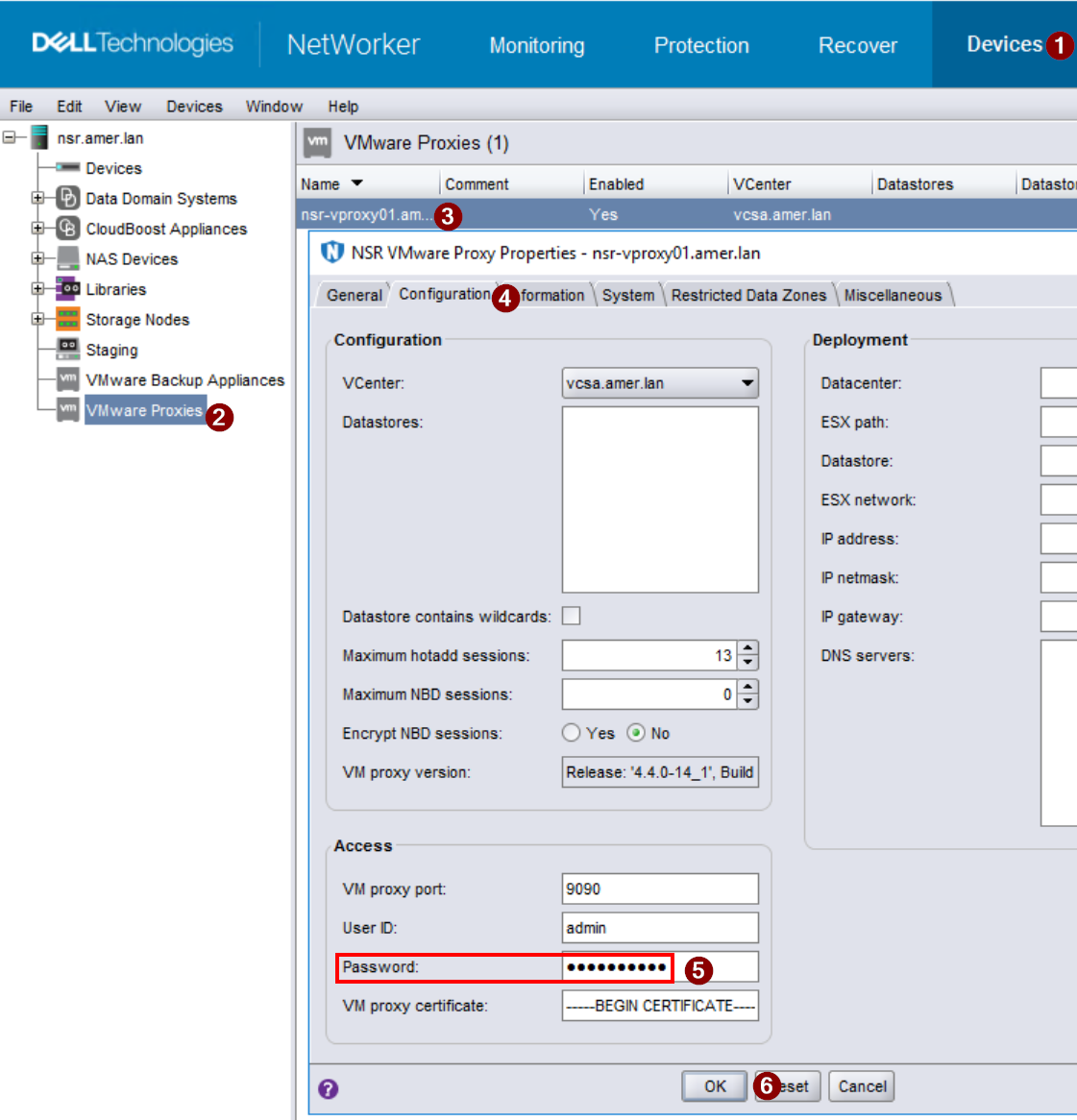
Figure 1: Screenshot of vProxy properties from the NetWorker Management Console (NMC).
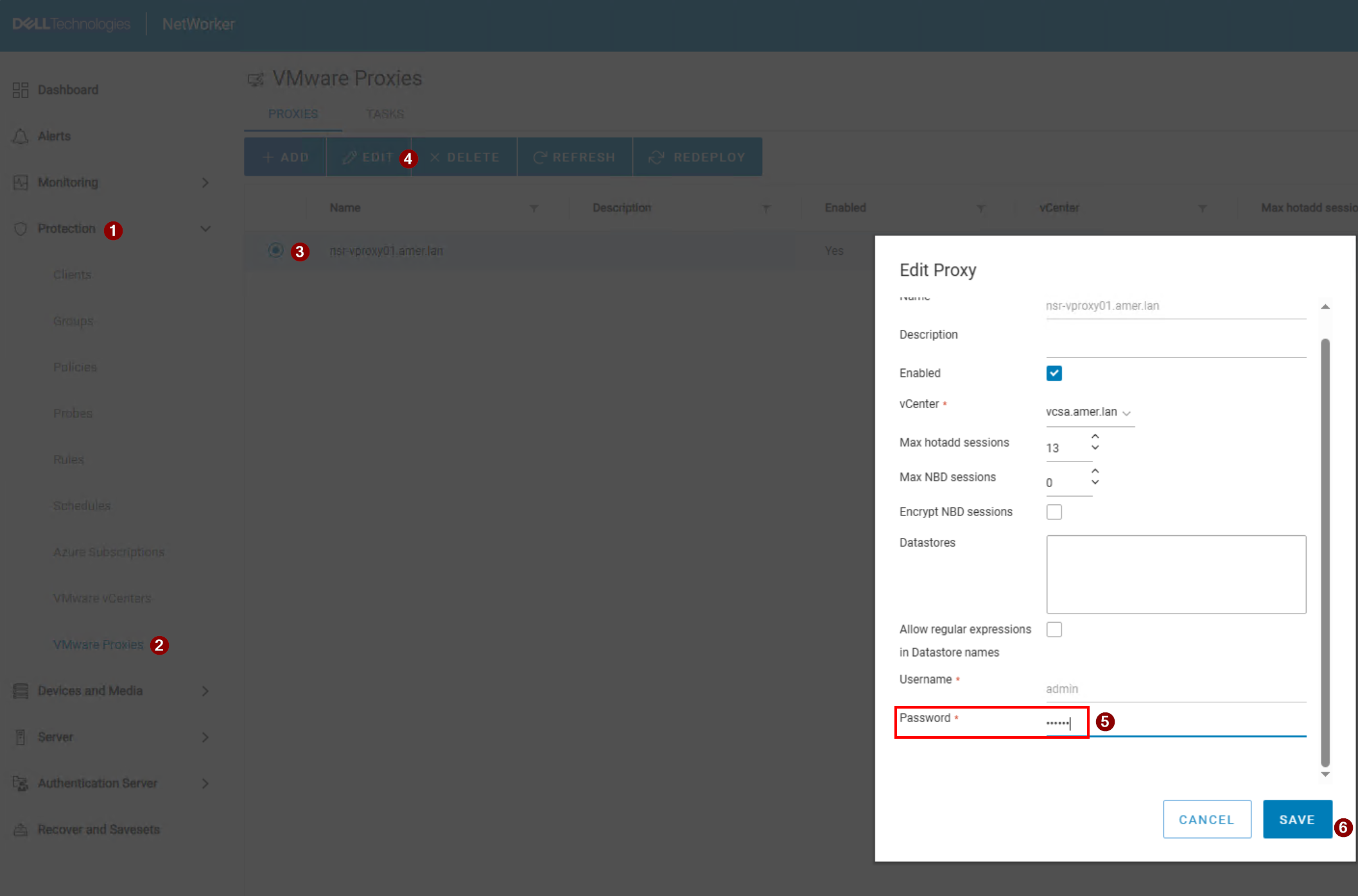
Figure 2: Screenshot of vProxy properties from the NetWorker Web User Interface (NWUI).
If the admin account is locked, log in with the root account from the vSphere web client and reset admin account with pam_tally2 to reset it:
pam_tally2 --user admin --reset
If the admin account continues to become locked, check to see where the login requests are coming from:
journalctl -u sshd | grep -w 'Failed password'
This command lists the IP addresses of systems which attempted (and failed) to login using the admin credentials:
Dec 06 09:23:36 nsr-vproxy02.amer.lan sshd[9407]: pam_unix(sshd:auth): authentication failure; logname= uid=0 euid=0 tty=ssh ruser= rhost=192.168.9.100  user=admin
Dec 06 09:23:38 nsr-vproxy02.amer.lan sshd[9407]: Failed password for admin from 192.168.9.100 port 54788 ssh2
In the above example, we can see that someone attempted to log in as admin using SSH from host 192.168.9.100. The following conditions may apply:
- The host is a NetWorker server with the incorrect vProxy password set in the vProxy properties
- There is an automated tool or script that is configured with the incorrect credentials (This would be outside of NetWorker).
- A user keeps attempting to access the vProxy using the incorrect credentials and locking the account.
NOTE: The address shown does not account for Network Address Translation (NAT) configurations. If NAT or Port Forwarding is used to redirect SSH traffic to the vProxy, the
journalctl output shows the NAT target address as the source, not where the SSH session originated from.
Affected Products
NetWorkerProducts
NetWorker Family, NetWorker SeriesArticle Properties
Article Number: 000215827
Article Type: Solution
Last Modified: 03 Feb 2026
Version: 8
Find answers to your questions from other Dell users
Support Services
Check if your device is covered by Support Services.