NetWorker: Authentication failure for DD host when creating retention lock devices
Summary: Failing to enable retention lock for data domain devices on NetWorker.
This article applies to
This article does not apply to
This article is not tied to any specific product.
Not all product versions are identified in this article.
Symptoms
Below error is observed during the enablement of Retention Lock (RL):
Unable to perform authentication for DD host <DD-FQDN>, user <username>, port <3009>, Mtree <mtreename>: Unable to send a request: SSL peer certificate or SSH remote key was not OK ().Cause
Previously when Cloud Tier devices are added, a management certificate was is imported using the DD Cloud Tier device create wizard.
However, since that management certificate is now outdated, DD is unable to authenticate it hence the error received.
Once the management certificate gets created, it is not being used during the backup/clone that is the reason why NetWorker did not recognize though it is outdated.
Resolution
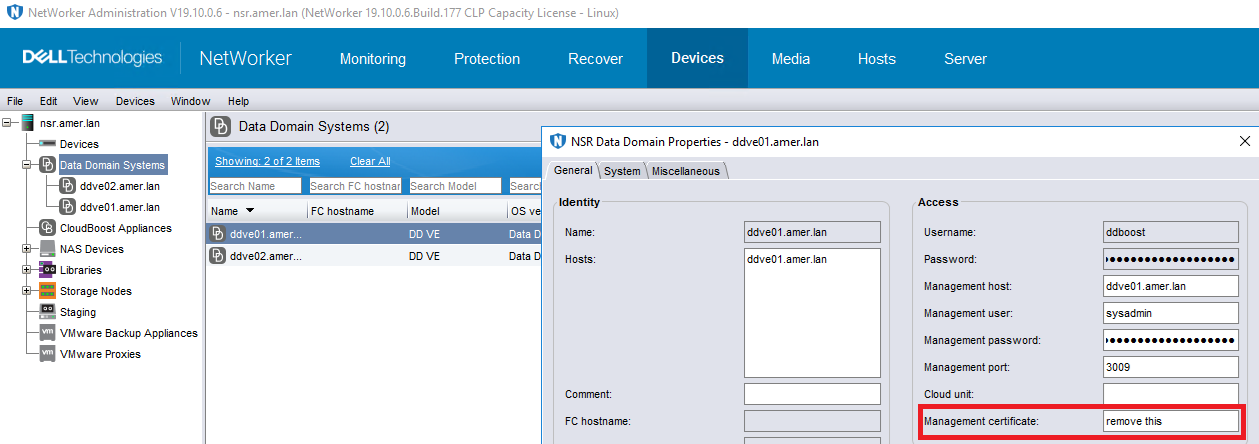
To fix this issue, remove the certificate under NMC > Device > Data Domain Systems > DD Properties > General > Management certificate.
Additional Information
Engineering team confirmed that EPIC was submitted for future approach and Fix in Future NetWorker Releases.
Affected Products
NetWorker FamilyArticle Properties
Article Number: 000331924
Article Type: Solution
Last Modified: 13 Jun 2025
Version: 1
Find answers to your questions from other Dell users
Support Services
Check if your device is covered by Support Services.