HDMI로 PIP(Picture in Picture) 또는 PBP 사용 시 화면이 표시되지 않거나 해상도가 낮음
Résumé: 이 문서에서는 HDMI를 사용하여 연결된 상태에서 PIP(Picture in Picture) 또는 PBP(Picture By Picture)를 사용할 때 Dell U3425WE 모니터에 비디오가 표시되지 않거나 해상도가 낮은 것에 대한 정보를 제공합니다.
Cet article concerne
Cet article ne concerne pas
Cet article n’est associé à aucun produit spécifique.
Toutes les versions du produit ne sont pas identifiées dans cet article.
Symptômes
영향을 받는 제품:
- Dell U3425WE 모니터
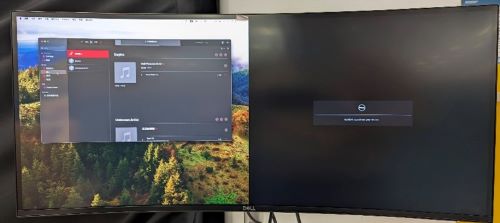

Cause
PIP 또는 PBP가 켜져 있으면 컴퓨터가 잘못된 HDMI EDID를 읽고 HDMI 신호를 통해 비디오가 표시되지 않거나 해상도가 낮아질 수 있습니다.
Résolution
PIP 또는 PBP가 켜져 있으면 도크의 연결 중 하나에서 HDMI를 사용하고 있는지 확인합니다. 그렇다면 Dell Technologies는 HDMI를 아래의 대체 연결 장치 중 하나로 교체할 것을 권장합니다.
Thunderbolt(USB-C) 연결로 변경:
- Thunderbolt(USB-C)를 모니터 Thunderbolt에 직접 연결합니다.
- 모니터 OSD의 PIP 또는 PBP 연결을 Thunderbolt(USB-C)로 변경합니다.

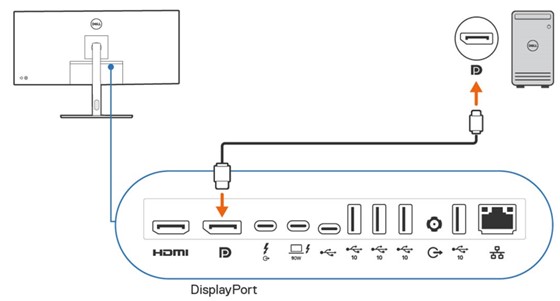
DisplayPort 연결:
- DisplayPort를 연결하여 DisplayPort를 직접 모니터링합니다.
- 모니터 OSD의 PIP/PBP 연결을 DP로 변경합니다.
Produits concernés
Dell U3425WEPropriétés de l’article
Numéro d’article: 000223576
Type d’article: Solution
Dernière modification: 24 avr. 2025
Version: 4
Trouvez des réponses à vos questions auprès d’autres utilisateurs Dell
Services de support
Vérifiez si votre appareil est couvert par les services de support.