NetWorker: Windows File System Backup for Azure Client is Missing Files
概要: Windows file system on Azure skips files although there is no NetWorker directive to do so.
この記事は次に適用されます:
この記事は次には適用されません:
この記事は、特定の製品に関連付けられていません。
すべての製品パージョンがこの記事に記載されているわけではありません。
現象
Windows file system on Azure skips files although there is no NetWorker directive to do so.
Debug save output shows
Debug save output shows
87713:save: Found prototype specification for '\\?\GLOBALROOT\Device\HarddiskVolumeShadowCopy1288\': skip : hiberfil.sys
87713:save: Found prototype specification for '\\?\GLOBALROOT\Device\HarddiskVolumeShadowCopy1288\Areas Compartidas\':+ skip : *.*
原因
The backup file system is on Azure storage volume. The system uses Volume Shadow copy Service (VSS) Writer "Sync Share Service Writer." It skips files by design.
To verify that this is the cause,
- Open a command prompt as Administrator and run:
C:\>  DISKSHADOW /l writers.txt
DISKSHADOW> LIST WRITERS DETAILED
DISKSHADOW> exit
- Look at the output file for writers.txt. If you see the below message, then that confirms the issue.
* WRITER "Sync Share Service Writer"
.////
and that writer contains Components with affected drive
            - Components:
            - File List: Path = J:\DataFiles, Filespec = *.*
            - Paths affected by this component:
                - J:\DataFiles
            - Volumes affected by this component:
                               - \\?\Volume{c34a534a-63a2-4aee-b47a-e2092dc7a901}\ [J:\]
解決方法
Turn off VSS for backing up Azure storage volumes with the command:
VSS:*=off
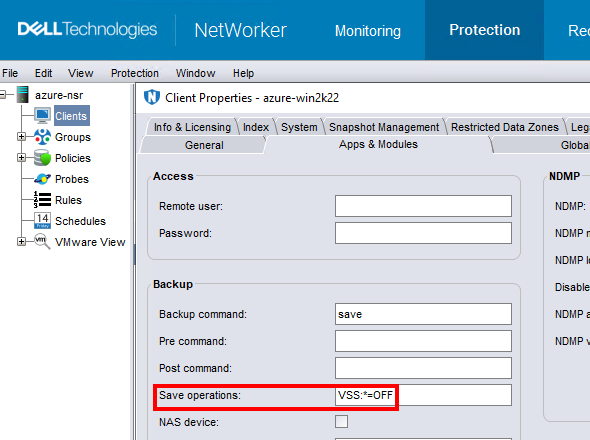
NOTE: Only do this for clients that backup file system data. Performing a backup without VSS makes it impossible to backup the windows
DISASTER_RECOVERY:\ save set; meaning, Bare Metal Recovery (BMR) of the Windows VM would not be possible.
対象製品
NetWorker製品
NetWorker Family文書のプロパティ
文書番号: 000210906
文書の種類: Solution
最終更新: 04 3月 2026
バージョン: 3
質問に対する他のDellユーザーからの回答を見つける
サポート サービス
お使いのデバイスがサポート サービスの対象かどうかを確認してください。