Dell Large Frame Monitors Touch Screen Function Does Not Work
Zhrnutie: Information about fixing no touch functionality on Dell Large Frame Monitors (LFM) when multiple video inputs are plugged into the display.
Symptómy
The touch functionality does not work when you have multiple video inputs connected to a Dell Large Frame Monitor and the firmware update fails.
Affected Monitors:
- P5524QT
- P6524QT
- P7524QT
- P8624QT
Príčina
When video inputs are plugged into the Dell Large Frame Monitor, you can only have one video input connected into the computer for the touch function to work properly. If you plug in two video inputs in from one computer, the touch function will not function. For multiple computers, each computer must be connected to the monitor with one HDMI or DisplayPort (DP) cable and one USB upstream cable.
Riešenie
Video Input Sources and USB Pairing
Ensure to connect both the video input source cable and the USB upstream cable that matches the Table below. Example: if you connect HDMI 1 and USB 2, it will not have touch functionality.
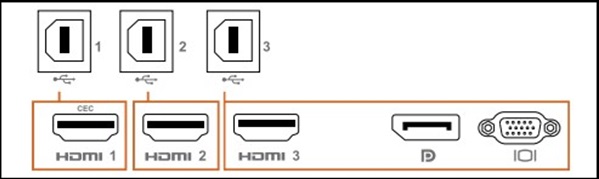
Table
| Input Sources | USB Upstream | Touch Function Works or Does Not |
|---|---|---|
| HDMI 1 (CEC) | USB 1 | ✔ |
| HDMI 2 | USB 2 | ✔ |
| HDMI 3 | USB 3 | ✔ |
| DisplayPort (DP) | ||
| VGA |