2.5 Inch SSDs
Unlock the potential of your computing experience with 2.5 inch SSDs, offering a reliable and efficient storage solution for both casual users and professionals. These solid-state drives are designed to fit seamlessly into a wide range of devices, enhancing performance by providing faster data access and improved system responsiveness. Whether you're upgrading an existing system or building a new one, 2.5 inch SSDs can help you achieve quicker boot times and smoother multitasking. Discover how these versatile storage options can elevate your digital environment, ensuring that your devices operate at their best.
This product is not available
Check out the following recommendations.




2.5 Inch SSDs
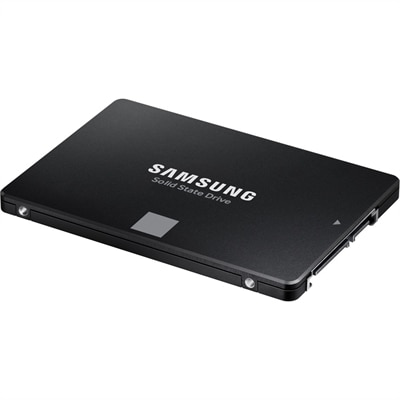
A 2.5-inch SSD is an internal solid-state storage drive designed for broad compatibility with laptops and desktop PCs. Most models use the SATA III interface, which connects through a SATA data cable and a SATA power connector in a desktop, or through a laptop’s compatible drive bay and connector. The familiar 2.5-inch size and commonly used 7mm thickness allow these drives to fit many systems that originally used a mechanical hard disk drive, although some laptops and desktops may require a spacer, mounting bracket, adapter, or a manufacturer-specific connector. Checking the computer’s service manual or specifications before purchasing helps confirm the supported drive height, interface, and installation requirements. Unlike a traditional hard disk drive, an SSD has no spinning platters or moving read/write heads. That solid-state design can make a noticeable difference in everyday use: a computer may start more promptly, applications can open with less delay, and files may feel more responsive when they are being accessed. SATA III SSDs are generally capable of read or write speeds approaching 550 MB/s, depending on the drive, computer, workload, and other system components. They are slower than newer M.2 NVMe SSDs when the platform supports PCIe storage, but they remain a practical choice for upgrading an older laptop, refreshing a desktop, or adding storage when available M.2 slots are occupied. Capacity is an important part of the decision. A 250GB or 500GB drive may suit a basic computer used for web browsing, documents, schoolwork, and a modest collection of applications. A 1TB drive offers more breathing room for photos, creative projects, downloaded media, and a larger software library, while 2TB and larger capacities are useful for extensive files, local game installations, video work, or a desktop that serves as a central household computer. Keep in mind that the operating system and formatting reduce the usable space shown after installation, and leaving some free capacity can help a drive maintain consistent performance. For shoppers comparing options, High Capacity SSDs may be worth exploring when a larger local library or long-term storage plan is part of the setup.
These drives can be especially useful for people extending the life of a familiar laptop rather than replacing an entire computer. An older notebook that once took several minutes to reach the desktop can feel considerably more comfortable after its mechanical drive is replaced with a SATA SSD, giving a student, remote worker, or family member a smoother way to handle assignments, video calls, photographs, and everyday browsing. A desktop user might install a 2.5-inch SSD as a boot drive, reserving another internal drive for bulk files, or add one to a compact PC that has no open M.2 slot. They are also convenient for PC builders who need widely supported storage and for users who have filled the faster storage sockets on a newer motherboard. Before beginning an upgrade, back up important documents, photographs, and other irreplaceable files to separate storage. If the existing drive contains the operating system, cloning software can copy the current installation to the SSD, though a clean installation may be preferable when the old system has accumulated unused applications or errors. Installation typically involves shutting down and unplugging the computer, removing the old drive or opening an available bay, securing the SSD, and attaching the correct data and power connections. Laptop procedures vary, and some systems may require a recovery key, encryption credentials, or a fresh operating-system setup. After installation, the drive may need to be initialized and formatted before it appears in the file manager. A 2.5-inch SSD can make a thoughtful gift for someone who relies on an aging computer, enjoys organizing a digital photo library, or wants more room for creative work, but compatibility and capacity are worth confirming first. It is also sensible to consider endurance ratings, warranty coverage, included accessories, and the availability of a mounting bracket or cable. SSDs are quiet and generally use less power than mechanical drives, which can be welcome in a bedroom, shared workspace, or study during the cooler months when a computer is used for longer stretches indoors. They are not a substitute for a backup strategy, however: keeping important files in more than one location helps protect against accidental deletion, hardware failure, loss, or damage. With the right interface, physical fit, and capacity, a 2.5-inch SSD provides a dependable way to improve responsiveness, expand usable storage, and keep a laptop or desktop useful for years to come.
FAQs:
Upgrading to a 2.5 inch SSD offers significantly faster boot times, quicker file transfers, and a more responsive overall computing experience. SSDs are also more durable and resistant to shocks compared to traditional hard drives, making them ideal for laptops and portable devices.
Yes, installing a 2.5 inch SATA SSD in an older laptop or desktop can breathe new life into the system. The upgrade can drastically reduce loading and startup times, making everyday tasks smoother and more enjoyable even on older hardware.
A 2.5 laptop SSD is a great choice for students, professionals, gamers, and anyone who values fast, reliable storage. It’s especially useful for those who multitask, work with large files, or want to extend the lifespan of their current device without investing in a brand-new computer.
The endurance rating, often measured in Terabytes Written (TBW), indicates how much data can be written to the SSD over its lifetime. A higher TBW means the drive is suitable for heavier usage, such as frequent file transfers or large media projects, ensuring long-term reliability.
Most modern laptops and desktops are designed to accommodate a 2.5 SATA SSD, making installation straightforward. Many users are able to install the drive themselves with basic tools and a little guidance, making it a popular DIY upgrade for improving system performance.