6ft USB Cables

6ft USB cables offer the ideal combination of length and convenience, making them a versatile choice for a variety of charging and data transfer needs. Whether you’re connecting devices across your workspace or reaching outlets from a distance, these cables provide the flexibility to keep your electronics powered and connected. Explore a wide selection of 6ft USB cables designed to support seamless connectivity for your favorite devices.

Filters

$17.99

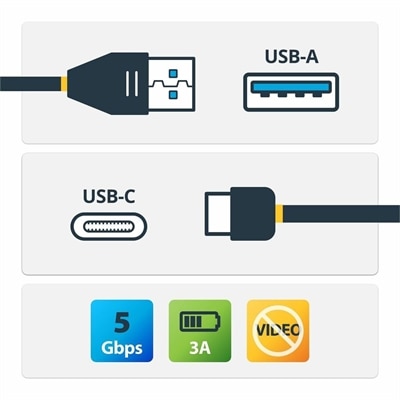
A USB-A to USB-C cable supporting 5Gbps data transfer, 3A charging, and device synchronization.

$17.99
$34.99

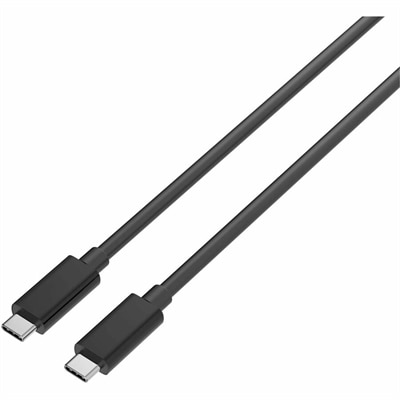
A durable USB-C cable supporting 240W charging, 20Gbps data transfer, and 4K DisplayPort Alt Mode.

$34.99

6ft USB Cables

Six-foot USB cables offer a practical amount of reach for everyday connections between computers, chargers, and accessories. At approximately 1.8 meters long, a 6-foot cable can run from a laptop on a desk to a nearby printer, connect a keyboard across a wide work surface, or let a phone rest within reach while its charger stays near a wall outlet. That extra room can make a workspace feel less cramped than a short cord that pulls against a port whenever a device moves. The right length still depends on the route: a cable traveling behind a monitor, around a desk leg, or through a cable-management tray needs more slack than one stretched directly between two nearby connections. A gentle curve at each end helps keep tension off the connectors and leaves room to reposition equipment. Connector type is just as important as length. USB-A has the familiar rectangular shape found on many computers and chargers, while USB-C has a smaller, oval shape that plugs in either way. USB-B connectors are commonly associated with printers and certain desktop peripherals, and Micro-USB remains relevant for some older accessories. A 6-foot USB-A to USB-C cable serves a different connection than a USB-C to USB-C cable, even though both may connect to a device with a USB-C port. The plugs at both ends need to match the equipment and the intended connection. An extension cable is different again: it typically provides a male connector at one end and a matching female receptacle at the other to extend an existing cord. Extension length becomes part of the overall connection, which can affect performance, particularly at higher data rates. For home offices, student desks, creative workspaces, and shared family computers, six feet often provides useful flexibility without leaving a large coil of unused cable underfoot.

The capabilities of 6-foot USB cables vary considerably, even when their connectors look alike. Connector shape does not establish transfer speed, charging wattage, or display support. USB 2.0 supports a theoretical maximum data rate of 480 Mbps, which can be sufficient for many printers, keyboards, mice, and everyday synchronization tasks. Cables specified for 5 Gbps or 10 Gbps can support faster transfers when the connected devices and ports support the same rate. Actual transfer times also depend on the equipment, file sizes, and other operating conditions, so a faster-rated cable cannot make a slower port exceed its capabilities. Charging follows a similar principle: the cable, power adapter, and device must work together. USB-C cables rated for up to 60W or 240W address different power requirements, but the device draws only the power it supports and negotiates with a compatible charger. A high-wattage cable alone does not turn a basic adapter into a laptop charger or guarantee a particular charging speed. For a laptop used throughout the workday, the cable’s stated power rating should support the computer’s charging requirements, along with a suitable power adapter. Smaller accessories may have much lower needs. Data support also deserves a separate check because some cables are intended primarily for charging and may offer limited data functionality or none at all. Likewise, USB-C does not automatically mean a cable can carry video to a monitor. Display connections require appropriate cable capabilities and compatible ports on the computer and monitor. At a six-foot length, this distinction is especially useful when arranging a desk with a laptop to one side and a display positioned farther back. Clear specifications for data rate, maximum power, and video support are more informative than thickness, color, or connector appearance. A cable matched to the task can keep a video call accessory connected reliably, support routine file transfers, or supply appropriate charging power without adding capabilities the connected equipment does not have.

Construction and fit influence how comfortably a cable works in daily use and how well it tolerates repeated handling. Smooth plastic jackets can be easy to wipe clean and route through desk openings, while flexible elastomer jackets may bend more comfortably around a compact workspace. Braided outer coverings can help resist everyday abrasion, although a woven surface does not by itself indicate faster transfer speeds, higher charging power, or immunity to damage. Reinforcement where the cable meets the connector is particularly relevant for cords that are plugged in frequently or packed into a laptop bag. That transition point experiences repeated bending, especially when a device is used while connected. A substantial connector housing may be easier to grip, but it also needs enough clearance around neighboring ports and any protective case. Right-angle plugs can reduce how far a cable projects from a device, provided their orientation suits the port location and does not block another connection. For layouts that require a longer route around furniture or between work surfaces, Long USB Cables offer a broader length category to consider alongside the required connector and performance specifications. Whatever the length, cables last longer when they are routed away from chair wheels, sharp desk edges, hot surfaces, and places where feet can catch them. Loose loops are preferable to tight knots, and reusable cable ties can organize slack without crushing the jacket. Disconnecting by the connector rather than pulling the cord helps protect both the cable and the device port. Before cleaning, unplug both ends and wipe the exterior with a soft, dry cloth; avoid soaking connectors or forcing anything into them. Fraying, exposed conductors, bent contacts, or unusual heat are reasons to stop using a cable. A thoughtfully matched six-foot cord can also be a useful addition to a student’s study setup or a practical gift for someone arranging a home workspace, particularly when the connector types and intended use are already known. The most useful choice balances comfortable reach, appropriate electrical capabilities, and construction suited to the way the cable will be handled each day.

FAQs:

Add the products you would like to compare, and quickly determine which is best for your needs.
Add the products you would like to compare, and quickly determine which is best for your needs.