$2591.99
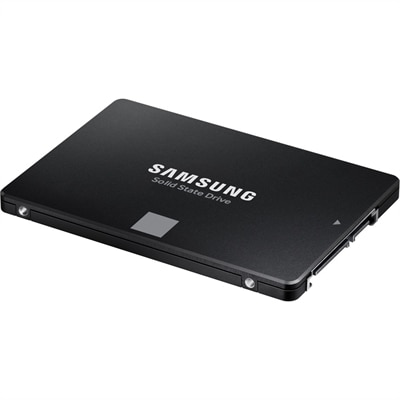
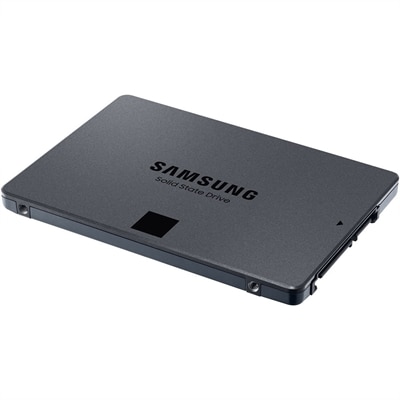
An SATA SSD offering 560MB/s read and 530MB/s write speeds with Intelligent TurboWrite and QLC storage.
Upgrade your storage capacity and streamline your data management with 8 TB hard drives. Perfect for handling large files, backups, and demanding applications, these high-capacity drives offer reliable performance for both personal and professional use. Explore a wide selection of 8 TB hard drives to find the ideal solution for expanding your desktop, workstation, or server storage needs.
An SATA SSD offering 560MB/s read and 530MB/s write speeds with Intelligent TurboWrite and QLC storage.
An 8 TB hard drive provides eight trillion bytes of capacity for documents, photos, videos, music, games, and computer backups. That amount of space suits people whose digital collections have grown beyond a laptop’s built-in drive or who want room for several years of files without constantly deciding what to delete. A family photo collection can start with a few phone snapshots and eventually include school performances, scanned albums, and long vacation videos; a creative hobby can produce equally large folders of original images, audio recordings, and finished projects. An 8 TB hard drive gives those collections room to grow, although the number of files it holds depends on their size, format, and quality. High-resolution footage consumes much more space than everyday documents, so estimates based on a fixed number of photos or movies are only rough comparisons. Computers may also display the capacity differently: eight trillion bytes equals approximately 7.28 tebibytes, before formatting and other overhead, even when an operating system labels that figure as terabytes. This difference does not mean part of the advertised capacity is missing. For shoppers comparing options, the main distinction is between internal hard drives that fit inside a compatible desktop and external hard drives that connect through an enclosure, commonly using USB. Both can provide substantial capacity, but they fit different routines. An internal model keeps the desk clear and becomes part of the computer’s everyday setup. An external model makes it easier to connect a backup drive, move a collection between compatible computers, or keep an additional copy separate from the main machine. Pricing varies with the enclosure, interface, recording technology, warranty, and intended workload, rather than capacity alone. Comparing those details alongside the total price gives a more useful picture of value than assuming every 8 TB drive offers the same experience.
Choosing an internal 8 TB hard drive starts with the computer rather than the drive itself. Many consumer models use a 3.5-inch form factor and a SATA connection, which means a desktop needs a suitable drive bay, an available motherboard connection, and the correct power connector. A laptop generally cannot accept a 3.5-inch desktop hard drive internally. For an external drive, check the included cable, the computer’s available ports, and whether a separate power adapter is required. Desktop-style external hard drives often need an electrical outlet, making them better suited to a regular workspace than a bag packed for daily travel. Connector shape and interface speed are separate considerations: a cable that fits does not necessarily provide the fastest connection the drive supports. Mechanical hard drives also have their own performance limits, so a fast USB interface will not make one behave like a solid-state drive. Rotational speed, cache, recording technology, and the type of files being transferred all affect everyday responsiveness. Moving a few large video files is different from copying thousands of small documents, and the initial backup of a nearly full computer may take many hours. Where specifications identify conventional magnetic recording or shingled magnetic recording, consider how often you expect to rewrite large amounts of data; sustained rewriting can be slower on some shingled models. Noise and placement deserve attention, too. A drive beside a microphone or on a quiet bedroom desk may make its hum and occasional clicking more noticeable than one beneath a busy workstation. Give an external enclosure a stable surface and adequate ventilation, and avoid moving a mechanical drive while it is operating. Finally, check operating-system compatibility and formatting requirements. Some drives arrive ready for one platform but need reformatting for another, a process that erases existing contents. These practical details often matter more day to day than a small difference in advertised specifications.
For home users, an 8 TB external hard drive can become the place where scattered folders finally come together: scanned paperwork from an old laptop, photos from several phones, and videos that have been sitting on memory cards. Keeping that collection organized by year, project, or household member makes the extra capacity genuinely useful rather than simply creating a larger miscellaneous folder. Photographers and video enthusiasts may use a hard drive for original files and completed projects while keeping active editing work on a faster drive. Musicians can keep recordings, exported mixes, and project copies together, while students and home-office users may appreciate having space for both everyday files and scheduled computer backups. Gamers should check compatibility carefully before choosing an external drive. Support varies by device, and some systems allow newer games to be kept on an external hard drive but require them to be moved to a supported internal drive before play. Capacity alone does not establish whether a game can run from it. For any use, distinguish between an archive and a backup: moving the only copy of a file onto a hard drive frees space elsewhere, but it does not protect that file if the drive fails. Important material deserves additional independent copies, ideally with one kept off-site, and occasional checks that backed-up files can actually be restored. A drive can also be a thoughtful graduation or birthday gift for someone building a photography portfolio, recording music, or preserving family history, provided its connections and power requirements match their setup. If eight terabytes would leave far more unused space than expected, comparing 4 TB SATA Hard Drives may help narrow the capacity needed for a compatible desktop. For those who do need the larger option, room for future projects, a suitable warranty, and a straightforward backup routine make an 8 TB hard drive a practical addition to everyday computing.
Add the products you would like to compare, and quickly determine which is best for your needs.