8GB DDR5 Memory
Upgrade your system’s performance and efficiency with 8GB DDR5 memory, designed to support the latest computing demands. Perfect for multitasking, gaming, and creative workflows, 8GB DDR5 memory delivers advanced technology to help keep your computer running smoothly. Explore a range of options to find the ideal solution for your desktop or laptop and experience the benefits of enhanced memory capacity in your everyday tasks.
This product is not available
Check out the following recommendations.




8GB DDR5 Memory
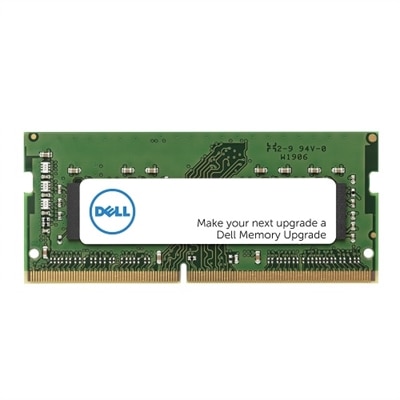
8GB DDR5 memory can be a practical way to refresh a compatible laptop or desktop, especially when the system has an open memory slot or when an existing module needs to be replaced. DDR5 is a newer memory standard designed to provide higher data-transfer rates and improved efficiency compared with earlier generations, with common starting speeds around 4800MT/s and options reaching 5600MT/s or beyond depending on the system and module. Many DDR5 modules operate at approximately 1.1 volts, which can help support efficient everyday computing, though actual specifications vary by model. The most important first step is checking compatibility. Desktop computers typically use longer UDIMM modules, while laptops and compact computers generally require shorter SODIMM modules. A computer built for DDR4 cannot use DDR5 memory, and a DDR5-compatible system may still have limits for supported capacity, speed, voltage, and module configuration. Checking the computer’s service manual, motherboard documentation, or system specifications before purchasing helps prevent an installation mismatch. It is also worth confirming whether the computer has an open slot, whether the existing memory can be combined with a new module, and whether the system supports user-installed memory at all. These details are easy to overlook when a module appears similar to one already inside the computer, since the notch position and electrical design differ between memory generations.
An 8GB DDR5 module can suit light and focused workloads such as web browsing, email, school assignments, word processing, streaming video, point-of-sale tasks, and basic photo organization. It may also be useful as a replacement for a failed module, a temporary upgrade for an older compatible computer, or an economical way to add memory to a system that already has 8GB installed. A family member who uses a laptop primarily for online appointments, research, recipes, and video calls may notice smoother app loading after a memory upgrade, while a student can benefit when keeping a browser, document editor, and class materials open together. Memory helps the computer keep active applications readily available, reducing the need to repeatedly reload information from storage. That said, capacity matters as much as memory generation and speed. Windows 11 and background services can consume a substantial portion of an 8GB system’s available memory before demanding applications are opened. With several browser tabs, video conferencing, cloud synchronization, creative software, or games running at the same time, an 8GB configuration may reach its limit and begin relying more heavily on slower storage. This can appear as pauses when switching applications, longer loading times, or stutter during demanding tasks. For a primary computer used for modern gaming, content creation, software development, or extensive multitasking, a 16GB or 32GB configuration is often a more comfortable starting point. Shoppers comparing generations may also review alternatives such as 16GB DDR4 Memory, while remembering that DDR4 and DDR5 are not interchangeable and must match the computer’s specifications.
When selecting 8GB DDR5 memory, compare the module type, rated speed, capacity, and configuration rather than focusing on a single specification. A higher advertised speed does not guarantee a performance improvement if the computer’s processor or motherboard supports a lower maximum rate; in many systems, the memory automatically operates at the fastest supported setting. Pairing compatible modules can also improve available memory bandwidth through dual-channel operation. A single 8GB module may work well for a straightforward upgrade, but two matched modules can provide a more balanced configuration when the computer supports them. DDR5 modules use two independent subchannels within each stick, yet the overall system can still benefit from a properly paired setup, particularly in applications that move larger amounts of data. Mixing modules with different speeds or timings may cause the system to run at the slower specifications, and mixing memory from separate kits can sometimes affect stability even when the basic capacity appears compatible. Installation should be performed with the computer powered off, unplugged, and handled carefully by the edges to avoid contact with the electrical connectors. After installation, the system’s firmware or operating system should recognize the updated capacity; a built-in memory diagnostic can help verify stability if problems appear. During the warmer and cooler parts of the year alike, this kind of upgrade can extend the useful life of a compatible computer, whether it is used at a kitchen table for everyday tasks, in a home office for focused work, or in a student workspace for learning and communication. Selecting the right 8GB DDR5 module means matching the computer first, then choosing the speed and configuration that fit the way the system is actually used.
FAQs:
Upgrading to 8GB DDR5 RAM offers significant improvements in speed, bandwidth, and power efficiency over previous memory generations. DDR5 technology allows for faster data transfer rates and improved multitasking capabilities, which results in smoother performance when running multiple applications or handling more demanding tasks.
8GB DDR5 memory is ideal for students, professionals, and everyday users who need reliable performance for tasks like web browsing, document editing, video streaming, and light creative work. It’s also a great choice for those who want to future-proof their device with the latest memory technology.
8GB DDR5 memory is only compatible with systems designed to support DDR5 technology. Before purchasing, it’s important to check your device’s specifications or consult the manufacturer to ensure compatibility, as DDR5 modules are not interchangeable with DDR4 or earlier memory types.
DDR5 RAM 8GB modules provide higher bandwidth and faster data rates, allowing your system to handle more applications simultaneously without slowdowns. This means you can switch between tasks like streaming, browsing, and editing documents more efficiently and with less lag.
Yes, upgrading to 8GB DDR5 memory can help extend your device’s usable life by improving performance and responsiveness. As software and operating systems become more demanding, having faster and more efficient memory ensures your system remains capable and enjoyable to use.