$169.99
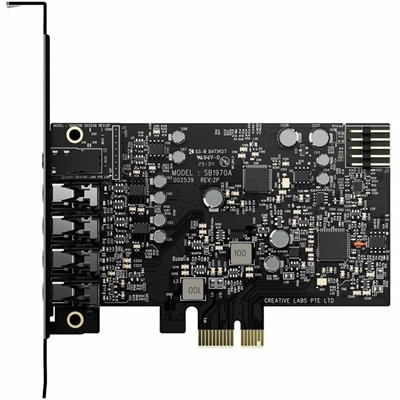
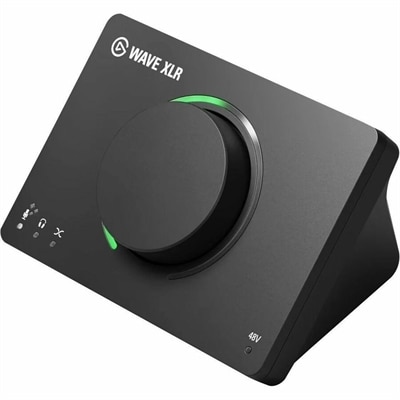
A USB audio interface delivering 80dB gain, DSP effects, VST inserts, mute control, and LED feedback.
Elevate your sound production with audio effects software designed to enhance creativity and refine every detail of your audio projects. Whether you're a music producer, podcaster, or content creator, the right tools can transform your work with professional polish and dynamic soundscapes. Explore a wide selection of audio effects software to find solutions that suit any workflow, from home studios to professional environments. Unlock new possibilities for mixing, mastering, and sound design with intuitive software options tailored for every skill level.
A USB audio interface delivering 80dB gain, DSP effects, VST inserts, mute control, and LED feedback.
Audio effects software gives creators practical ways to find, shape, generate, organize, and play back sound for projects that need more than a simple recording. These tools can include searchable sound libraries, waveform editing, effects processing, custom sound generation, looping ambience, and playback controls for live performances. A filmmaker might use a low rumble to make an empty hallway feel uneasy, then layer footsteps, a door latch, and distant room tone to give the scene a convincing sense of space. A game designer may need short, responsive sounds for menus, movement, impacts, tools, or environmental details, while a video editor may use audio effects software to clean dialogue, soften unwanted noise, add transitions, or build a richer atmosphere beneath a visual sequence. Theater groups, educators, streamers, podcasters, and hobbyist musicians can also use these applications to prepare cues and bring them into a live or recorded production. Some software is designed primarily for browsing and managing large audio collections, with keyword or natural-language search that helps users locate a particular mood, texture, or action without remembering an exact file name. Other tools focus on creating original effects through synthesis, layering, pitch changes, distortion, reverberation, delay, filtering, and automation. There are also applications built for dependable playback, allowing an operator to trigger cues during a performance, presentation, attraction, or streamed event. When exploring the options on this page, it can help to think first about the creative setting and the kind of control required. A person editing short videos at a desk may value direct integration with a timeline and a simple interface, while someone running a live show may place greater importance on cue organization, keyboard shortcuts, rapid triggering, and reliable offline access. For additional listening and computer accessories, browse Audio Enhancements to help create a more complete workspace.
Choosing audio effects software is often less about counting features and more about matching the workflow to the project. Compatibility should be near the top of the list: check whether the application works with the computer’s operating system, preferred editing program, and audio file formats. Integration can save considerable time when sounds can move directly into a video or game timeline instead of being exported, renamed, and imported one at a time. Library management also matters as collections grow. Helpful search filters, tags, favorites, folders, descriptive metadata, and preview controls make it easier to find a clean transition, a believable outdoor ambience, or a brief mechanical click when a deadline is close. Cloud-connected libraries can provide access across supported devices and may simplify updates, while offline support is valuable for travel, classrooms, locations with unreliable internet, or live environments where uninterrupted playback matters. Anyone considering generated sound should review how prompts are handled, what editing controls are available afterward, and whether the resulting files fit the intended use. For professional work, licensing terms deserve careful attention. Look for clear information about commercial use, broadcast or online publishing, modification rights, attribution, and whether generated or library-based audio can be included in client projects, games, podcasts, or monetized videos. Processing features should be considered alongside the library itself. Equalization can clarify or soften frequencies, compression can help keep levels consistent, noise reduction can improve recorded material, and reverb can suggest anything from a small room to a wide exterior space. A strong visual waveform, adjustable preview volume, undo history, and non-destructive editing can make experimentation feel safe, especially for beginners who are still learning how a few small changes alter the character of a sound. Hardware is part of the experience as well. A comfortable computer, capable headphones or speakers, and enough storage can make detailed editing more enjoyable, while a portable setup may benefit from an efficient application that does not depend on a constant connection. Before choosing, consider the length and complexity of typical projects, the number of people who will access the files, and whether the software needs to support one creator or a larger production workflow.
Audio effects software can be a thoughtful gift for a creative person who enjoys making videos, music, games, podcasts, short films, or live presentations. It suits the curious beginner who wants to turn everyday recordings into something expressive, as well as the experienced creator who needs a faster way to search and prepare sound. A student might use it to build a soundscape for a media assignment, recording the soft hiss of a radiator or the crunch of gravel underfoot and then shaping those sounds into a scene. A streamer may create distinctive alerts and transitions, while a family member with an interest in game development may appreciate tools for designing a complete set of interface sounds and environmental loops. For someone new to audio, an intuitive layout, guided presets, clear tutorials, and a manageable library can make the first session less intimidating. More advanced users may look for detailed automation, multitrack editing, batch processing, custom tagging, and support for external controllers. It is also worth considering the recipient’s working habits: a person who enjoys experimenting may prefer synthesis and generative tools, while someone who spends more time editing video may benefit from fast browsing, one-click previews, and smooth timeline integration. As cooler weather encourages more indoor creative time, audio projects can become an engaging way to practice observation and storytelling without requiring a large physical setup. The best choice leaves room to grow, supports the intended computer and software environment, and makes it easy to move from an idea to a finished cue. Whether the goal is a subtle room tone, a dramatic impact, a playful game sound, or a carefully timed live playback sequence, the right application can help transform quiet recordings and imaginative concepts into audio that gives a project depth, movement, and personality.
Add the products you would like to compare, and quickly determine which is best for your needs.