$44.99
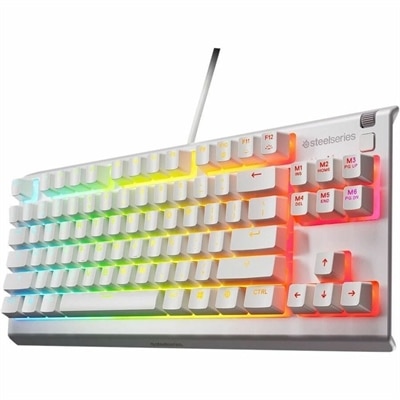
A white tenkeyless gaming keyboard with whisper-quiet switches, anti-ghosting keys, water resistance, and customizable RGB lighting.
Elevate your gaming setup with backlit gaming keyboards that blend style and functionality for an immersive experience. Designed to enhance visibility and add a dynamic edge to any desktop, backlit gaming keyboards are a popular choice among gamers seeking both performance and visual appeal. Explore options that cater to every type of player, whether you're building a new rig or upgrading your current gear, and discover how the right keyboard can transform your gameplay environment.
A white tenkeyless gaming keyboard with whisper-quiet switches, anti-ghosting keys, water resistance, and customizable RGB lighting.
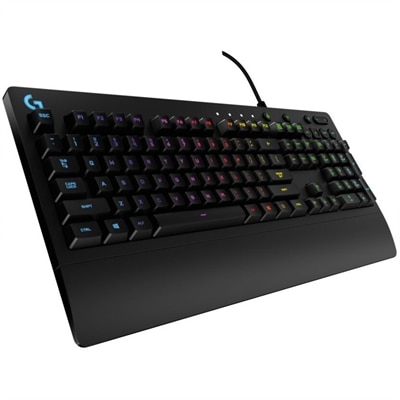
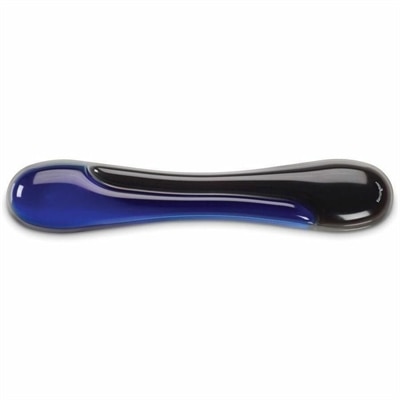
A wired gaming keyboard with RGB lighting, spill-resistant Mech-Dome keys, palm rest, and dedicated media controls.
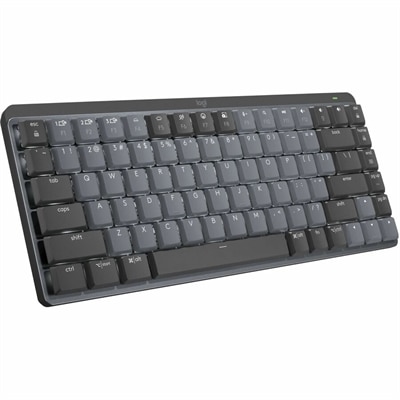
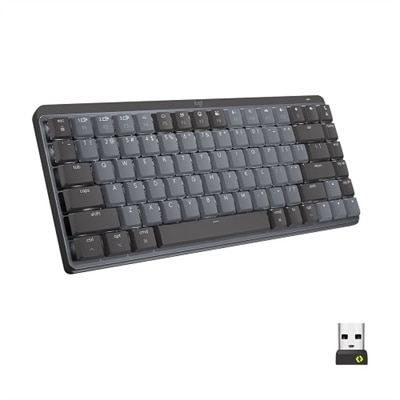
A wireless mechanical keyboard with tactile quiet switches, adaptive backlighting, aluminum construction, Bluetooth, and USB-C charging.
Backlit gaming keyboards combine illuminated keys with layouts and controls designed for play, making it easier to locate commands when a room is dim and giving a desktop setup a distinctive look. The lighting can be as restrained as a soft white glow beneath the letters or as expressive as changing colors across the entire keyboard. Single-color backlighting provides a consistent appearance, often with adjustable brightness, while zoned RGB lighting applies colors to groups of keys. Per-key RGB lighting allows individual keys to display different colors when supported by the keyboard and its software. That flexibility can help separate movement controls, ability shortcuts, and frequently used commands at a glance. A steady color on the movement keys may be more useful during a tense match than a fast-moving rainbow effect, while a subdued glow can suit an evening spent switching between a game and a chat window. How clearly the legends illuminate matters as much as the lighting pattern: shine-through characters let light pass through the lettering, whereas opaque keycaps may leave most of the glow visible around the edges. Secondary symbols are not always illuminated, so their visibility deserves attention for anyone who regularly types punctuation or uses function shortcuts. Backlighting supports visibility and personalization, but it does not by itself make a keyboard faster or more accurate; switch behavior, key recognition, connection quality, and the user's familiarity with the layout all contribute to the experience. Brightness controls and an option to turn effects off are useful when the same desk serves as a workspace during the day and a gaming station at night. For setups where illuminated typing matters beyond gaming, Backlit Keyboards provide a related category to explore. Across these styles, the most useful illumination is comfortable to look at, clear from a normal seated position, and easy to adjust without interrupting what is happening on screen. A keyboard with readable legends and straightforward lighting controls can feel equally at home beside a gaming desktop or connected to a laptop on a small desk.
The feel beneath the lighting shapes every movement, message, and shortcut. Mechanical gaming keyboards use individual switches for their keys, with linear, tactile, and clicky designs offering different sensations. Linear switches move without a deliberate tactile bump, tactile switches provide a noticeable point of feedback, and clicky switches add an audible click. Mechanical does not automatically mean loud: switch construction, the keyboard case, internal damping, and how firmly the keys are pressed all influence sound. Membrane keyboards typically use a flexible membrane and rubber domes, often producing a softer, cushioned feel that some people prefer for mixed typing and gaming. In a shared apartment or a room where someone else is on a video call, sound can matter just as much as responsiveness. Actuation force and travel distance also affect comfort; a very light switch may feel effortless to one player but register unintended presses for another. Low-profile designs reduce key height and often shorten travel, while taller keycaps create a different typing angle and fingertip feel. Layout determines how naturally those keys fit into the rest of the setup. Full-size keyboards include a number pad, useful for spreadsheets, numeric entry, and games with extensive shortcut assignments. Tenkeyless keyboards remove that section while generally retaining dedicated arrow and navigation keys, leaving more room for broad mouse movements. Compact layouts reduce the footprint further, although some commands move to function layers that take time to learn. For someone who plays with a low mouse sensitivity, that extra space can keep the mouse from bumping the keyboard during a wide turn. Anti-ghosting and key rollover describe aspects of how simultaneous keypresses are handled, which matters when movement, sprinting, and another action overlap. Support can differ by connection mode or key combination, so these features are best understood through the keyboard's stated specifications. Dedicated media controls, programmable keys, and onboard profile memory can add convenience, but their usefulness depends on the games, applications, and shortcuts used most often rather than on the sheer number of controls.
Materials, construction, and everyday care help determine how a backlit gaming keyboard holds up over time. Plastic housings can keep weight manageable, while metal top plates may add rigidity and a more substantial feel; overall construction matters more than any single material. Keycaps are commonly made from ABS or PBT plastic. ABS can feel smooth and accept vivid finishes, while PBT often has a textured surface and tends to resist the polished appearance that develops with repeated use. Neither material alone guarantees clear backlighting or lasting legends, because the lettering method and light-transmitting sections also matter. Double-shot keycaps use two molded plastics for the cap and legend, though the design must specifically support shine-through lighting for the characters to glow. Stable larger keys, secure feet, and a base that stays put are practical details during both hurried play and long typing sessions. Fit includes keyboard height and position as well as width: relaxed shoulders, nearby mouse placement, and a comfortable wrist angle are more important than an aggressive-looking tilt. A palm rest may provide support between bursts of typing, but it should not force the wrists upward. Wired connections avoid battery charging, while wireless designs reduce cable clutter; supported wireless modes, latency, and lighting-related battery use vary by model. Compatibility extends beyond the connection itself, since advanced lighting effects and remapping may require software that supports the intended operating system. Regular care usually means disconnecting the keyboard, removing loose dust gently, and wiping exterior surfaces with a soft cloth according to the manufacturer's directions. Liquid should never be sprayed directly onto the keys, and spill resistance should not be mistaken for waterproofing. Keycap removal and deeper cleaning also depend on the design. As a gift for a PC gamer, student, or someone building a more personal desk setup, a backlit gaming keyboard works best when its layout, sound, and connectivity match the recipient's habits. Those practical details make the illuminated keys a useful part of everyday computing, not simply a colorful backdrop.
Add the products you would like to compare, and quickly determine which is best for your needs.