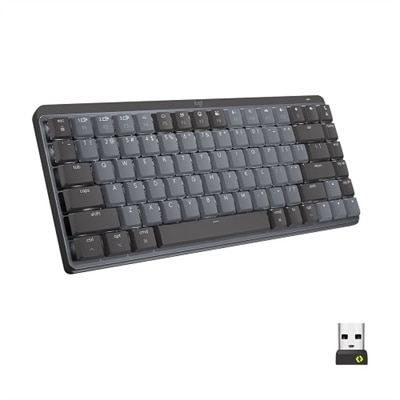
Backlit Keyboards
Enhance your workspace or gaming setup with backlit keyboards, designed to bring style and improved visibility to your typing experience. Whether you're working late into the night or enjoying immersive gameplay, these keyboards offer a sleek and modern addition to any desk. Explore a wide range of options to find the perfect backlit keyboard that suits your needs and personal aesthetic.
This product is not available
Check out the following recommendations.




Backlit Keyboards
Backlit keyboards use small lights beneath or around the keys to make letters, numbers and symbols easier to see in dim surroundings. That simple bit of illumination can make a noticeable difference when a room is softly lit, an overhead lamp is off or daylight has faded from the windows. Instead of searching by touch for frequently used keys, you can see the layout at a glance and keep your hands positioned comfortably for typing, browsing, studying or gaming. A backlit keyboard can be a practical addition to a home office, bedroom desk, shared workspace or creative setup, especially for anyone who works into the evening and prefers not to brighten the entire room. Lighting options vary by design. Some keyboards provide a single-color backlight, often with adjustable brightness levels for a subtle glow or clearer visibility, while others feature RGB lighting with a broad range of colors and effects. RGB backlighting may allow users to select a favorite color, coordinate the keyboard with other desk accessories or apply different lighting zones to highlight commonly used controls. For a straightforward work area, a consistent white or soft-colored light can keep the focus on the screen and the task at hand. For a gaming setup, customizable illumination can add atmosphere and make important keys easier to identify during fast-paced play. Explore RGB Gaming Keyboards for designs that put additional emphasis on colorful lighting and gaming-oriented features.
Choosing a backlit keyboard starts with considering how and where it will be used. Wired models connect directly to a compatible computer and are often a convenient choice for a permanent desk, where dependable power and a tidy, familiar setup matter most. Wireless keyboards can provide more freedom to adjust the position of the keyboard, clear space when it is not in use or move between a desk and another nearby seating area. With a wireless model, check the connection type, operating range and battery approach, since backlighting can affect how often the keyboard needs to be recharged or have its batteries replaced. A keyboard with adjustable light intensity can help balance visibility and power use. Key feel is equally personal: low-profile keys may suit people who prefer short, quick presses, while full-height keys can offer a more traditional typing experience with pronounced travel. Pay attention to layout, number-pad availability, shortcut controls and compatibility with the computer or device. Someone entering figures regularly may appreciate a full number pad, while a compact keyboard can leave more room for a mouse, drawing tablet or notebook. Quiet keys are useful in shared rooms, libraries or late-night workspaces, and a spill-resistant design can provide extra reassurance around coffee, water or everyday desk clutter. Size, wrist position and overall desk space also deserve attention. A keyboard should sit at a comfortable distance, allowing the shoulders to relax and the wrists to remain in a natural position rather than reaching forward for long periods.
Backlit keyboards suit a wide range of routines and can make a thoughtful gift for a student setting up a study area, a remote worker refining a home office or a family member who enjoys evening gaming. They are also useful for people who share a room or prefer a calmer environment after dark; a gentle key glow can provide enough visibility for typing without turning on strong overhead lighting that disturbs others. Writers, programmers, researchers and anyone who spends extended periods entering text may appreciate being able to see the key arrangement clearly when the surrounding light changes. Gamers often look for responsive keys, durable construction, anti-ghosting or rollover features and lighting controls that complement their preferred play style, while everyday users may place greater value on comfort, quiet operation and simple brightness adjustment. For a gift, consider the recipient’s existing setup, whether they need a wired or wireless connection, and whether a compact or full-size layout would fit their habits. A backlit keyboard can also refresh a familiar desktop without requiring a complete change to the workspace: place it on a clean surface, adjust the light to a comfortable level and keep frequently used controls within easy reach. During the cooler months, when evenings often begin with work, study or entertainment indoors, the soft glow beneath the keys can make a desk feel more inviting while supporting clear, comfortable use. Like any keyboard, the best choice depends on the balance of lighting, layout, connection, key feel, durability and design that matches the person using it.
FAQs:
Backlit keyboards offer enhanced visibility in low-light environments, making it easier to type accurately during late-night work sessions or in dimly lit rooms. They also add a modern, stylish look to your workspace and can help reduce eye strain by providing gentle illumination behind the keys.
A dell backlit keyboard is especially useful for students, remote professionals, gamers, and anyone who often works or plays in environments with limited lighting. It’s also a great choice for those who value both functionality and aesthetics in their computer accessories.
Many backlit keyboards, including several dell backlit keyboards, offer adjustable brightness settings. This allows you to customize the level of illumination to match your environment or personal preference, whether you need a subtle glow or brighter lighting.
Most dell backlit keyboards are designed to be compatible with a wide range of operating systems, including Windows and, in many cases, macOS. Always check the product specifications to ensure compatibility with your specific device.
When selecting a backlit keyboard, consider factors such as key feel (mechanical or membrane), brightness adjustment options, backlight color choices, build quality, and compatibility with your devices. These features can help you find a keyboard that matches your typing preferences and complements your setup.