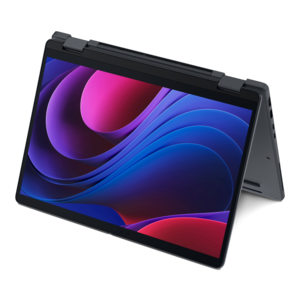
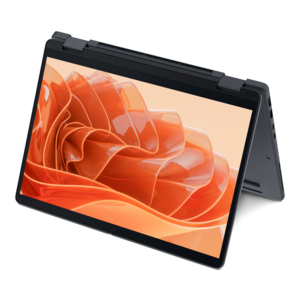
Budget 2 In 1 Laptops
Discover the perfect blend of versatility and affordability with budget 2 in 1 laptops. These innovative devices seamlessly transition between laptop and tablet modes, making them ideal for students, professionals, and anyone on the go. With a range of options that cater to various needs and budgets, budget 2 in 1 laptops offer the convenience of a portable tablet combined with the functionality of a traditional laptop. Explore our selection to find the right device that fits your lifestyle without breaking the bank.
This product is not available
Check out the following recommendations.


Budget 2 In 1 Laptops
Budget 2 in 1 laptops bring together the familiar keyboard and trackpad of a laptop with the touch-friendly flexibility of a tablet. A 360-degree hinge allows the display to fold backward into several useful positions, including traditional laptop mode for typing, tent mode for following a recipe or presenting a project, stand mode for watching videos, and tablet mode for reading or sketching. For shoppers comparing budget 2 in 1 laptops, the best choice usually starts with the way the device will be used each day. Students may appreciate a lightweight design that slips into a backpack and a touchscreen that makes annotating documents or navigating digital textbooks feel natural. A professional working from home might prefer a comfortable keyboard, a clear webcam and a display that makes video calls, spreadsheets and browser-based tools easy to manage. Families can use a convertible laptop for online learning, streaming, travel planning and shared household tasks, while frequent travelers may value a compact chassis, dependable battery life and a hinge that makes it easy to use the computer on a tray table or a café counter. These laptops can also make thoughtful gifts for someone starting school, building a home office or replacing an older computer, especially when a single device needs to support both productivity and relaxed entertainment. During the cooler months, a 2 in 1 can move easily from a desk to a sofa, kitchen table or reading chair without feeling tied to one workspace. Look for a sturdy hinge that feels smooth but secure, a responsive touch panel and a screen size that balances portability with comfortable viewing. Smaller displays are often easier to carry, while larger displays provide more room for documents, split-screen work and creative projects.
The operating system is one of the most important considerations because it determines which applications a budget 2 in 1 laptop can run. ChromeOS devices are often responsive on modest hardware and work especially well for people who spend much of their time in a web browser, using cloud storage, email, online classrooms, streaming services and browser-based productivity tools. They are simple to set up and can be a practical choice for schoolwork, communication and everyday browsing, but they do not run native Windows desktop programs in the same way a Windows laptop does. A Windows 2 in 1 may be the better fit for shoppers who need traditional desktop applications, specialized school or work software, fuller file-management options or compatibility with a wider range of accessories and peripherals. Before choosing, make a short list of the applications that matter most and confirm that they are supported by the operating system. Memory also deserves close attention. For general browsing, writing, video calls and school assignments, 8GB of RAM is a sensible starting point because it gives the laptop more room to handle multiple browser tabs and open applications without frequent slowdowns. Shoppers who regularly keep many tabs open, edit photos, work with large documents or switch between several demanding programs may benefit from more memory when available. Processor performance affects how quickly the laptop starts, opens applications and responds to everyday commands, so compare the processor family and generation rather than relying only on a low price. A modern entry-level processor can be well suited to routine tasks, while more demanding multitasking calls for additional performance. Battery capacity, charging convenience and sleep-mode behavior are also worth checking, particularly for students moving between classrooms or anyone who works away from an outlet.
Storage can shape the overall feel of a budget 2 in 1 laptop. Some affordable configurations use eMMC storage, which can keep the device compact and economical but may offer less capacity and slower file transfers than a solid-state drive. A model with an SSD generally provides faster startup and application loading, along with a more responsive experience when opening files or moving between tasks. Consider how much local space is needed for photos, downloaded videos, creative files and offline schoolwork; people who rely primarily on cloud storage may be comfortable with less capacity, while those who keep large files on the device should look for a more generous drive or confirm that expandable storage is supported. A comfortable keyboard matters just as much as a good touchscreen when essays, messages or reports are part of the routine. Check for well-spaced keys, a precise trackpad and a hinge that stays steady while tapping the display. A front-facing camera, microphone quality and privacy features can make a noticeable difference during virtual classes and meetings. Useful connections may include USB ports, an audio jack, wireless connectivity and, depending on the setup, an external display connection. Weight and construction should match the expected routine: a child or student carrying the laptop all day may benefit from a lighter frame, while a shared household computer may prioritize a larger screen and a more substantial design. Comparing these details alongside the operating system, 8GB-or-more memory, storage type, processor, battery life and warranty support makes it easier to narrow a broad selection to a capable everyday computer. Shoppers focused on schoolwork and portability can also explore Student 2 In 1 Laptops for additional ideas suited to learning, study spaces and life on the move.
FAQs:
When selecting a budget 2 in 1 laptop for school or work, prioritize at least 8GB of RAM and a 256GB SSD for smooth multitasking and quick file access. A responsive touchscreen, sturdy 360-degree hinge, and full HD (1080p) display are also important for comfortable reading, note-taking, and streaming. Long battery life and a lightweight design can make a big difference if you’re on the move throughout the day.
Many budget 2 in 1 laptops come with touchscreens that support stylus input, making them a great choice for digital drawing, sketching, or basic photo editing. While they may not match the processing power of high-end devices, they offer enough performance for hobbyists or students interested in creative work. Look for models with good color accuracy and stylus compatibility for the best experience.
Most budget 2 in 1 laptops run either Windows or Chrome OS. Windows-based models can run a wide range of traditional desktop applications, and some can run Android apps through the Microsoft Store or third-party solutions. Chromebooks, on the other hand, natively support Android apps from the Google Play Store, making them versatile for users who prefer mobile-style applications.
Yes, budget 2 in 1 laptops are well-suited for video calls and online classes. They typically include built-in webcams and microphones, and the flexible design allows you to use them in tent or stand mode for hands-free video conferencing. For the best experience, choose a model with a high-definition webcam and clear audio output.
The main advantage of a budget 2 in 1 laptop is its versatility. You can use it as a standard laptop for typing and productivity, or flip it into tablet mode for browsing, reading, or drawing. This flexibility is especially useful for students, families, and professionals who need a device that adapts to different tasks and environments.