$159.99
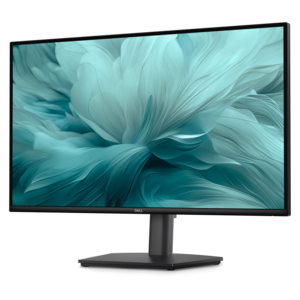
A height-adjustable monitor certified by TÜV Rheinland® for 3-star eye comfort and productive everyday use.
Elevate your workplace with our curated selection of business essentials, designed to enhance productivity and efficiency in any professional setting. Whether you're outfitting a bustling corporate office or a home workspace, our range of high-quality electronics and accessories ensures you have everything needed to support your daily operations. From cutting-edge computers to reliable communication tools, our collection is tailored to meet the diverse needs of modern businesses. Discover how the right equipment can transform your work environment and keep you ahead in today's fast-paced world.
A height-adjustable monitor certified by TÜV Rheinland® for 3-star eye comfort and productive everyday use.
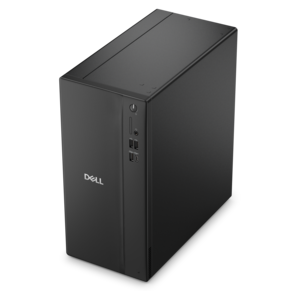
A business-ready tower desktop delivering reliable everyday performance with essential security features for productive workflows.
A business-ready tower desktop delivering dependable performance and security for everyday productivity workloads.
A space-saving, business-ready desktop delivering reliable everyday performance with essential security features.
A sleek, portable laptop with an expansive 16:10 display and AI PC options for work anywhere.
Business essentials are the everyday tools and equipment that help a company carry out its work, from preparing documents and managing schedules to communicating with customers and collaborating across locations. For a modern workplace, that foundation often includes business laptops, desktops, monitors, and computer accessories suited to the people using them and the tasks they handle. These categories support a wide range of settings: a small accounting office working through detailed spreadsheets, a creative team reviewing visual presentations, a consultant moving between client meetings, or a home office that doubles as a quiet place for video calls. The most useful equipment fits those routines without adding unnecessary complexity. A laptop offers flexibility for employees who divide their time between a desk, meeting rooms, and travel, while a desktop can provide a consistent workstation for someone who spends most of the day in one place. Processing capability and memory influence how comfortably a computer handles several applications at once, particularly when a browser full of tabs sits alongside a large workbook and an active video meeting. More demanding tasks, such as editing high-resolution images or working with complex design files, may call for greater computing and graphics capability than email, document preparation, and routine administrative work. Operating system compatibility also matters when a business depends on particular applications or established workflows. Physical design is another part of everyday usefulness: a readable display, a comfortable keyboard, and connections that match existing equipment can make repeated tasks feel less cumbersome. For a growing team, a consistent approach to these features can simplify shared workspaces and reduce the need for different adapters at every desk. Business essentials are not defined by a single configuration; they are the practical foundation that allows different roles to work effectively, whether the day centers on appointments, research, customer support, or preparing the next important presentation.
A productive workspace extends beyond the computer itself, with monitors and accessories shaping how comfortably information can be viewed, entered, and shared. Screen size needs to make sense for both the work and the desk. Someone comparing figures across two documents may appreciate room to keep both visible, while a compact workspace may be better served by a smaller display that leaves space for a notebook and comfortable keyboard placement. Resolution affects the clarity of text and images, but the experience also depends on viewing distance and display scaling; a dense spreadsheet should remain readable without forcing someone to lean forward throughout the afternoon. Adjustable height, tilt, and compatible mounting options help position a screen for the person using it rather than making the person accommodate the screen. Keyboards and mice deserve similar attention because their size, shape, and layout influence thousands of small movements during a workday. A number pad can be useful for frequent numerical entry, while a more compact keyboard may leave additional room for mouse movement on a narrow desk. Quiet input devices can be a considerate choice in shared offices or during calls, though comfort remains personal. Headsets and webcams support conversations with remote coworkers and customers, with microphone performance, fit, and camera placement all contributing to the experience. A headset worn for a brief check-in has different comfort demands from one used for back-to-back appointments. Docking stations, adapters, and charging accessories can bring these pieces together, provided their connections, power requirements, and display support match the connected devices. A connector that fits physically does not necessarily support every charging or video function, so compatibility deserves attention before equipment becomes part of a daily routine. The Accessories For Business collection brings attention to the supporting tools that help turn an individual computer into a more complete workspace. In a shared office, an orderly arrangement of cables and easy-to-reach connections can also make it simpler for the next person to sit down and begin working.
Durability, materials, and care become especially important when business equipment is used throughout the week or carried between locations. A computer that stays on a dedicated desk faces different conditions from a laptop tucked into a bag every morning, opened during appointments, and brought home at night. Metal and reinforced plastic housings each have their own design characteristics, but material alone does not establish how well a device will withstand daily use; overall construction, hinge design, handling, and any documented testing also matter. For portable equipment, weight and dimensions affect how easily it fits into a commute, while a protective case needs enough room for the device without allowing excessive movement. Padding, secure closures, and separate compartments can help keep chargers and other accessories from pressing against a computer during travel. Battery life is relevant to mobile work, although actual runtime varies with applications, screen brightness, settings, and usage. A long day away from a desk may still require a compatible charger and access to power. At fixed workstations, keeping ventilation openings clear and allowing adequate space around equipment supports proper operation. Routine care should follow the manufacturer's directions, particularly for display surfaces and coated finishes; harsh cleaners, excess moisture, and rough cloths can damage materials intended for frequent handling. Disconnecting equipment as directed before cleaning and keeping drinks away from electronics are simple habits that help protect a workspace. Security features also belong in the broader picture of intended use, especially where employees handle confidential documents or work in shared environments. Device locking options, supported sign-in methods, and compatibility with an organization's management requirements can influence whether equipment fits a particular role. Clear warranty terms and support options are worth understanding when computers are central to daily operations. For independent professionals, established offices, and teams equipping new employees, well-matched business essentials create a practical setting for focused work: readable screens, comfortable controls, dependable connections, and equipment designed for the demands of the day.
Add the products you would like to compare, and quickly determine which is best for your needs.