IT Support Essentials
IT support essentials are the backbone of a smooth-running workplace, providing reliable solutions for everyday technical challenges. From efficient laptops and desktops to high-quality monitors and must-have accessories, the right tools make all the difference in productivity and problem-solving. Explore a range of IT support essentials designed to keep teams connected, organized, and ready to tackle any task with confidence.
This product is not available
Check out the following recommendations.


IT Support Essentials
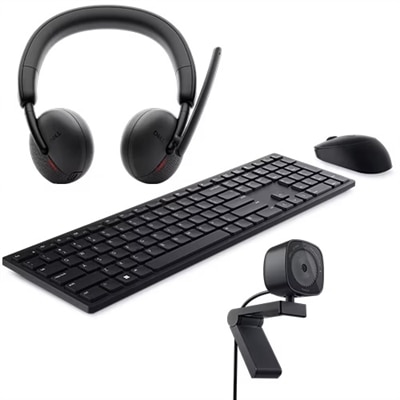
IT support essentials bring together the everyday technology people rely on to work, learn and stay connected, along with the accessories that make that technology easier to manage. This collection is designed for home offices, small businesses, classrooms and shared workspaces where dependable equipment can make troubleshooting more straightforward. A capable laptop or desktop gives support staff and end users a practical foundation for running applications, managing tickets, communicating with colleagues and diagnosing common issues. A clear, comfortable monitor can make long hours of reviewing settings, instructions or support requests easier on the eyes, while a responsive keyboard and mouse help users work efficiently when precision matters. Accessories such as headsets, webcams, adapters, cables and power equipment can also help complete a workspace, especially when a support professional needs to move between calls, screen sharing and hands-on assistance. When selecting products, consider the environment in which they will be used, the number of people who may rely on them and the applications they need to run. A family member setting up a first home office may value simple controls and comfortable ergonomics, while a small business may prioritize manageability, compatibility and equipment that can support several workflows throughout the day. For a student exploring information technology or someone beginning an entry-level help desk role, a well-organized computer setup can provide a useful place to practice operating-system navigation, software installation, account management and clear technical communication.
Good support starts with a consistent process, and the right equipment helps that process remain organized. When an issue is reported, support staff typically identify the symptoms, gather details about the user’s environment, reproduce the problem when possible and isolate likely causes before applying a fix. A reliable computer can help with reviewing ticket histories, documenting each step and testing changes without guesswork. Compatibility with common operating systems, including Windows, macOS and Linux, may be important for people who assist a variety of users, while straightforward access to system settings and diagnostic tools can make routine tasks less intimidating. Support essentials can also help with basic connectivity checks, such as confirming whether a device is connected, verifying settings, testing access to a service and distinguishing an application problem from a broader connection issue. Clear audio and video accessories are useful when support is delivered remotely, since a calm explanation is often as important as the technical solution. Many problems that feel urgent become manageable when the person receiving help can hear instructions clearly and see the relevant screen. For households and small teams, accessories that simplify cable management, improve posture or reduce workspace clutter can be especially worthwhile; a neatly arranged desk makes it easier to find the right connection, identify an unplugged cable or notice a device that needs attention. During the cooler months, when more work and learning may take place indoors, these small improvements can help a shared room serve as a dependable office, study area or support station without feeling crowded.
Security and responsible device care are also central to effective IT support. Products selected for this purpose should fit the user’s habits and make it easier to keep software updated, use strong account protections and separate personal activity from work or school tasks when appropriate. Support professionals may need to recognize suspicious messages, unexpected pop-ups, unusual sign-in activity or signs that an account has been compromised, then explain the next steps in plain language. A suitable computer and monitor setup can support careful review of alerts, documentation of incidents and communication with the appropriate service team. For additional assistance with protecting users, accounts and devices, explore IT Security Support Services. These essentials can be selected for a dedicated support desk, a remote worker who handles occasional troubleshooting or a family member who is becoming the go-to technology helper at home. They can also make thoughtful gifts for a college student studying technology, a relative building a first professional workspace or a friend who spends time helping others solve computer problems. Focus on practical fit rather than unnecessary complexity: check available connections, display and accessory compatibility, workspace dimensions, operating-system requirements and the level of assistance the user is likely to need. A dependable setup should feel approachable on the first day and remain useful as skills grow, whether the task involves helping someone recover access, preparing a computer for a new user, explaining a software setting or keeping routine support work moving smoothly.
FAQs:
For IT support roles, laptops and desktops with robust processing power and memory are essential for running diagnostic tools, managing multiple applications, and supporting virtual environments. Monitors with high resolution and adjustable stands can improve visibility and ergonomics during troubleshooting, while accessories like external drives, reliable headsets, and multi-port adapters can further streamline daily support tasks.
Anyone responsible for maintaining, troubleshooting, or setting up computers and networks can benefit from IT support essentials. This includes IT professionals, students in technical programs, remote workers, small business owners, and even tech-savvy family members who help others with technology issues.
Accessories such as external storage devices, ergonomic keyboards, and precision mice can greatly enhance efficiency and comfort during long troubleshooting sessions. They also provide critical backup options and help ensure seamless connectivity when working across multiple devices or locations.
When selecting monitors for IT support, look for features such as high resolution for detailed visibility, adjustable stands for ergonomic positioning, and multiple input ports for connecting various devices. Wide viewing angles and color accuracy can also be beneficial when working with multiple applications or collaborating with others.
Yes, IT support essentials make thoughtful and practical gifts for anyone pursuing a career in technology or managing tech for others. Gifting a reliable laptop, versatile monitor, or useful accessory can help students, recent graduates, or new hires build a strong foundation for their IT journey.