$275.99
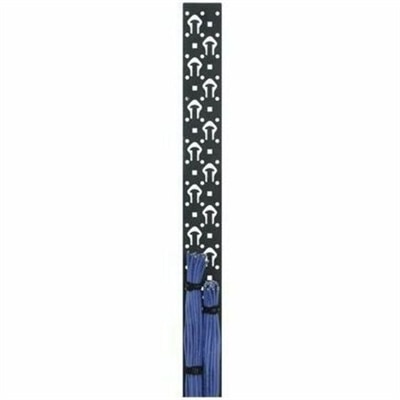
A black powder-coated steel lacer strip providing vertical cable management with tie posts and mounting holes.
Cable management racks offer an efficient solution for organizing and securing cables in any workspace or home setup. Designed to reduce clutter and enhance accessibility, these racks help maintain a tidy environment while supporting optimal device performance. Explore a range of cable management racks to keep your electronics, computers, and accessories neatly arranged and easily accessible.
A black powder-coated steel lacer strip providing vertical cable management with tie posts and mounting holes.
Cable management racks provide a structured way to guide, bundle and protect the cords connected to a desktop, workstation, entertainment setup or shared office system. Rather than allowing cables to collect in loose loops on the floor or behind a desk, a rack-based arrangement keeps each run visible, supported and easier to trace. This can make a noticeable difference in a compact home office, where a power cord, display cable, USB cable and audio lead may all converge in the same small area. It can also help in a professional workspace with multiple computers and displays, where orderly routing supports a cleaner appearance and makes routine maintenance less frustrating. When choosing a cable management rack, consider the available width, mounting style, depth, weight capacity and the number of cables it needs to accommodate. Measure the space around the equipment as well as the path cables must follow, allowing enough room for gentle bends and future additions. A compact horizontal organizer may suit a single workstation, while a larger vertical or enclosed design can help manage cables running between shelves, equipment panels and floor-level power connections. Open designs make it easy to reach and identify individual cords, while covered channels can conceal excess cable and create a more finished look. For compatible enclosure options that support organized equipment placement, browse Racks For Servers.
A dependable setup begins with a simple, repeatable layout. Place connected equipment and connection panels in a logical order, then position a horizontal cable manager between groups that frequently connect to one another. This keeps short patch cables from hanging across the front of other equipment and reduces the temptation to pull one cord from a tangled bundle. Select cable lengths that match the distance between connection points whenever possible; a cable that is several feet longer than necessary can create bulky loops that obscure labels and restrict airflow. Vertical D-ring-style guides can direct cable drops along the sides of a rack, helping wires travel from one level to another without sagging across the face of the installation. Finger-style channels with slots and covers are useful when a cleaner, enclosed appearance matters or when many cables run side by side. Flexible hook-and-loop straps are generally a practical choice for bundling because they hold cables together without sharply compressing their outer jackets, and they can be opened when equipment is moved or another connection is added. Avoid fastening every cable into one oversized bundle. Smaller groups are easier to identify, replace and rearrange, especially when one device needs troubleshooting. Keep heavier power cords routed separately from delicate signal and data cables where the layout allows, and avoid placing cable bundles against ventilation openings or where they could be pinched by a door, drawer or adjustable panel.
Cable management racks are useful for people building a home office, refreshing a classroom workstation, organizing a small business desk area or maintaining an entertainment setup with several connected devices. They can be particularly helpful during a workspace change, when furniture is moved and old cable paths no longer make sense. A well-arranged rack can reduce floor clutter, make cleaning easier and lower the chance that someone will catch a foot on a loose cord. It also gives every connection a more deliberate place: power leads can follow one route, display and peripheral cables can follow another, and spare capacity can remain available for a future monitor or accessory. Before purchasing, check that the rack’s mounting hardware suits the intended surface and that its dimensions align with the surrounding frame or cabinet. Look for smooth edges, sturdy construction and cable openings that are large enough for the plugs being used. Labeling both ends of important cables is a small step that saves time later, particularly when several cords look alike from a distance. For a gift, a cable management rack can be a thoughtful practical choice for someone setting up a first home office, improving a study area or assembling a more polished computer station. During the cooler months, when more time may be spent indoors working, studying or enjoying connected entertainment, an organized cable setup helps make the space feel calmer and more comfortable without taking attention away from the equipment itself.
Add the products you would like to compare, and quickly determine which is best for your needs.