$10.99
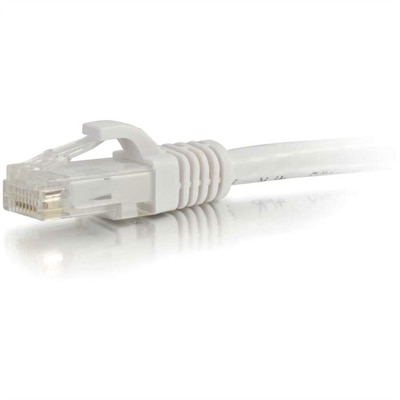
A white copper Cat6 Ethernet cable with a snagless boot supporting Gigabit networking and bandwidth-intensive applications.
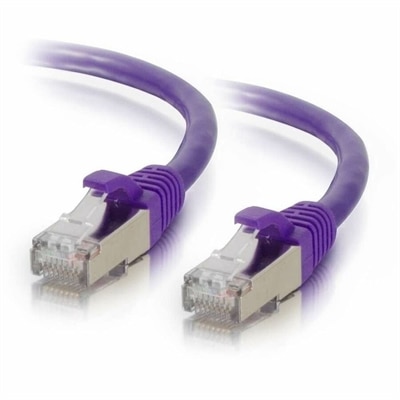
Cat 5 cables are essential components for establishing reliable and efficient network connections in both home and office environments. These versatile cables are designed to support a wide range of networking needs, providing dependable performance for your internet and data transfer requirements. Whether you're setting up a new network or upgrading an existing one, choosing the right Cat 5 cables ensures seamless connectivity and optimal functionality. Explore our selection to find the perfect fit for your networking setup and enjoy hassle-free communication across all your devices.
A white copper Cat6 Ethernet cable with a snagless boot supporting Gigabit networking and bandwidth-intensive applications.
Cat 5 cables are twisted-pair Ethernet cables used to create wired connections between compatible computers, broadband equipment and other devices with an Ethernet port. Inside the outer jacket, four pairs of copper wires are carefully twisted to help limit interference and preserve the signal as data travels from one device to another. Most cables use an RJ-45-style connector at each end, making them familiar to anyone who has connected a desktop computer to a router or added a wired connection to a home office. Traditional Cat 5 cable supports data speeds of up to 100 Mbps at a bandwidth of 100 MHz, with a maximum recommended single-cable run of 328 feet, or 100 meters, when the installation follows appropriate cabling practices. That performance can be suitable for basic internet access, older equipment and simple home connections, although many modern households and workplaces have moved to Cat 5e or higher categories to support faster service and newer devices. Cat 5e, or Category 5 enhanced, is designed to reduce crosstalk and generally supports Gigabit Ethernet speeds of up to 1,000 Mbps over standard distances. Because Cat 5 and Cat 5e cables can look nearly identical from the outside, check the category printed along the jacket before choosing a cable for a new setup. If you are comparing cable types or building a complete wired arrangement, the broader selection of Network Cables can help you find a cable category that matches your equipment and internet plan.
Choosing the right Cat 5 cable starts with the space between the devices. Measure the route rather than the straight-line distance, allowing enough length to follow the edge of a desk, pass behind furniture or reach a wall-mounted connection without pulling the plugs tight. A cable that is slightly longer than necessary is usually easier to arrange than one stretched across a walkway, though excessive slack can become tangled behind a desk. Short patch cables are practical for connecting nearby equipment, while longer lengths help when a computer sits across a room from the broadband equipment. Consider the cable’s construction as well. Stranded copper conductors are flexible and well suited to short connections that may be moved or unplugged, while solid-core cable is intended for more permanent in-wall or structured installations and should not be repeatedly bent. Shielded cable can be useful in areas with substantial electrical interference, but an unshielded cable is often adequate for a typical home office, living room or classroom. Look for clearly labeled category markings, secure connectors with intact locking tabs and a jacket that feels durable without being so stiff that it is difficult to route. Color can also have a practical purpose: using one color for a desktop computer, another for a printer and another for a media device can make a crowded workspace easier to understand later. A cable does not increase the speed of an internet plan by itself. The final connection speed depends on the cable category, the Ethernet ports on the connected devices, the broadband service and the quality of the installation. When an older Cat 5 cable is being replaced, Cat 5e may provide a sensible step forward for Gigabit-compatible equipment, while a higher category may be appropriate for newer performance requirements.
Cat 5 cables can be useful for home offices, small businesses, classrooms, gaming areas and shared workspaces where a dependable wired connection is preferred over relying only on wireless access. A student may use one to connect a desktop computer for online coursework, while someone working from home may appreciate a direct connection for video meetings, large file transfers or a more consistent connection during a busy afternoon. They can also help organize a family media area by connecting compatible entertainment equipment without placing every device on a wireless connection. In a small office, spare cables are practical to keep in a drawer because desks move, equipment gets replaced and a connection that reached comfortably in one room may be too short after a rearrangement. Cat 5 cables can make useful additions to a technology-focused gift for a new homeowner, college student, remote worker or someone assembling a first computer setup, especially when paired with other compatible accessories rather than treated as a decorative item. Before purchasing, confirm the connector type required by each device, the speed supported by the ports and the distance the cable must cover. Avoid sharp bends, heavy furniture pressure and locations where the cable may be pinched or repeatedly stepped on. Keep the cable away from sources of strong electrical interference when possible, and test the connection after installation to make sure the link negotiates at the expected speed. With the proper length, construction and category, a Cat 5 cable can provide a tidy, straightforward connection that continues to be useful for compatible equipment through changing workspaces and cooler months spent indoors.
Add the products you would like to compare, and quickly determine which is best for your needs.