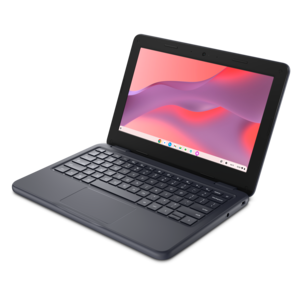
Chromebooks With Webcams
Chromebooks with webcams are the perfect solution for anyone seeking a reliable, versatile, and user-friendly device for both work and play. Designed to seamlessly integrate into your daily routine, these Chromebooks come equipped with built-in webcams, ensuring you stay connected with colleagues, friends, and family through crystal-clear video calls. Whether you're attending virtual meetings, participating in online classes, or simply catching up with loved ones, Chromebooks with webcams offer the convenience and performance needed to handle all your digital communication needs effortlessly. Explore our selection to find the ideal Chromebook that fits your lifestyle and enhances your online experience.
This product is not available
Check out the following recommendations.


Chromebooks With Webcams
Chromebooks with webcams combine everyday laptop computing with a built-in camera for video calls, virtual appointments, online learning, and conversations with friends and family. Most modern Chromebooks include a front-facing webcam, usually positioned above the screen so the camera faces the person using the keyboard. Camera specifications vary by model, however, and the presence of a webcam does not guarantee a particular resolution, microphone arrangement, or privacy feature. An integrated camera keeps the setup simple: opening a compatible video-calling website or app and granting camera and microphone permission is often enough to get started. That convenience fits familiar moments, from joining a morning meeting at the kitchen table to checking in with a study group or sharing a birthday greeting with relatives across the country. Chromebooks are designed around browser-based computing, making them a practical fit for people whose routines center on email, documents, learning platforms, and other web applications. Compatibility with any required software remains important, especially when a workplace or school relies on specialized programs, extensions, or exam-monitoring tools. For webcam use, 720p generally describes a resolution of 1280 by 720 pixels, while 1080p describes 1920 by 1080 pixels. A 1080p webcam can capture more detail than a 720p camera under comparable conditions, but resolution is only part of the picture. The camera sensor, image processing, room lighting, and video service all influence what someone on the other end actually sees. A face lit by a window in front of the laptop will usually appear clearer than one silhouetted against a bright window behind it. A stable internet connection also matters because video services may reduce image quality when bandwidth is limited. For shoppers comparing this category with other laptop types, Laptops With HD Webcam offers a related category to explore. The most useful combination is not simply a higher camera resolution, but a camera, display, keyboard, and operating environment that suit the way the laptop will be used.
The rest of the laptop shapes the webcam experience as much as the camera itself. A compact Chromebook can fit comfortably into a backpack and leave room for a notebook on a small desk, while a larger screen can make it easier to see meeting participants alongside a shared document. Screen resolution affects the clarity of displayed text and images; it is separate from webcam resolution, which describes the image the camera captures. Display brightness and reflections also influence comfort during long calls, particularly in rooms with overhead lighting or desks near windows. A stable hinge helps keep the camera angle consistent, and positioning the laptop on a secure raised surface can bring the lens closer to eye level. For people who type notes during conversations, keyboard spacing, key feel, and palm-rest room deserve attention. A responsive touchpad makes it easier to switch between meeting controls and reference material without adding another accessory. Memory and processor capability affect how comfortably the system handles a video call alongside multiple browser tabs, a presentation, or a shared spreadsheet. Battery runtime varies with the workload, and continuous camera use, higher screen brightness, and background activity can consume more power than light browsing. Access to charging may therefore matter during a full day of remote classes or back-to-back appointments. Built-in microphones and speakers offer a convenient starting point, though an echoing room or a nearby television can make conversations harder to follow. A compatible headset can keep a discussion more private and place the microphone closer to the speaker’s mouth. Headphone connections, wireless audio support, and port selection vary, so the right physical fit extends to the accessories used every day. For shared household spaces, a lightweight laptop that moves easily from a busy dining area to a quiet corner may be more useful than a setup that depends on several connected peripherals.
Construction, care, and privacy features help determine how well a Chromebook with a webcam fits into a longer-term routine. Depending on the model, the chassis may use plastic, metal, or a combination of materials, with different trade-offs in weight, rigidity, and surface feel. Material alone does not establish durability; hinge design, build quality, and any documented testing or protective features also matter. Reinforced corners or a spill-resistant keyboard may be useful for frequent travel between classrooms or workspaces, but those features should not be assumed, and spill resistance does not mean waterproofing. A properly sized padded sleeve helps protect the laptop from scratches inside a bag, while keeping pens, charging plugs, and other hard objects away from the closed screen reduces pressure points. The webcam lens needs occasional attention, too: fingerprints and dust can leave video looking hazy even when the camera is functioning correctly. Gentle cleaning with a soft, lint-free cloth, following the device’s care instructions and avoiding liquid sprayed directly onto the laptop, helps protect the lens and display. Privacy shutters, where included, provide a physical way to cover the camera when it is not in use. Camera and microphone permissions are separate controls, so covering the lens does not mute audio. Account security, software updates, and the model’s published automatic update end date are also relevant to continued use. For a different viewing angle or an improved camera setup, many standard USB webcams work with Chromebooks, although compatibility, connectors, supported resolution, and advanced features should be checked. A camera may connect through USB-A or USB-C, sometimes with an appropriate adapter, without providing every adjustment offered by its desktop software. Students, remote workers, frequent travelers, and relatives who enjoy regular video chats may all find this category useful. As a gift, a Chromebook with a webcam is most thoughtful when its size, accessibility options, and application compatibility match the recipient’s habits. A comfortable, easy-to-manage laptop can make a weekly family call or a recurring online class feel like a natural part of the day rather than another setup task.
FAQs:
When choosing a Chromebook for video conferencing, consider models with HD or 1080p webcams for clear visuals, built-in microphones with noise reduction, and privacy shutters for added security. Some Chromebooks also offer HDR support and advanced camera technology for better performance in low light, making them ideal for online meetings and virtual classrooms.
Yes, Chromebooks with webcams are widely used in education due to their ease of use, durability, and reliable video capabilities. They support popular platforms like Google Meet and Zoom, making them excellent for virtual classrooms, group projects, and online presentations. Many schools and universities recommend or provide Chromebooks for remote learning.
Many Chromebooks are compatible with external webcams and accessories certified as Works With Chromebook. These can enhance video quality or provide more flexible camera angles. Additionally, accessories like headsets and external microphones can improve your overall video call experience.
Many modern Chromebooks include privacy features such as physical webcam shutters or kill switches, allowing you to cover the camera when not in use. You can also manage camera permissions through Chrome OS settings, giving you control over which apps and websites can access your webcam.
A chromebook tablet offers the flexibility of a touchscreen and often includes both front and rear cameras, making it versatile for video calls, taking photos, or scanning documents. Traditional Chromebook laptops typically feature a single front-facing webcam, optimized for video conferencing and online meetings.