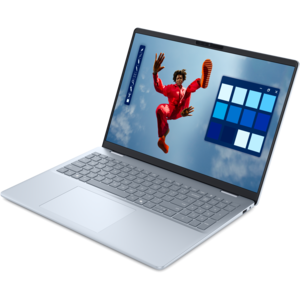
$1299.99
A stylish laptop with built-in AI and a spacious display for creators and developers.
Coding laptops are designed to help developers, programmers, and tech enthusiasts tackle projects with efficiency and ease. Whether you're building software, learning to code, or managing complex workflows, the right device can make all the difference. Explore a wide selection of coding laptops tailored to support your productivity and creativity, so you can focus on bringing your ideas to life.
A stylish laptop with built-in AI and a spacious display for creators and developers.
An AI-powered laptop with a spacious display and Intel Arc graphics for creators and developers.
Coding laptops are designed to make the everyday rhythm of programming feel smooth, focused and dependable, whether you are learning your first language, building a website, maintaining business applications or experimenting with data science projects. A capable laptop gives developers room to write and test code, keep documentation open, run development tools and switch between multiple browser tabs without constant pauses. For many users, the processor is the first specification to consider. A modern multi-core processor can handle compiling, code analysis and demanding development environments efficiently, while a higher-performance processor is useful for large projects, mobile development tools, virtual machines and other workloads that benefit from additional processing power. Memory is equally important for multitasking. While 16GB is a practical baseline for smooth everyday programming, 24GB or 32GB can provide more breathing room for running containers, emulators, local databases, virtual environments or machine learning tools alongside an editor and browser. A solid-state drive with at least 512GB capacity can help applications launch quickly and give project files, development tools and test environments ample room. Larger capacity may be worthwhile for users who work with several programming languages, large code repositories, media assets or locally stored development environments. Since coding often involves reading dense lines of text for hours at a time, the display deserves more attention than its size alone suggests. A sharp panel with clear text, comfortable brightness and useful viewing space can reduce eye strain and make it easier to compare files side by side. Higher-resolution screens can make small characters appear crisp, while a larger display may reduce the need to constantly rearrange windows. An external monitor can also expand the workspace at a desk, leaving the laptop screen available for documentation, testing or a terminal.
The keyboard is where a programmer’s hands may spend most of the day, so a comfortable layout, consistent key response and firm support can make a meaningful difference over long sessions. Look for a keyboard that makes punctuation easy to reach, offers useful function keys and provides enough travel to help each keystroke feel deliberate. A precise touchpad, responsive webcam and clear microphone add convenience for code reviews, classes and remote collaboration. Battery life matters for students moving between lectures, libraries and study spaces, as well as professionals who prefer to work away from a desk during the cooler months. A laptop that can last through several hours of writing and testing reduces the need to search for an outlet, though demanding builds, screen brightness and intensive applications can affect runtime. Port selection is another practical consideration. USB ports, video output and audio connectivity can help users attach an external display, mouse, keyboard, headset or other accessories without relying on a crowded collection of adapters. Build quality and portability should match the way the laptop will be used. A lighter model suits commuters and students, while a more substantial design may provide additional cooling, a larger screen or room for a higher-performance processor and graphics capability. Integrated graphics are sufficient for many web, scripting and application-development tasks. A dedicated graphics processor can be useful for game development, 3D work, visual computing and certain machine learning projects, although it may add weight, fan noise and power demands. When choosing among coding laptops, balance performance with comfort: the fastest configuration is not always the most practical choice if it is difficult to carry or uncomfortable to use.
Different programmers have different priorities, and the right coding laptop should support the tools and habits that shape the user’s workflow. Someone learning HTML, CSS, JavaScript or Python may value a comfortable keyboard, reliable battery life and a clear display more than specialized graphics performance. A mobile app developer may need enough memory and processing power to run emulators while keeping an editor, browser and testing tools open. A game developer, engineer or machine learning student may benefit from a stronger processor, additional memory and a capable graphics processor for demanding projects. Professionals working with large codebases can appreciate faster compile times, generous drive capacity and a display that makes it easy to review several files at once. Operating system preference also matters because some development tools, command-line environments and testing workflows are tailored to a particular platform. Before choosing a configuration, check compatibility with the languages, frameworks, integrated development environments and emulators that will be used most often. A student receiving a coding laptop as a gift may appreciate a balanced setup that can support coursework, research, video calls and personal projects for several years, while an experienced developer may prefer to prioritize memory, processor performance or a particular keyboard layout. Educators who demonstrate programming concepts, prepare lessons or grade assignments can also benefit from a dependable computer; shoppers comparing options for instructional use can explore Teacher Laptops for additional context. Security features such as a privacy shutter, fingerprint reader or secure login can add peace of mind, especially when the laptop is used in shared spaces. A strong warranty and accessible support can also be valuable when the computer is central to school, work or a personal project. Whether it rests beside a mug of coffee during an early study session, travels in a backpack between classes or powers a late-night build at a home desk, a well-chosen coding laptop should feel ready for the next line of code as well as the larger project ahead.
Add the products you would like to compare, and quickly determine which is best for your needs.