Colorful Mice
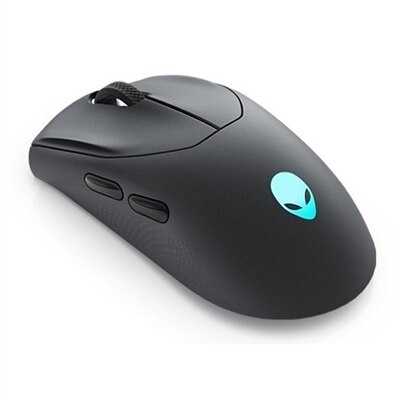
Brighten up your workspace and express your personal style with colorful mice designed to add a vibrant touch to any setup. Whether you’re working, gaming, or browsing, these eye-catching options make it easy to find a mouse that matches your unique taste. Explore a wide selection of colorful mice that combine fun aesthetics with everyday functionality, helping you stand out while staying productive.
This product is not available
Check out the following recommendations.




Colorful Mice
Colorful mice bring a practical accessory into the personality of a workspace, study area, or gaming setup. In this context, “colorful mice” refers to computer mice in bright hues, soft pastels, patterned finishes, and designs with customizable lighting—not pet mice. A mouse may be a small part of a computer setup, but it is one of the accessories used most often, making its shape, finish, and everyday feel worth considering. A vivid blue, coral, green, lavender, white, or multicolor design can add a deliberate accent to a desk, coordinate with a laptop sleeve or monitor stand, or simply make routine tasks feel a little more personal. Color is often the first detail that catches the eye, yet comfort should remain just as important. Look for a shape that supports the palm without forcing the fingers into an awkward position, with buttons that are easy to reach and a scroll wheel that moves smoothly. Hand size and grip style can make a noticeable difference: some people rest their whole hand over the mouse, while others guide it with their fingertips or hold it more lightly. A compact mouse can suit smaller hands, travel bags, and neatly arranged desks, while a fuller shape may feel more supportive during long stretches of work, school, creative projects, or gaming. Users who switch between their left and right hands may appreciate Ambidextrous Mice, which are shaped for comfortable use on either side and can help reduce strain during a busy day. A colorful mouse can also make a thoughtful gift for a student setting up a first desk, a remote worker refreshing a home office, a creative professional who enjoys expressive accessories, or a gamer building a coordinated setup. It is useful without feeling impersonal, especially when the color reflects the recipient’s favorite shade or complements the rest of their workspace. For shared family computers, a distinctive finish can make an accessory easy to identify, while a bright design can help younger users feel more connected to their study area.
Beyond appearance, consider how the mouse will connect and where it will be used. Wired models provide a direct connection and avoid the need for batteries, while wireless models help keep a desk clear and are convenient for laptops, flexible work areas, and people who move between rooms. Battery life, charging methods, receiver storage, and Bluetooth compatibility can all affect convenience. A wireless mouse that pairs easily with a computer and has dependable battery life is helpful for travel, presentations, and working in a comfortable chair during the cooler months. If a model uses a USB receiver, check that the computer has a compatible port or that an appropriate adapter is available. Sensor performance also matters. For everyday browsing, writing, online learning, and office applications, a responsive optical sensor with steady tracking is generally sufficient. People who edit images, work with detailed layouts, or play fast-paced games may prefer adjustable sensitivity, commonly expressed in DPI, so the pointer can move slowly and precisely or travel quickly across a larger screen. Extra buttons can be convenient for browser navigation, shortcuts, media controls, or in-game commands, but they are most useful when their placement feels natural and their functions can be customized. Lighting may be a simple glow, a color-changing effect, or a programmable feature that matches the rest of a setup; it can add atmosphere to an evening desk, although it may affect battery life on wireless models. Also check operating-system compatibility, software requirements, dimensions, weight, and the type of surface used beneath the mouse. A smooth desk mat can support consistent movement and protect the finish, while a travel-friendly shape and durable construction can make a colorful mouse a reliable companion in classrooms, offices, libraries, and shared workspaces. During early fall through winter, when more time may be spent indoors at a desk, a comfortable and expressive mouse can make a familiar setup feel refreshed without requiring a complete replacement of the computer or monitor. Choosing the right balance of color, comfort, connectivity, control, and durability helps ensure that the accessory looks at home on the desk and performs naturally through everyday use.
FAQs:
A colorful wireless mouse not only adds a touch of personality to your workspace but also offers the convenience of cordless operation, reducing desk clutter. Many models feature ergonomic designs for comfortable use during long hours, and the vibrant colors can help boost mood and creativity.
Colorful mice make great gifts for students, remote workers, gamers, creative professionals, and anyone who enjoys personalizing their tech. Their fun designs and functional features appeal to a wide range of users, making them a thoughtful choice for birthdays, holidays, or back-to-school surprises.
When selecting a colorful mouse, consider factors such as ergonomic shape, connectivity options (like Bluetooth or USB receiver), battery life, and compatibility with your devices. Also, think about your preferred color or design to match your style or workspace theme.
Yes, many colorful mice are versatile enough for both productivity tasks and gaming. Some models offer features like adjustable DPI settings and customizable buttons, making them suitable for a variety of uses, from everyday office work to casual gaming sessions.
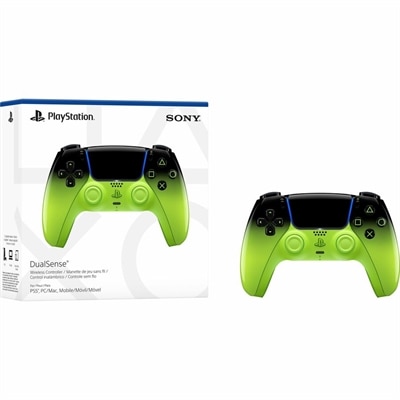
Absolutely! You can coordinate your colorful mouse with other accessories such as keyboards, mouse pads, and even Colorful Controllers, creating a cohesive and vibrant tech setup that reflects your personal style.