$570.00
A durable, serviceable Chromebook designed specifically for education environments.
Unleash your creativity and bring your visions to life with our exceptional selection of computers for graphic designers. Whether you're crafting intricate illustrations, designing stunning visuals, or editing high-resolution videos, finding the right computer is crucial to achieving seamless performance and precision. Our curated range offers powerful options tailored to meet the demanding needs of graphic design professionals, ensuring you have the speed, efficiency, and reliability required for your projects. Dive into a world where cutting-edge technology meets artistic innovation and discover the perfect tool to elevate your creative journey.
A durable, serviceable Chromebook designed specifically for education environments.
A durable, serviceable laptop or 2-in-1 designed specifically for K-12 learning environments.
A durable, serviceable Chromebook laptop or 2-in-1 designed specifically for K–12 environments.
A durable, serviceable Chromebook designed specifically for education environments.
A laptop featuring Intel® 13th Gen processors, a built-in FHD camera, and an enlarged ergonomic keyboard.
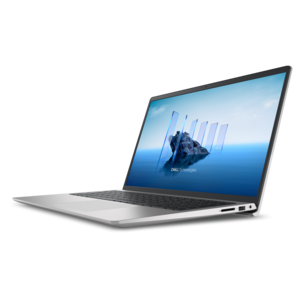
A thin, lightweight laptop crafted from eco-friendly materials with Series 3 Intel Core processors for productivity.
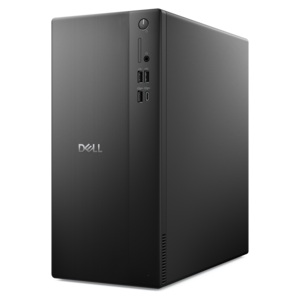
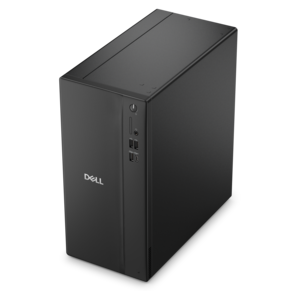
A business-ready tower desktop delivering reliable everyday performance with essential security features for productive workflows.
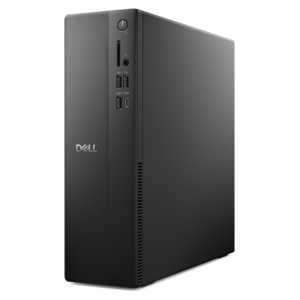
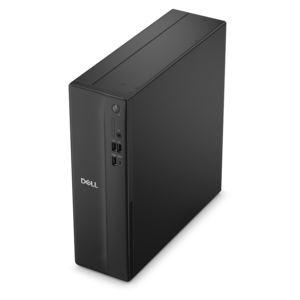
A space-saving business desktop delivering reliable everyday performance with essential security features for productive workflows.
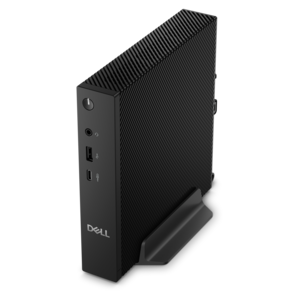
A compact thin client supporting cloud software, ThinOS, Windows 11 IoT Enterprise, or no operating system.
A remarkably thin, lightweight laptop designed for ultimate mobility and effortless everyday productivity.
A powerful desktop designed to boost everyday productivity in a streamlined setup.
A versatile 2-in-1 laptop with Intel Core processors, DDR5 memory, and multiple modes for creative work.
A versatile desktop for everyday productivity and creative tasks.
A powerful desktop designed to boost everyday productivity while conserving workspace.
A space-saving desktop delivering reliable performance and security for everyday productivity.
A compact desktop delivering reliable performance and security for everyday productivity.
A durable, serviceable laptop designed specifically for demanding education environments.
A portable laptop with a sleek design, 16:10 display, and AI PC options for productivity anywhere.
A business-ready tower desktop delivering dependable performance and security for everyday productivity workloads.
A durable productivity laptop featuring an expansive 16:10 display and convenient numeric keypad.
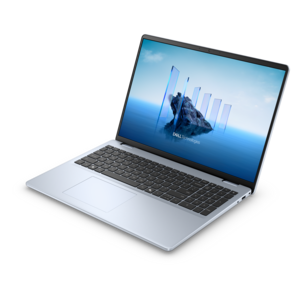
A sleek, portable laptop with an expansive 16:10 display for reliable productivity anywhere.
A modern laptop with AMD Ryzen™ processors, delivering effortless productivity and captivating entertainment in a design.
A slim, lightweight laptop with Intel® Core™ processors and graphics for productive work anywhere.
A modern laptop with Intel Core processors and graphics for effortless productivity and captivating entertainment.
Computers for graphic designers need to keep pace with a workflow that moves between imagination, precision, and demanding creative software. A designer may begin the day sketching a logo, open several large image files, build a layered layout, adjust typography, review a presentation, and finish with a high-resolution export—all while keeping reference images, communication tools, and browser tabs open. The right computer should feel responsive throughout that process, with a fast multi-core processor that can handle creative applications and multitasking without hesitation. Memory is equally important: 16GB can support many everyday 2D design projects, while 32GB or more is a sensible choice for large Photoshop files, complex illustrations, motion graphics, video editing, or simultaneous work across several applications. A dedicated graphics processor can make a meaningful difference for 3D modeling, visual effects, animation, and GPU-accelerated filters, while modern integrated graphics can be well suited to illustration, page layout, photo editing, and other 2D work. Fast solid-state drive technology helps applications launch quickly and makes large project files easier to open, save, and transfer. Capacity matters, too. Designers working with high-resolution photography, font libraries, video clips, and multiple project archives should look for enough room to keep active work close at hand without constantly moving files elsewhere. A computer with upgradeable memory or additional drive options may offer useful flexibility as a portfolio grows. For shoppers comparing form factors, Dell Laptops For Graphic Designers can be a helpful starting point for finding portable systems suited to creative work. Laptops are especially practical for students, freelancers, instructors, and professionals who move between a home office, studio, classroom, client meeting, or shared workspace. A desktop can be the better fit for a dedicated design station, particularly when sustained performance, a larger screen, easy connection to accessories, and future expandability matter more than portability. Whichever format you choose, consider the applications the user relies on most, the size of typical files, and the difference between everyday design and specialized workloads before making a decision.
Display quality deserves as much attention as internal performance. Graphic design depends on seeing subtle shifts in color, texture, contrast, and detail, whether a designer is choosing a background shade, retouching a portrait, preparing packaging artwork, or checking how a screen design will appear across different devices. A high-resolution display provides a cleaner view of fine lines and small type, while a larger screen gives palettes, timelines, artboards, and reference materials more room to coexist. Full HD can be suitable for many tasks, but higher resolutions can provide a more spacious, detailed workspace, especially on larger monitors. Look for a display with strong color coverage and dependable color accuracy, including support for widely used gamuts such as sRGB or DCI-P3 when the work calls for it. Brightness, contrast, viewing angles, and a matte or low-glare surface can also affect comfort during long creative sessions. A designer might spend hours refining the curve of a letterform or nudging an image by a single pixel; a sharp, comfortable screen helps those small decisions feel less tiring. A monitor with height, tilt, swivel, or pivot adjustment can support a healthier posture and make portrait-oriented layouts easier to review. Designers who divide their time between illustration and presentation may appreciate a touchscreen or pen-compatible display, while those focused on print production may prioritize calibration options and a broad color range. Accessories can complete the workspace: a precise mouse, comfortable keyboard, drawing tablet, webcam, headset, or USB-C dock can reduce friction between ideas and finished files. A second monitor can keep tool panels, reference material, or client notes visible without crowding the primary canvas. For a student beginning a design program, a well-matched computer and monitor can create a dependable foundation for assignments and portfolio work. For a working designer, these products may be a thoughtful gift for a new home office, graduation, career change, or creative hobby that has grown into something more serious. The most useful choice is not necessarily the most powerful configuration available; it is the one that balances performance, display quality, comfort, connectivity, and the way the recipient actually creates.
Before selecting a computer for graphic design, map the purchase to the user’s real habits. Someone creating logos, brochures, social graphics, and vector illustrations may place greater value on processor speed, memory, display quality, and a comfortable desk setup than on advanced graphics hardware. A designer who builds 3D scenes, edits high-resolution video, animates effects, or works with complex visualizations will benefit from a stronger graphics processor, additional memory, ample solid-state capacity, and efficient cooling for longer workloads. Students and emerging creatives may prefer a versatile laptop that fits into a backpack and connects to a monitor when they are working at a desk. Established professionals may choose a desktop with a larger display and room for specialized peripherals, while a hybrid setup can offer both a portable computer and a carefully arranged studio workspace. Battery life, weight, port selection, wireless connectivity, camera quality, and build quality are important for mobile work, especially when a designer presents concepts in different locations. At home, consider the desk footprint, available lighting, and whether the computer can connect easily to external monitors, drives, card readers, printers, or other creative accessories. It is also worth checking application compatibility, operating system requirements, color-management support, backup habits, and warranty coverage before completing a purchase. Keep active projects protected with a reliable backup routine, and leave some unused drive capacity so performance does not become constrained as files accumulate. During the warmer and cooler parts of the year alike, a quiet, comfortable workstation can make long sessions of editing, layout, and review more pleasant. The best computer for a graphic designer is ultimately the one that removes distractions: files open promptly, canvases remain fluid, colors appear trustworthy, and the user has enough flexibility to follow an idea from the first rough sketch to the final polished export.
Add the products you would like to compare, and quickly determine which is best for your needs.