Cordless Printers

Discover the freedom and convenience of cordless printers, designed to meet the demands of modern life. Say goodbye to tangled cables and limited mobility as you explore our extensive range of innovative printing solutions. Cordless printers offer seamless connectivity, allowing you to print from virtually anywhere in your home or office. Whether you're looking for a compact model for personal use or a robust machine for your business needs, our selection ensures you'll find the perfect match to enhance your productivity and streamline your workflow. Embrace the wireless revolution with cordless printers and experience a new level of efficiency and flexibility.

Filters

$99.99

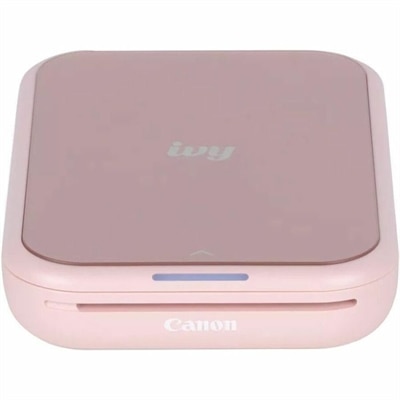
A portable blush pink mini photo printer creating customizable sticker photos instantly from your smartphone.
$99.99
$237.99

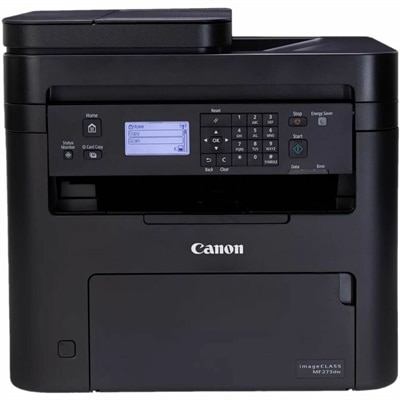
A monochrome wireless multifunction laser printer with printing, scanning, and copying for productive small-office workflows.

$237.99
$99.99

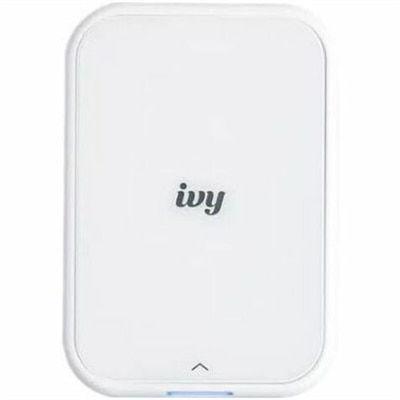
A portable, pure white zero-ink photo printer creating personalized stickers from your smartphone.

$99.99
$449.99

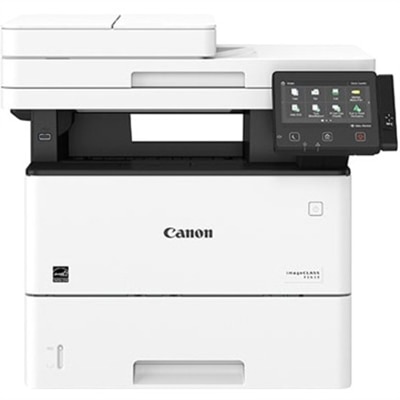
A monochrome multifunction laser printer with copier, fax, scanner, 45-ppm output and customizable color touchscreen.

$449.99

Cordless Printers

Cordless printers make it possible to send documents and images from a compatible laptop, desktop, smartphone, or tablet without connecting that device to the printer with a USB cable. In most home and office settings, “cordless” describes the wireless connection, not the power source: many wireless printers still need an electrical outlet, while certain portable models use rechargeable batteries. That distinction matters when the printer needs to sit across the room from a computer or travel between work locations. Wi-Fi connectivity lets compatible devices share a printer through a home wireless network, making it practical to print a shipping label from a phone, a school assignment from a laptop, or a presentation from a desktop. Some models also support a direct wireless connection that does not require a router, and certain portable printers use Bluetooth; connection methods depend on the printer and the device sending the job. Wireless printing support also varies by operating system, app, and document type, so compatibility extends beyond simply having a wireless connection. A shared household printer may need to work with several kinds of devices, while a dedicated home office printer may primarily serve one computer and an occasional phone. Placement affects everyday convenience, too. A printer on a sturdy side table can leave the main desk clear, but it still needs an accessible power source, room for paper trays, and a reliable wireless signal. Thick walls and distance from the router can interfere with connectivity even when the printer fits neatly into an unused corner. For remote workers, college students, and households balancing forms, homework, and personal projects, wireless printing reduces the need to gather around a single connected computer. It also allows the printer to occupy a practical spot rather than the only place a short cable can reach. The result is a more flexible workspace, with fewer cables crossing the desk and printed pages within easy reach when a digital file needs to become something tangible.

The right cordless printer format depends on what those pages contain and how often they are needed. Document-focused printing calls for clear text, readable fine lines, and dependable handling of standard letter-size paper, while photo printing places greater emphasis on color reproduction, detail, and compatibility with suitable photo paper. Inkjet printers can accommodate a range of document and image tasks, with photo quality varying by ink system, paper, and print settings. Laser printers are often suited to repeated text-heavy jobs, and monochrome models concentrate on black-and-white output rather than color. For a workspace that also handles forms, receipts, and handwritten notes, Compact Wireless All In One Printers combine printing, scanning, and copying in a space-conscious design. A flatbed scanner provides a surface for individual pages, photographs, and materials that cannot pass through a feeder. An automatic document feeder can simplify scanning or copying a stack of loose sheets, though support for two-sided scanning is a separate feature from two-sided printing. Automatic duplex printing turns the sheet inside the printer to produce double-sided documents without manual reinsertion, which is useful for class readings, reference packets, and longer household records. Paper capacity influences how frequently a tray needs attention, especially when several people share the same printer. Supported paper sizes and weights matter for envelopes, labels, cardstock, and other specialty media; not every printer handles each material. Physical fit involves more than the closed dimensions on a specification sheet. An extended output tray, an open scanner lid, and access to ink or toner can require additional space around the machine. Front-loading paper trays may be convenient beneath shelving, while a top-loading design needs clear space above it. A compact body is especially useful on an apartment desk or a small office shelf, but easy access to frequently used controls and paper paths can matter just as much as the footprint. For occasional short jobs, the time before the first page appears may be more noticeable than the speed of a long print run.

Portable cordless printers serve a different rhythm from printers that stay in one place. A battery-powered design can support paperwork during a client visit, temporary work assignment, or trip, provided its supported paper format and device connections match the task. Battery runtime, charging requirements, carrying weight, and the space needed to load paper all affect how comfortably a printer travels. A small photo printer may be convenient for keepsakes but is not necessarily designed for full-size documents, while a portable document printer may prioritize readable pages over photographic detail. For stationary and portable designs alike, durability depends partly on construction and partly on matching the printer to its workload. Secure paper guides, accessible controls, and trays that sit firmly in position contribute to everyday usability. A manufacturer's recommended monthly print volume is more relevant to sustained use than a maximum duty-cycle figure, which should not be treated as a routine target. Ink, toner, or specialized printing media also shape ongoing care. Consumable yield estimates depend on test conditions, and pages with dense graphics or large areas of color can use more material than simple text. Inkjet printheads may require occasional maintenance, particularly after extended periods without printing, while laser printers have different cleaning and replacement needs. Care instructions vary by design, but a stable surface, gentle handling, and paper stored away from moisture help support consistent feeding and cleaner results. Keeping vents unobstructed and using supported media are practical considerations for a printer expected to handle years of ordinary tasks. In a shared workspace, device access settings and any supported secure-print features can help keep sensitive documents from appearing before the intended person is ready to collect them. A cordless printer can also be a useful gift for a graduate setting up a first apartment or someone creating a dedicated home workspace, especially when its size and capabilities suit the recipient's routine. Whether the day calls for a signed form, a neatly printed report, or photographs for a family album, the most useful features are those that fit naturally into the space and the work happening there.

FAQs:

Add the products you would like to compare, and quickly determine which is best for your needs.

Add the products you would like to compare, and quickly determine which is best for your needs.