$182.99
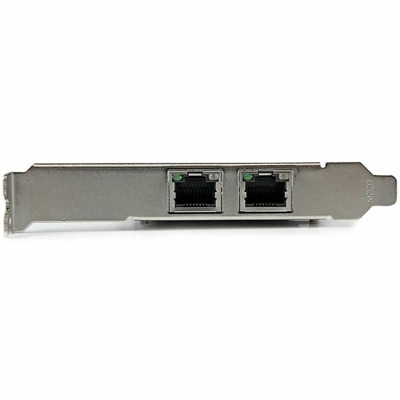
A dual-port PCIe x4 Gigabit Ethernet adapter featuring Intel i350, VLAN tagging, link aggregation, low-profile support.
In today's rapidly evolving digital landscape, data center networking stands as the backbone of modern business operations, seamlessly connecting servers, storage devices, and other critical infrastructure. Efficient data center networking ensures that data flows smoothly across your organization, enhancing productivity and supporting scalable growth. Whether you're managing vast amounts of information or enabling cloud services, investing in robust networking solutions is essential for maintaining agility and reliability. Discover how optimized data center networking can propel your business forward by providing the connectivity needed to meet the demands of the digital age.
A dual-port PCIe x4 Gigabit Ethernet adapter featuring Intel i350, VLAN tagging, link aggregation, low-profile support.
Modern digital operations depend on dependable connectivity between computing resources, applications, users and the wider internet. The equipment selected for this environment should help move information quickly, consistently and securely, whether it supports a small business, a growing company, a research organization or a large enterprise with demanding workloads. Before making a purchase, consider the number of connected devices, the amount of traffic expected, the distance between locations and the speed each connection must sustain. A system designed for occasional file access may not be suitable for real-time analytics, virtual desktops, high-performance computing or artificial intelligence workloads that generate heavy flows of information. It is also important to look beyond advertised speed. Latency, throughput, port capacity, compatibility, management features and power requirements all affect everyday performance. A connection can have a high maximum rate yet still feel sluggish if traffic is delayed by congestion, inefficient configuration or an undersized link. For organizations with multiple rooms, floors or sites, the physical layout matters as well. A carefully planned two-layer fabric can create direct, predictable paths between access points, while a more traditional layered design may suit simpler environments with modest traffic patterns. Fiber and copper connections each have a place, depending on distance, installation conditions and required bandwidth, and the right combination can make upgrades easier as workloads expand. Buyers should review connector types, supported standards, cable lengths and available expansion capacity before installation rather than discovering compatibility problems after equipment has been mounted. This is especially valuable when a technology team is replacing aging hardware in stages and must keep existing systems operational during the transition. A clear inventory of current devices, available connections and future requirements can prevent rushed purchases and help create a more balanced environment. Additional guidance and related purchasing options are available through Data Center Infrastructure.
A dependable connectivity environment also needs to handle different kinds of information movement. East-west traffic describes communication among systems within the same facility or operating environment, and it can become especially important for clustered applications, distributed databases, virtual machines and AI workloads. North-south traffic describes movement between internal resources and outside users, branch locations, cloud platforms or the public internet. Treating both patterns alike can lead to bottlenecks, so buyers should consider how information will travel and where controls should be placed. Security features can help inspect activity, restrict unauthorized access and separate sensitive workloads from general traffic. Segmentation is useful when an organization needs distinct areas for employees, visitors, development projects, voice communications or business-critical applications. Redundancy is equally important: backup paths, alternate power options and replaceable components can help keep essential services available if a connection or device fails. For a busy team, the best design often feels invisible; employees open applications, join meetings and reach shared resources without thinking about the infrastructure underneath. Behind that smooth experience, monitoring tools can identify unusual traffic, rising utilization and failing connections before they interrupt work. Automation can further reduce repetitive setup tasks by applying consistent rules across many devices and allowing authorized teams to make changes with fewer manual steps. When evaluating management software, look for clear dashboards, useful alerts, role-based permissions, configuration backups and support for the standards already used in the organization. Ease of administration matters just as much as raw performance, particularly for smaller IT teams that may be responsible for several locations. Installation should account for airflow, rack space, cable organization, labeling and future service access, because a neat layout makes troubleshooting much less stressful than a crowded cabinet where every connection looks alike. During the warmer part of the year, cooling and power consumption may deserve extra attention, while cooler months can be a practical time to complete planned maintenance without disrupting peak business activity. These solutions are generally purchased by IT managers, systems administrators, consultants, schools, healthcare organizations, creative studios and companies supporting hybrid work rather than given as personal gifts. The right choice should match the organization’s application needs, growth plans, security policies and technical expertise, creating a stable foundation for daily work and future expansion.
Add the products you would like to compare, and quickly determine which is best for your needs.