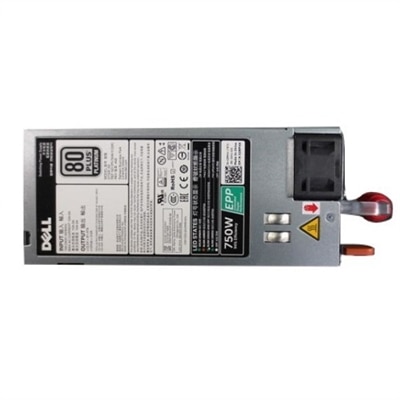
Desktop Computer Power Supplies
Desktop computer power supplies are essential components that provide reliable energy to keep your system running smoothly. Whether you're building a new PC or upgrading an existing setup, finding the right power supply ensures optimal performance and efficiency. Explore a wide selection of desktop computer power supplies designed to meet the needs of home offices, gaming rigs, and professional workstations alike.
This product is not available
Check out the following recommendations.




Desktop Computer Power Supplies
Desktop computer power supplies, often called PSUs, provide the steady electrical foundation a desktop PC needs to operate. They convert alternating current from a household outlet into the regulated direct current used by the processor, graphics card, motherboard, drives, cooling fans and other internal components. Because every part of a computer depends on clean, consistent power, the PSU deserves the same careful attention as the processor or graphics card when planning a new build or refreshing an existing desktop. A suitable unit can support dependable everyday performance for schoolwork, office applications, creative projects, gaming and home computing, while an undersized or incompatible unit may limit upgrades or cause instability when demanding software places the system under load. The right choice begins with checking the computer’s total power requirements rather than relying on a single component’s estimate. Basic desktops with integrated graphics and modest processors may operate comfortably in a lower wattage range, while systems with a dedicated graphics card, a higher-performance processor, several drives or additional cooling may call for substantially more capacity. Many mainstream builds fall near the 550-watt to 650-watt range, whereas performance-focused gaming and creative systems commonly benefit from 750 watts, 850 watts or more. The ideal rating leaves reasonable headroom for brief power spikes and future upgrades without paying for capacity the computer will never use. Reviewing the recommendations for the processor and graphics card, adding the requirements of the remaining components, and allowing extra room for expansion can make the selection process more predictable.
Efficiency certification is another useful point of comparison. An efficiency rating indicates how effectively a PSU converts wall power into usable power for the computer, with less energy lost as heat. Ratings such as 80 PLUS Bronze, Gold and Platinum can help shoppers compare efficiency levels across compatible units, although the certification is only one part of overall quality. A more efficient PSU may produce less excess heat and allow the cooling system to work more quietly, which can be especially welcome in a home office, bedroom or shared living space during the cooler months. Build format matters as well. Standard ATX units fit many full-size desktop cases, while compact computers may require a smaller form factor or a manufacturer-specific design. Before choosing, confirm the case dimensions, mounting arrangement and cable clearances, since a unit that meets the wattage requirement may still be physically unsuitable. Cable configuration can make a noticeable difference during installation. A non-modular PSU has its cables permanently attached, while a semi-modular or fully modular design lets the builder connect only some or all of the cables needed for the selected components. Using fewer cables can simplify routing, reduce clutter around airflow paths and make it easier to achieve a neat interior. It is important to use the cables supplied for the specific PSU and never mix detachable cables from different units, even when the connectors appear similar. Check the available motherboard, processor and graphics power connectors carefully, including support for newer graphics connections when applicable, and consider whether the included cable length will reach comfortably through the case.
A desktop computer power supply can be a practical choice for someone assembling a first PC, replacing an aging unit or preparing for a graphics upgrade. It may also suit a family member, student or enthusiast who enjoys building and maintaining a desktop, although compatibility details are more important than appearance when giving one as a gift. A recipient will typically need to know the case type, motherboard connection, graphics card requirements and preferred wattage before a PSU can be selected with confidence. For office desktops, reliable power helps support long work sessions, video meetings and everyday multitasking; for gaming PCs, adequate capacity and suitable connectors help the system respond to demanding graphics workloads; and for creative desktops, additional headroom can be valuable when applications use the processor and graphics card together. Look for protections such as over-voltage, under-voltage, over-power, short-circuit and over-temperature safeguards, along with a reputable warranty and clear specifications. Noise level may matter to anyone recording audio, studying in a quiet room or working near the computer for much of the day. Keeping the PSU’s intake unobstructed and periodically clearing dust from the case can help preserve airflow and maintain dependable operation. If a desktop is built for intensive professional applications and requires a different class of power solution, browse Workstation Power Supplies for additional options. By matching wattage, efficiency, form factor, connectors, cable design and protection features to the computer’s actual needs, shoppers can choose a power supply that fits the build cleanly and provides a stable foundation for daily use and future improvements.
FAQs:
Modular desktop power supplies allow you to attach only the cables you need, resulting in cleaner cable management and improved airflow. Semi-modular units have essential cables like the motherboard and CPU connectors permanently attached, with additional cables being optional. Non-modular power supplies have all cables permanently connected, which can make cable management more challenging but may be simpler for straightforward builds.
To determine the right wattage, add up the power requirements of your main components, such as the CPU, GPU, drives, and peripherals. It's wise to choose a power supply with a slightly higher wattage than your total needs to allow for future upgrades and to ensure stable performance under load.
The 80 PLUS certification indicates the efficiency of a power supply in converting AC power to DC power. Higher efficiency ratings, such as Gold or Platinum, mean less energy wasted as heat, lower electricity bills, and a quieter, cooler system overall.
While a new power supply won't directly increase processing speed, it can provide more stable and consistent power to your components, reducing the risk of crashes or unexpected shutdowns during demanding tasks like gaming, content creation, or multitasking.
Anyone using their desktop for gaming, creative work, or multitasking with multiple peripherals can benefit from a reliable power supply. Upgrading ensures your system can handle new hardware and software, making it a valuable investment for students, professionals, and home users alike.