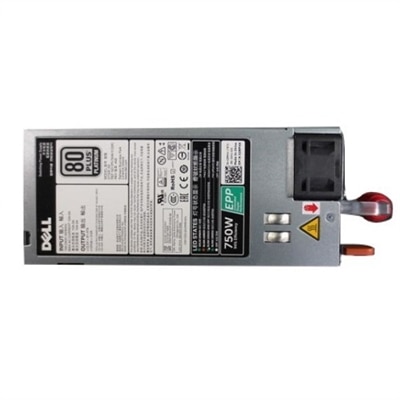
Workstation Power Supplies
Workstation power supplies are essential for maintaining reliable performance and stability in demanding computing environments. Designed to support the advanced needs of professionals, these power solutions help ensure that your workstation runs smoothly during intensive tasks. Explore a wide selection of workstation power supplies to find the right fit for your setup, whether you’re upgrading an existing system or building a new one from the ground up.
This product is not available
Check out the following recommendations.




Workstation Power Supplies
Workstation power supplies are the foundation of a dependable professional desktop, converting electricity from a wall outlet into the stable, carefully regulated DC power used by the processor, graphics card, motherboard, drives and other internal components. Unlike a basic office computer that may perform routine browsing and document work, a workstation can spend hours rendering a scene, compiling a large project, processing high-resolution video or handling complex engineering and creative applications. Those sustained workloads place greater demands on the power supply, making capacity, efficiency, connector compatibility and build quality important considerations. Many workstation configurations benefit from 750W to 1000W or more, particularly when paired with a high-performance CPU and professional graphics card, although the right wattage depends on the complete system rather than a single component. Check the recommended power requirement for the graphics card, account for the processor and installed components, and leave reasonable headroom for startup demands, future upgrades and the occasional accessory added inside the case. A power supply that operates close to its maximum output all the time may have less flexibility when the system suddenly accelerates during a render or simulation. Think of it like the electrical foundation beneath a busy studio: when everything is steady and properly sized, the computer can concentrate on the work instead of reacting to strain. If you are comparing options for a traditional tower or custom-built desktop, the broader selection of Desktop Computer Power Supplies can also help place workstation-oriented requirements in context.
Efficiency is another meaningful part of the decision. An 80 PLUS Gold or Platinum rating indicates that a power supply converts a higher percentage of incoming AC electricity into usable DC power under specified testing conditions, with less energy lost as heat. Efficiency does not determine every aspect of performance, and the rating should be considered alongside output capacity, voltage regulation, protections and operating noise, but it can contribute to a cooler, quieter workspace over long periods of use. This matters in a home office where a constant fan hum can become distracting, as well as in a design studio where several workstations may run throughout the day. A quiet cooling fan, thoughtfully designed airflow and a unit that is not consistently pushed to its limit can make the computer feel calmer during extended sessions. Fully modular cabling is useful for similar practical reasons. Because unused cables can be detached, the builder can connect only what the system requires, leaving more room for airflow and making the interior easier to inspect or service. Semi-modular and fixed-cable designs can still be suitable, particularly when the case has ample cable-routing space, but detachable connections often create a cleaner installation. Before purchasing, confirm the physical dimensions of the power supply and the cable layout supported by the case. Measure twice if the computer uses a compact chassis; a high-output unit may be longer than a standard model, and a few extra centimeters can determine whether installation is straightforward or frustrating. Look for current standards such as ATX 3.1 and PCIe 5.1 when building around modern high-performance graphics hardware. Native support for newer high-power connectors can reduce the need for adapters and help maintain a tidy, secure connection. Always seat connectors fully, avoid sharply bending cables near a plug, and follow the installation guidance supplied with the computer and power supply.
The people most likely to appreciate a workstation power supply are professionals, students in technical programs, creators and experienced PC builders who already know the demands of their system or are planning a substantial upgrade. It can be a practical replacement when an older unit has become noisy, unreliable or unable to support a newer graphics card, and it may be part of a carefully planned build for 3D modeling, architecture, scientific visualization, animation, photography, music production or software development. It is less likely to be a spontaneous gift than a pair of headphones or a monitor because compatibility is highly specific: the recipient needs the correct wattage, form factor, connectors and electrical configuration. As a gift, it makes the most sense when paired with a clear component list or chosen together with the person building the computer. A thoughtful purchase starts with the system’s processor, graphics card, motherboard, number of drives, cooling hardware and available case space. Check whether the computer uses a standard ATX design or a proprietary format, and verify connector requirements rather than assuming that every cable fits every system. Quality protections such as over-voltage, under-voltage, over-power, short-circuit and over-temperature safeguards can help protect expensive internal components when something unexpected occurs. A reputable warranty and clearly documented specifications also provide confidence during installation and future troubleshooting. Keep the power supply clean and unobstructed once installed, give its intake adequate ventilation, and connect the computer to a properly grounded outlet or suitable uninterruptible power source where appropriate. With the right match, a workstation power supply fades into the background: the fans remain composed, the internal cables stay organized, and the computer has the steady reserve it needs when a routine task turns into an all-night render.
FAQs:
When choosing a workstation power supply, prioritize units with high wattage (typically 750W or more), 80 Plus Gold or Platinum efficiency, fully modular cables for better cable management, and enough connectors for your CPU and GPU configuration. Features like hot-plug capability and redundancy can also be valuable for mission-critical environments.
Professionals working in fields such as graphic design, 3D modeling, video production, engineering, and scientific research often benefit the most. These users typically run demanding applications and may use multiple GPUs or high-end CPUs that require stable, ample power for optimal performance.
Yes, selecting a power supply with higher wattage and modular design allows for greater flexibility if you plan to add more powerful components or expand your workstation in the future. This ensures your system remains reliable as your hardware needs evolve.
Efficient power supplies convert more of the incoming electricity into usable power for your workstation, resulting in less heat generation and lower energy costs. This is especially important for workstations that run intensive tasks for extended periods.
Modular cables allow you to use only the cables you need, which helps reduce clutter inside your case and improves airflow. This can lead to better cooling performance and makes building or upgrading your workstation much easier.