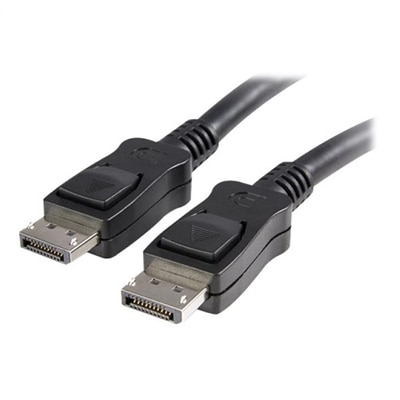
DisplayPort Cables
DisplayPort cables are essential for connecting monitors, computers, and a variety of digital devices to achieve seamless audio and video transmission. Designed to support high-resolution displays and smooth performance, these cables are a reliable choice for both home and office setups. Whether upgrading your workstation or enhancing your entertainment system, DisplayPort cables provide the connectivity you need for clear visuals and dependable signal transfer. Explore a range of options to find the right cable for your setup and enjoy an optimized digital experience.
This product is not available
Check out the following recommendations.
Related Products
DisplayPort Cables
DisplayPort cables provide a direct connection between a compatible computer, graphics card, docking station or other source device and a monitor, carrying high-definition video and, when supported by the connected equipment, digital audio through a single cable. They are commonly used with desktop workstations, home offices, creative setups, classroom displays and gaming computers, where a dependable connection helps a screen operate at its intended resolution and refresh rate. A DisplayPort connection may support standard HD resolutions, 4K and beyond, but the final performance depends on the source device, monitor, graphics hardware, cable capability and settings used together. A cable does not increase the capabilities of a computer or display on its own; instead, it helps the existing equipment communicate at the level it supports. DisplayPort 1.2 cables are suitable for many everyday monitor connections, including resolutions up to 4K at 60Hz or 1080p at higher refresh rates when the connected devices support those specifications. Shoppers comparing options can review DisplayPort 1.2 Cables for displays used in office work, web browsing, schoolwork, photo viewing and general entertainment. For newer, more demanding displays, DisplayPort 1.4 cables can support combinations such as 4K at high refresh rates and 8K at 60Hz, including HDR configurations when the computer and monitor also support them. DisplayPort 2.1 cables are designed for particularly high-bandwidth applications, including ultra-high refresh-rate gaming, advanced creative work and multi-monitor setups with very high resolutions. Some DisplayPort 2.1 cables use UHBR specifications, such as UHBR10, UHBR13.5 or UHBR20, with the highest-rated options offering up to 80 Gbps of raw bandwidth under the appropriate conditions. Because resolution, refresh rate, color depth, HDR and compression can all affect bandwidth requirements, checking the specifications of both the source and display is an important step before choosing a cable. A cable rated for a higher standard can provide useful room for a future monitor upgrade, but it will not make an older graphics card deliver a signal beyond its own limits.
Length is another practical consideration. A short cable can help keep a compact desk neat, especially when a laptop or desktop sits close to the monitor. A longer cable may be more convenient when a computer is positioned beneath a desk, inside a cabinet designed for equipment, or several feet away from a display used for presentations. For most personal workstations, a length between 3 and 6 feet often provides enough reach without leaving a large loop behind the monitor. Extra length can introduce more opportunity for bends, snags and signal concerns, so selecting the shortest cable that comfortably reaches each port is generally sensible. Look for sturdy construction, strain relief around the connectors and a jacket that can withstand regular repositioning. Many standard DisplayPort cables include latching connectors or a release button that helps prevent an accidental tug from loosening the connection. These features can be useful in a busy home office, a shared workspace or a gaming setup where the desk is moved and adjusted frequently. Latching connectors should be released according to the cable design rather than pulled forcefully, since pressing the release mechanism helps protect the ports. Before ordering, confirm the connector type on each device. A standard DisplayPort connector is different from HDMI, Mini DisplayPort and USB-C. USB-C displays and laptops may support DisplayPort through an alternate mode, but they require a compatible USB-C-to-DisplayPort cable or adapter, and not every USB-C port carries video. Adapters can also be directional, so check whether the connection is intended to run from DisplayPort to HDMI, HDMI to DisplayPort or USB-C to DisplayPort. For a multi-monitor arrangement, a compatible computer and display may support DisplayPort Multi-Stream Transport, allowing more than one monitor to connect in a chain or through a hub; however, this depends on the graphics hardware, monitor features and configuration. When troubleshooting, reseating both ends, selecting the correct monitor input, updating graphics drivers and checking the chosen resolution and refresh rate can resolve many ordinary connection issues.
DisplayPort cables can be a useful addition for anyone setting up a new computer area or refreshing a display arrangement during the cooler months. They are practical for a remote worker who wants a larger external screen, a student organizing a study corner, a photographer or designer reviewing detailed images, and a gamer seeking a smooth high-refresh-rate connection. They can also make a thoughtful, practical gift for someone building a desk setup, provided the connector type and performance requirements are known. A cable is easy to overlook until a new monitor is unpacked and the existing connection is too short, uses the wrong connector or cannot support the desired refresh rate, so matching the cable to the equipment in advance can save time during setup. For work, DisplayPort can help connect a desktop or laptop dock to a crisp monitor for documents, spreadsheets and video calls. For entertainment and gaming, the right specification can help a compatible display deliver smoother motion, higher resolution and HDR imagery. For creative tasks, sufficient bandwidth can be especially valuable when working with large canvases, detailed photographs, video timelines or multiple screens. Keep in mind that some high-resolution and high-refresh-rate combinations may require Display Stream Compression, a particular graphics setting or a newer generation of hardware, and the display’s manual remains the best source for confirming supported modes. Cable management also matters: leave enough slack to move the monitor, avoid tight bends near the connector, and route the cable away from areas where chair wheels or foot traffic could catch it. A reliable DisplayPort cable, chosen for the required standard, length and connector style, can provide a clean connection that stays out of the way while helping a compatible monitor perform as designed.
FAQs:
DisplayPort versions differ primarily in their maximum supported resolutions, refresh rates, and bandwidth. For example, DisplayPort 1.2 supports up to 4K at 60Hz or 2K at 144Hz, DisplayPort 1.4 supports up to 8K at 60Hz or 4K at 144Hz with Display Stream Compression (DSC), and DisplayPort 2.1 is designed for future displays, supporting up to 16K at 60Hz with even higher bandwidth capabilities.
DisplayPort cables are ideal for a wide range of users, including gamers seeking high refresh rates, creative professionals working with high-resolution content, business users managing multi-monitor setups, and students who need reliable connections for projects and presentations.
VESA certification ensures that a DisplayPort cable meets strict industry standards for performance and reliability. This certification helps guarantee compatibility with your devices and reduces the risk of issues such as signal loss or display errors.
Yes, many DisplayPort cables and compatible monitors support Multi-Stream Transport (MST), which allows you to daisy chain multiple monitors together from a single DisplayPort output, creating an extended or mirrored desktop experience.
If your monitor shows a black screen, ensure the DisplayPort cable is fully seated and latched in place. You may also need to restart your monitor or computer, update your graphics drivers, or try a VESA-certified cable to resolve potential handshake or compatibility issues.