$299.99
A smart docking station offering up to 130W USB-C power delivery and remote management capabilities.
Docking Solutions for Hybrid Work Environments empower professionals to seamlessly transition between office and remote settings. These versatile accessories help streamline connectivity, enhance productivity, and support a clutter-free workspace. Whether setting up at home or in the office, find docking options designed to make device management simple and efficient. Explore a range of solutions tailored for today’s flexible workstyles and create a more organized, connected workspace wherever you are.
A smart docking station offering up to 130W USB-C power delivery and remote management capabilities.
A professional docking station delivering 130W power and versatile connectivity for streamlined productivity.
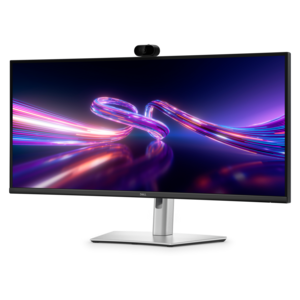
A curved WQHD IPS monitor with a built-in webcam and convenient USB-C hub for collaborative workspaces.
As hybrid work becomes the norm for professionals across industries, the right docking solution can make all the difference in creating a seamless transition between home and office environments. Whether you’re setting up a temporary workspace at the kitchen table or returning to a dedicated office desk, docking stations are designed to simplify your daily routine by consolidating power, data, and display connections into a single, easy-to-manage hub. This convenience is especially valuable during seasons of change—when the warmth of late summer gives way to the crisp air of fall—making it easier to stay productive wherever your work takes you. Docking solutions come in a range of configurations, from compact travel hubs ideal for hot-desking and frequent travel to more robust desktop docks that support multiple monitors, high-speed data transfer, and stable wired internet. Many models feature universal compatibility, supporting a variety of operating systems and device types, so you can connect your laptop, monitor, keyboard, mouse, and other essential accessories with minimal hassle. For those who rely on video calls or presentations, integrated audio and video docks can streamline virtual meetings, offering features like speakerphones and meeting controls that keep you connected and in control.
When considering which docking solution is the best fit, it’s important to think about your specific workflow and the devices you use most often. For professionals who need to replicate the multi-monitor setups of their office at home, look for docks that support dual or even triple external displays at high resolutions. Power delivery is another key factor—choosing a dock with sufficient wattage ensures your laptop stays charged even during long work sessions. For those who move between locations frequently, a lightweight travel hub with essential ports can be a practical addition to your bag, making it easy to set up a functional workspace anywhere. Docking stations are also a thoughtful gift for recent graduates, remote workers, or anyone starting a new job, providing the flexibility and efficiency needed to adapt to different work environments. In enterprise settings, IT teams often appreciate docks that allow for centralized management and firmware updates, helping to reduce support requests and maintain consistency across a fleet of devices. If your workflow demands the ability to connect multiple monitors, you can explore more options on our dedicated page for Docking Stations for Multi-Monitor Workflows, where you’ll find solutions tailored to high-productivity setups.
No matter your work style, investing in a reliable docking solution can help you maintain focus and efficiency as your environment changes with the seasons. Imagine the ease of arriving at your desk—whether it’s in a bustling office or a quiet corner at home—and transforming your laptop into a full workstation with just one connection. Docking stations not only reduce cable clutter but also enhance your ability to multitask, collaborate, and transition smoothly between meetings and projects. As hybrid work continues to evolve, the right docking solution offers the flexibility and performance needed to stay connected and productive, supporting your goals through every stage of the year.
Add the products you would like to compare, and quickly determine which is best for your needs.