$12.99
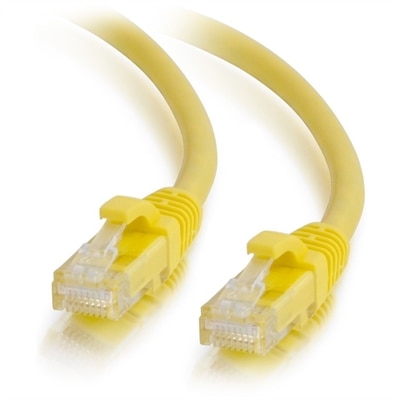
A yellow Cat6a unshielded Ethernet patch cable with snagless RJ45 connectors supports reliable 10Gbps networking.
Ethernet connections are the backbone of any reliable network, providing a stable and fast way to connect your devices for seamless communication and data transfer. Whether you're setting up a home office, enhancing your gaming experience, or ensuring smooth operations in a business environment, the right Ethernet solution is crucial. Explore an array of options that cater to various needs, from simple setups to complex configurations. Embrace the world of Ethernet connections and unlock the potential for enhanced productivity and connectivity in your digital life.
A yellow Cat6a unshielded Ethernet patch cable with snagless RJ45 connectors supports reliable 10Gbps networking.
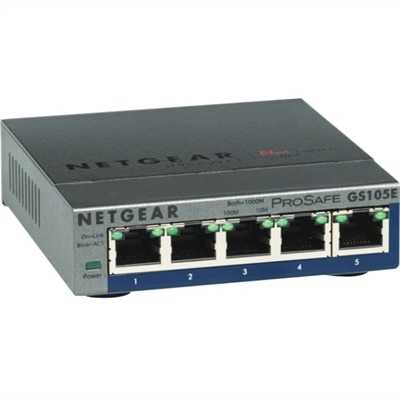
A 5-port Gigabit Ethernet switch featuring VLAN, QoS, IGMP snooping, link aggregation, and traffic monitoring.
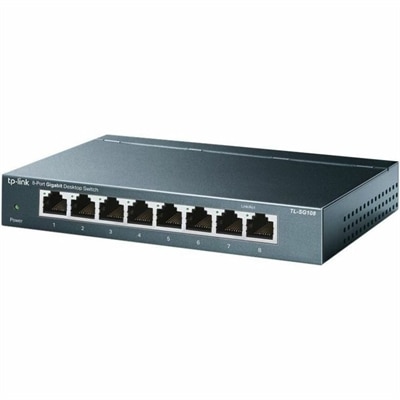
An 8-port Gigabit desktop switch with metal casing, fanless operation, plug-and-play setup, QoS, and energy savings.
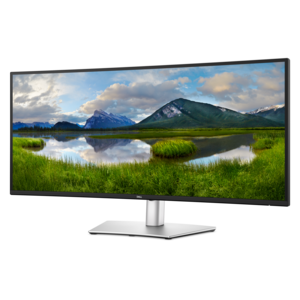
A curved ultrawide WQHD monitor with USB-C power delivery up to 90W and RJ45 Ethernet connectivity.
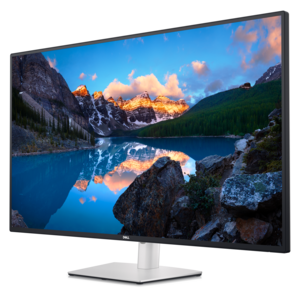
A 4K USB-C hub monitor supporting multi-PC connectivity, four FHD partitions, ComfortView Plus, and wired Ethernet.
Ethernet connections give compatible laptops and desktops a wired path for transferring data and accessing the internet. In a typical computer setup, an Ethernet cable carries signals through twisted pairs of copper conductors and plugs into an RJ-45 port, the rectangular socket with a small notch for the connector’s locking tab. Unlike Wi-Fi, this physical connection does not depend on a wireless signal reaching a desk through walls, furniture, or neighboring wireless activity. That can make a wired connection a practical choice for a home office, a shared study space, or a desktop used for online gaming. Ethernet can provide consistent performance and low local connection latency, although overall internet speed still depends on the internet service, the capabilities of connected devices, and conditions beyond the computer. A wired connection cannot eliminate every interruption or make a slow internet plan faster, but it can remove wireless interference as a source of inconsistency. For someone presenting during a video meeting, uploading a large creative project, or downloading course materials while other household members are online, that predictability can be useful. Ethernet accessories also suit workspaces where a computer stays in one place for much of the day: a laptop beside an external monitor, a desktop beneath a writing desk, or a study station used for evening coursework. Some computers have a built-in Ethernet socket, while slimmer laptops may require a compatible USB Ethernet adapter or a docking station with an Ethernet connection. The distinction matters because a cable alone cannot add a missing port. Information about Ethernet Ports can help clarify the physical connection and how it fits into a computer setup. Whether the connection is built in or added through an accessory, the most useful combination is one that matches the computer, supports the intended workload, and fits comfortably into the space without putting strain on its connectors.
Ethernet cable categories describe standardized performance capabilities, but a higher category does not automatically produce a faster experience. Cat 5e supports Gigabit Ethernet over standard channel lengths of up to 100 meters and is specified for frequencies up to 100 MHz. Cat 6 is specified up to 250 MHz, supports Gigabit Ethernet over the same maximum channel length, and can support 10 Gigabit Ethernet over shorter distances, generally up to 55 meters depending on installation conditions and interference. Cat 6a is specified up to 500 MHz and supports 10 Gigabit Ethernet over channels up to 100 meters. Those frequency ratings are not internet speeds; they describe electrical performance rather than the number of gigabits an internet connection delivers. For an everyday laptop or desktop, the useful connection speed is constrained by the slowest relevant component, including the computer’s Ethernet interface, any adapter or dock, and the connection at the other end. A faster-rated cable does not turn a Gigabit Ethernet port into a multigigabit port. Cable length and construction are equally relevant to a tidy, dependable workspace. A short patch cable can keep a compact desk from collecting loops behind the monitor, while a longer cable may accommodate a computer positioned farther from the wall connection. A little slack allows a laptop to move without tugging at the plug, but excess cable can become awkward around chair wheels and foot space. Copper conductors, consistent manufacturing, and properly fitted connectors contribute to dependable performance. Stranded copper patch cables are generally flexible enough for desk-level use, while the outer jacket helps protect the conductors from everyday abrasion. Shielding can help in environments with substantial electrical interference when used as part of a properly installed, compatible setup; it is not automatically necessary for a typical home desk. For most personal workspaces, appropriate length, compatible speed ratings, and sound construction matter more than choosing the highest category printed on the jacket.
The fit of an Ethernet accessory extends beyond its cable connector. A USB Ethernet adapter needs to match an available USB connection on the computer, and its supported operating systems, driver requirements, and stated Ethernet speed all deserve attention. USB-C describes a connector shape, not a guarantee of a particular data rate or set of features. An adapter’s performance also depends on the USB capabilities of the host computer. A docking station can bring Ethernet together with connections for monitors and everyday peripherals, making it convenient for someone who carries a laptop between rooms and returns to the same desk each morning. However, display support, laptop charging, and data transfer capabilities vary, so those functions should be confirmed separately rather than assumed from the presence of a USB-C plug. Physical proportions matter in daily use as well. A wide adapter housing can crowd an adjacent port, while a short flexible lead may leave more room for another accessory. Connector boots can protect locking tabs from snagging, but bulky designs may be less convenient around closely spaced sockets. At a desk shared by several people, an easy-to-reach connection can make switching computers less disruptive than reaching behind a monitor or crawling beneath the work surface. Durability depends partly on handling: releasing the locking tab before unplugging, holding the connector rather than pulling the cable, and avoiding sharp bends help protect the assembly. Keeping cables away from chair casters, pinching desk joints, and walkways reduces both wear and clutter. Connections should stay dry, and visible damage to a jacket, plug, or locking tab is a reason to assess whether the accessory needs replacement. These practical details matter for remote employees who connect every weekday, students who alternate between campus and home, and creative users moving large files from a stationary workspace. For a family member setting up a first apartment or a dedicated study corner, compatible connectivity accessories can also be a useful gift when the computer’s ports and workspace requirements are known. A well-matched Ethernet setup supports those routines quietly, keeping the focus on the work, conversation, or game on the screen.
Add the products you would like to compare, and quickly determine which is best for your needs.