$49.99
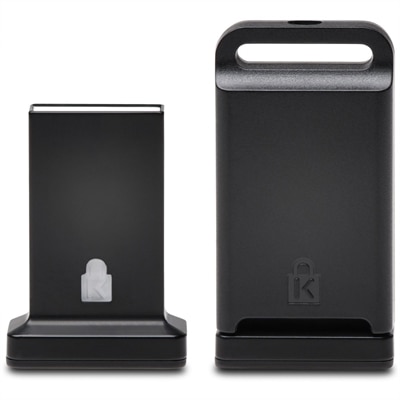
A cross-platform USB-A fingerprint security key offering FIDO2, FIDO U2F, passwordless and multi-factor authentication.
Fingerprint readers offer a secure and convenient way to access your devices, data, and applications with just a touch. Designed for seamless integration into your daily routine, these innovative solutions help streamline authentication processes across various settings. Whether you're upgrading your personal security or enhancing workplace efficiency, explore a wide selection of fingerprint readers to find the ideal match for your needs.
A cross-platform USB-A fingerprint security key offering FIDO2, FIDO U2F, passwordless and multi-factor authentication.
A genuine OEM palmrest assembly with integrated fingerprint reader and touchpad, rigorously tested for reliable compatibility.
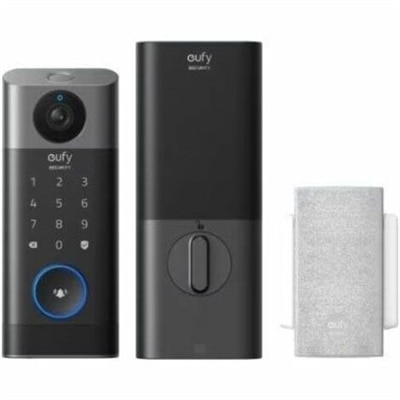
A water-resistant smart lock with fingerprint unlocking, 2K video, rechargeable 10,000mAh battery, and remote access control.
Fingerprint readers are biometric security devices that capture and analyze the unique ridge-and-valley pattern on a person’s finger to help verify identity. Unlike a password, which can be forgotten, mistyped or reused across accounts, a fingerprint is a physical characteristic that stays with its owner and can make everyday sign-in feel nearly effortless. A reader may be built into a laptop, keyboard or other personal computer, or it may connect as a compact USB accessory for use at a desk. Some models are designed for Windows Hello or other passwordless login systems, while others support multi-factor authentication through a compatible security key or application. The best choice depends on the computer, operating system and accounts involved, so check compatibility before purchasing. A reader intended for a Windows PC may not work with every tablet, mobile device or software platform, and a USB model may require an available port or an adapter. People who regularly work from home, share a household computer or move between a personal laptop and a desktop can appreciate the quick, private access a fingerprint reader provides. It can also be useful for professionals handling sensitive documents, managing customer records or signing in repeatedly throughout a busy day. Even simple routines, such as opening a laptop beside a morning cup of coffee or returning to a computer after stepping away, can feel smoother when authentication takes a quick touch instead of a typed password.
Fingerprint readers use several sensing methods, each with its own approach to recognizing a print. Optical readers use light to capture a digital image of the fingertip, much like a highly detailed photograph of the ridges and valleys. They are a familiar choice for desktop use and can provide dependable results when the finger is placed flat and the sensor surface is clean. Capacitive readers use electrical signals and an array of tiny capacitors to map differences between fingerprint ridges and the spaces around them. This design is common in compact devices because it can capture fine details in a small footprint. Ultrasonic readers send high-frequency sound waves into the fingertip and interpret the returning signals to create a three-dimensional picture of the print, which may help distinguish surface details in more challenging conditions. Thermal readers detect temperature differences between the warmer ridges of the finger and the air-filled valleys between them. Regardless of the sensing method, consistent placement matters. A finger that is wet, excessively dry, dusty or covered by a glove may not register correctly, and a scratched or smudged sensor can slow recognition. Wiping the reader with a soft, manufacturer-approved cloth and enrolling the same finger more than once at slightly different angles can improve everyday performance. It is also worth considering the reader’s size, cable length, enrollment process, false-rejection behavior and the number of fingerprints it can store. A larger desktop unit may be comfortable for a shared workstation, while a small reader can travel easily in a laptop bag. Those comparing computers with built-in biometric access may also want to browse Touchscreen Devices for systems that combine convenient interaction with modern login features.
A fingerprint reader can be a practical addition for students, remote workers, small-business owners and anyone who wants a more streamlined way to protect a personal computer. It may suit a family member who finds long passwords difficult to remember, a frequent traveler who wants fast access without typing in public, or a home office user who locks the screen whenever leaving the desk. As a gift, it is especially fitting for someone setting up a new workspace, upgrading an older computer or building better digital habits during the cooler months when more time is spent indoors. The most useful reader is not necessarily the one with the most advanced specifications; it is the one that fits the recipient’s devices and routine. Look for clear operating-system support, straightforward setup instructions, a durable sensor surface and a design that will remain comfortable after months of daily use. Privacy deserves attention as well. Fingerprint data is typically converted into a mathematical template for matching rather than stored as a simple photograph, but the exact handling depends on the device and its software. Review the manufacturer’s privacy information and learn how biometric data can be removed or replaced if the reader is no longer used. For an office or shared workspace, consider whether each person can enroll an individual finger and whether the system provides a backup sign-in method. A fingerprint reader works best as part of a broader security routine that includes strong, unique passwords, automatic screen locking, software updates and multi-factor authentication where available. With the right match between reader type, computer and daily habits, a small touch can make a laptop or desktop feel more personal, accessible and secure without adding another item to remember.
Add the products you would like to compare, and quickly determine which is best for your needs.