Flatbed Document Scanners
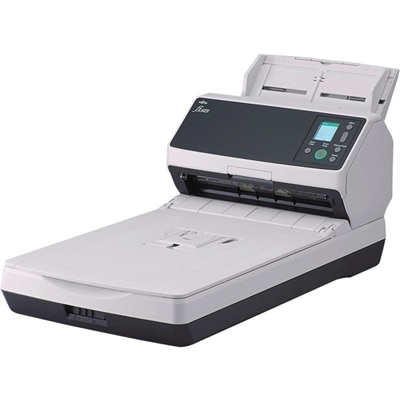
Flatbed document scanners offer a reliable solution for digitizing paperwork, photos, and important records with ease. Ideal for both home offices and professional environments, flatbed document scanners are designed to handle a variety of scanning tasks efficiently. Whether you need to archive documents, share files electronically, or reduce paper clutter, these scanners provide the flexibility and performance needed to streamline your workflow. Explore a wide selection of flatbed document scanners to find the perfect fit for your scanning needs.
This product is not available
Check out the following recommendations.
Related Products



Flatbed Document Scanners
Flatbed document scanners are desktop devices designed to turn paper documents, photographs, artwork and other physical materials into digital files. Instead of feeding a page through a narrow slot, a flatbed scanner uses a smooth glass surface beneath a hinged lid. You place the item face down on the glass, close the lid and let the scanning element move beneath it. This design makes flatbed scanners especially useful for single sheets, bound books, certificates, receipts, handwritten notes, scrapbook pages and delicate photographs that may be too fragile, thick or irregular for a traditional sheet-fed scanner. They can be a practical addition to a home office, classroom, small business or family workspace, helping reduce paper clutter while keeping important records easier to organize, share and back up. A flatbed document scanner can also be a thoughtful gift for someone who enjoys preserving family photographs, digitizing recipes, archiving artwork or managing paperwork from a home office. During the cooler months, when indoor projects naturally move to the forefront, scanning old albums or sorting household files can be a rewarding way to make meaningful materials easier to revisit. When choosing among flatbed document scanners, start with the materials you expect to scan most often. Basic paperwork and text documents typically require less resolution than photographs, illustrations or small graphics. Resolution is measured in dots per inch, or dpi; higher settings such as 1200 or 2400 dpi can capture more fine detail, subtle texture and color information, although they also create larger files and may take longer to process. A lower setting can be efficient for everyday forms and records, while a higher setting is better suited to photo preservation, enlargements and detailed artwork. Consider the size of the glass bed as well. A standard page-sized surface handles common office documents, while a larger scanning area may be useful for drawings, newspaper clippings, maps or creative projects that do not fit neatly within ordinary paper dimensions. A lid with enough flexibility to accommodate thicker materials can make it easier to scan books and bound items without pressing them flat.
The difference between a pure flatbed and a flatbed scanner with an Automatic Document Feeder, commonly called an ADF, is another important purchase consideration. A standard flatbed is often the better match for photos, books, fragile pages and occasional scanning because each item is positioned individually on the glass. An ADF allows a stack of loose pages to be loaded at once, which can save time when converting multipage forms, invoices, school records or office files. Some units combine both methods, giving you the careful handling of a glass bed and the convenience of batch scanning. If you regularly scan a large volume of loose paperwork, look for an ADF capacity that suits the size of your typical stack and check whether the feeder supports single-sided or double-sided scanning. Duplex capability can reduce manual page turning when working with two-sided documents. Speed is also worth comparing, but advertised scan times may vary with resolution, color mode, paper size, file format and whether image correction or optical character recognition is enabled. If scanning is part of a daily workflow, explore High Speed Flatbed Scanners for options intended to make larger scanning tasks more efficient. Sensor technology can influence both the scanner’s design and its performance. Contact Image Sensor, or CIS, technology is commonly found in slim, power-efficient models and can be convenient for smaller desks or USB-powered setups. Charge-Coupled Device, or CCD, sensors may provide greater depth of field, which can help when scanning uneven surfaces, thicker books or certain three-dimensional objects. Connectivity is another detail that affects everyday convenience. USB connections are straightforward for a computer-based setup, while compatibility with the operating system and included scanning software can simplify installation. Look for software features such as automatic cropping, deskewing, dust and scratch reduction, color correction, searchable PDF creation and optical character recognition. OCR can convert printed text in a scanned image into editable or searchable content, making it easier to find a name, date or phrase later.
A well-chosen flatbed scanner can support both practical recordkeeping and more personal projects. A remote worker might use one to archive signed forms, receipts and handwritten notes without keeping piles of paper beside a laptop. A student can scan textbook pages, diagrams or marked-up worksheets for reference, while a teacher or artist may use the glass bed to preserve sketches and printed materials. Families often use flatbed scanners to create digital copies of photographs, letters, children’s drawings and recipes that have gathered in drawers over the years. For the best results with photographs, clean the glass gently with a soft, lint-free cloth and avoid placing dusty or damp materials on the scanning surface. Keep photos flat when possible, remove paper clips and staples before scanning, and save important images in a high-quality format before creating smaller copies for email or sharing. For documents, choose a file format based on how the scan will be used: searchable PDF is convenient for records, while common image formats may be better for photos and graphics. Organizing files with descriptive names and consistent folders can be just as valuable as the scan itself; a file labeled with a date and subject is much easier to find than one with a generic number. Before purchasing, measure the available desk space, confirm the scanner’s operating-system compatibility, review its power and connection requirements, and consider how often you will scan. A compact, USB-powered unit may suit occasional home use, while a model with an ADF, faster processing and broader document handling may be more appropriate for a busy office. Paying attention to resolution, sensor type, scanning area, feeder features, software support and physical dimensions helps match the device to the materials you actually handle, whether that means a few treasured photographs, a shelf of bound pages or a steady stream of everyday paperwork.
FAQs:
Flatbed document scanners are designed to handle a wide variety of materials, including single sheets, fragile photographs, artwork, passports, bound books, and even thick or irregularly shaped documents. Their flat glass surface makes them especially suitable for scanning delicate or non-standard items that cannot be fed through an automatic document feeder.
A flatbed scanner requires you to place documents or items directly onto a glass surface, making it ideal for scanning fragile, thick, or bound materials. In contrast, a sheet-fed scanner pulls sheets through the device, which is quicker for high-volume scanning but less suitable for delicate or non-standard items.
Yes, many flatbed document scanners come with built-in software that allows you to scan documents directly to searchable PDF files. This feature uses Optical Character Recognition (OCR) technology to convert scanned images into text, making it easy to search, edit, and organize your digital documents.
Flatbed document scanners are beneficial for a wide range of users, including home organizers digitizing family photos, students and researchers scanning book pages, artists preserving artwork, and businesses archiving contracts or administrative records. Their versatility makes them suitable for personal, professional, and creative applications.
For professional use, consider features such as high optical resolution for detailed image capture, compatibility with editing and organizing software, support for multiple file formats, and the ability to handle various media types. Additional features like removable lids, high-rise hinges, and integration with cloud services can further enhance productivity and flexibility.