Flatbed Scanners With ADF
Discover the versatility and efficiency of flatbed scanners with ADF, designed to streamline your document management tasks. Ideal for both home offices and professional environments, these scanners offer a convenient solution for digitizing everything from photos to multi-page documents. Explore a selection of flatbed scanners with ADF that combine reliable performance and user-friendly operation, making it easy to handle all your scanning needs with confidence.
This product is not available
Check out the following recommendations.




Flatbed Scanners With ADF
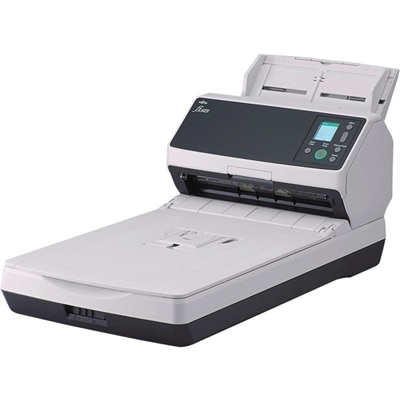
A flatbed scanner with an automatic document feeder (ADF) combines two useful scanning methods in one desktop device. The flatbed portion has a glass surface for placing individual sheets, photographs, identification cards, passports, book pages, receipts, and other items that should not be pulled through rollers. The ADF sits above the glass and is designed for stacks of loose paper, allowing you to load multiple pages and let the scanner process them in sequence. This combination is especially practical for home offices, small businesses, classrooms, clinics, legal practices, real estate offices, and anyone who regularly moves between delicate originals and larger paper batches. A family member digitizing albums may use the glass to capture an old photograph without bending it, then use the feeder to archive a folder of household records. A professional may scan a signed form on the flatbed, followed by a multi-page report through the ADF, without changing devices or rearranging the workspace. When shopping for a flatbed scanner with ADF, consider the daily volume and the kinds of originals you handle most often. Some models are designed for occasional scanning, while others are built for steadier office workloads. A feeder capacity of about 50 to 60 pages can be convenient for routine batches, and scanning speeds around 25 pages per minute may help convert a stack of documents without requiring constant attention. Actual results vary by resolution, color mode, paper size, and whether both sides of each sheet are scanned, so published speed ratings are best viewed as a useful point of comparison rather than a guarantee for every task.
The ADF is most valuable when you need to digitize multi-page documents efficiently. Load a stack of invoices, meeting notes, tax records, school paperwork, or customer forms, select the appropriate settings, and the scanner can move through the pages automatically. Models with duplex scanning capture both sides of a sheet in a single pass, which is particularly helpful for contracts, applications, and reports that contain information on the front and back. Look for support for the paper sizes and weights you use most frequently, along with guides that keep pages aligned as they enter the feeder. A well-designed feeder should handle ordinary office paper smoothly, although folded corners, adhesive notes, staples, torn edges, and unusually thick sheets may require individual scanning on the flatbed. The glass surface gives you a safer option for fragile, curled, or bound materials. You can place an open book page face down, lower the cover gently, and capture the page without separating it from the binding. It can also be useful for photographs, artwork, receipts, business cards, IDs, and passports, where careful positioning matters more than batch speed. Resolution is another important consideration. Standard office documents generally scan well at moderate settings, while photographs, fine illustrations, and small text may benefit from higher optical resolution. Color depth, automatic exposure, background removal, and blank-page detection can make digital files cleaner and easier to organize. Built-in or bundled software may automatically crop edges, correct skew, straighten pages, reduce background shading, and recognize text through optical character recognition (OCR). OCR can turn an image-based scan into a searchable PDF, making it easier to locate a name, invoice number, date, or phrase later instead of opening files one by one. Before choosing, check whether the software supports the file formats and cloud, email, or document-management workflows you prefer. Wired USB connections are common for a dedicated desk, while network-capable options can be helpful when several authorized users need access from different computers.
A flatbed scanner with ADF can be a thoughtful, practical addition for someone establishing a home office, organizing family records, managing a small business, or preserving personal documents during a move. It may also suit a student or educator who needs to scan reading materials, worksheets, artwork, and signed forms, provided the intended documents fit the scanner’s size and usage guidelines. Think about where the scanner will live, since the lid and feeder need enough clearance to open fully, and leave room at the front and rear for pages to enter and exit. A compact design can be useful in a shared workspace, but a larger footprint may offer a more generous glass bed or sturdier paper handling. Check the maximum scan area if you work with legal-size pages, photos larger than standard letter paper, or bound materials. It is also worth considering the device’s controls and setup process: one-touch buttons for scanning to a computer, email, a folder, or a PDF can simplify repeated tasks, while clear software settings help different household or office users select color, resolution, page size, and file type without confusion. For those comparing related office equipment, Printers With Automatic Document Feeders may provide another way to manage printing and document-feeding needs. To keep a scanner working reliably, remove paper clips and staples before loading pages, fan the stack lightly, keep the glass free of dust and fingerprints, and follow the manufacturer’s guidance for cleaning the rollers and replacing consumable parts. Store important digital files with clear names and sensible folders, and consider keeping a second copy of irreplaceable scans. With the flatbed available for careful, one-at-a-time work and the ADF ready for organized stacks, this type of scanner can make the transition from crowded file cabinets and scattered paper piles to an orderly digital archive feel manageable.
FAQs:
A flatbed scanner with an ADF combines the flexibility of scanning delicate, bound, or irregularly shaped items on the flatbed with the efficiency of scanning stacks of documents automatically through the feeder. This hybrid design allows users to handle a wide variety of media, from fragile photos and books to multi-page reports, all with minimal manual intervention.
Flatbed scanners with document feeders are popular among office professionals, educators, students, and home users who need to digitize both single sheets and mixed media. They are especially useful in environments where both high-volume document scanning and occasional scanning of specialty items like IDs or receipts are required.
Yes, many flatbed scanners with ADF offer duplex scanning, which means they can scan both sides of a page simultaneously. This feature is particularly valuable for processing double-sided contracts, forms, and other paperwork efficiently.
These scanners are designed to handle a wide range of items, including loose papers, multi-page documents, books, magazines, photographs, IDs, passports, and even fragile originals. The flatbed is ideal for items that cannot be fed through the ADF, while the feeder streamlines bulk scanning tasks.
Optical Character Recognition (OCR) software included with many flatbed scanners with ADF enables users to convert scanned images into searchable and editable digital documents. This makes it easier to organize, edit, and retrieve information from scanned files, supporting greater productivity and document management.