Flight Simulation Joysticks
Elevate your virtual aviation experience with state-of-the-art flight simulation joysticks. Designed to deliver precise control and immersive gameplay, these joysticks are essential for any aspiring pilot or seasoned flight sim enthusiast. Whether you're navigating commercial airliners, engaging in thrilling dogfights, or exploring uncharted skies, our selection of flight simulation joysticks provides the perfect blend of responsiveness and realism to enhance your journey. Discover a range of options tailored to meet the needs of every flying style and skill level, ensuring you achieve the ultimate in-flight experience from the comfort of your home.
This product is not available
Check out the following recommendations.




Flight Simulation Joysticks
Flight simulation joysticks bring the movements of a virtual aircraft into the hand, turning a small forward push, a gentle bank, or a measured rudder input into a more tactile flying experience. These computer gaming accessories serve a wide range of interests, from relaxed sightseeing over familiar coastlines to demanding instrument approaches, formation flying, and space simulation. A typical flight stick controls pitch and roll through forward, backward, and side-to-side movement. Models with a twist axis also provide a way to control yaw, allowing coordinated turns and runway alignment without separate rudder pedals. An integrated throttle slider or lever adjusts engine power while keeping the desktop footprint relatively compact. A hands-on throttle-and-stick configuration, commonly called HOTAS, separates the throttle from the joystick so each hand has a dedicated control. That arrangement can make frequent power changes feel more deliberate, particularly when holding an approach speed or maneuvering alongside another aircraft. Neither layout is universally better: a compact joystick suits a shared desk and occasional evening flights, while separate controls fit longer sessions and more specialized virtual cockpits. The aircraft being simulated matters, too. A joystick naturally complements aircraft with center sticks or side sticks, although many simulators also let it control aircraft represented with a yoke. Grip shape, button placement, and resistance influence comfort as much as the overall control layout. A palm rest that supports the hand, a trigger within easy reach, and a hat switch that can be operated without shifting the grip help keep attention on the flight. Left-handed and ambidextrous configurations deserve particular consideration because a sculpted right-handed grip may not work comfortably in the opposite hand. For beginners, returning flight simulation enthusiasts, and experienced players expanding a setup, the most useful controls are those that match the intended flying experience and remain comfortable through an entire session.
The feel of a flight simulator joystick comes from several elements working together: its sensors, centering mechanism, physical travel, construction, and software settings. Magnetic Hall-effect sensors measure position without the sliding electrical contact used in a traditional potentiometer, reducing one source of wear. They do not make a joystick immune to drift, mechanical play, or calibration issues, and sensor type alone does not determine overall accuracy. A well-supported mechanism with consistent resistance can make small corrections easier to repeat, whether leveling the wings after a turn or keeping a distant runway centered in the windshield. Strong centering springs can provide a pronounced return to neutral, while lighter resistance may feel less tiring during extended maneuvering. Spring resistance is also different from force feedback, which requires specific hardware and software support to reproduce changing control forces. Housing materials commonly include molded plastic, with metal components used in some grips, bases, and internal mechanisms. Plastic construction can be practical for equipment that moves between a shelf and a desk, while a heavier base can help resist movement during firmer inputs. Weight alone does not establish durability; joint quality, mounting stability, cable support, and the condition of moving parts also matter. Rubber feet help on suitable surfaces, but enthusiastic control movements may still call for a compatible clamp or mounting plate. Physical fit includes clearance around the stick at full travel and enough room for the throttle without crowding the keyboard. Routine care is usually straightforward: remove surface dust with a soft cloth, keep liquids away from openings, and follow the manufacturer's cleaning directions. Solvents, spray cleaners, or lubricants should not be applied unless specifically approved. Cables benefit from gentle routing without sharp bends or tension at the connector. When controls are put away, storing them without pressure against the grip or throttle helps protect exposed mechanisms. These everyday details matter for accessories expected to handle repeated takeoffs, long cruising sessions, and frequent transitions between gaming and other desktop activities.
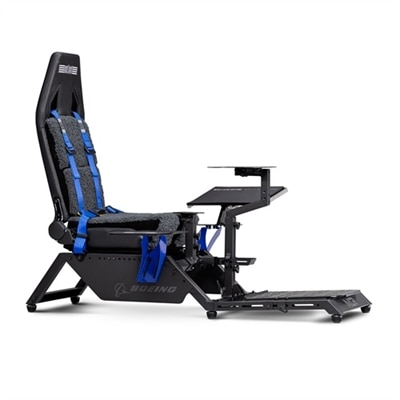
Compatibility determines how those physical controls translate into the simulator. A USB connection does not guarantee that a flight joystick works with every computer operating system, game console, or flight simulation title. Support needs to cover the exact platform and software, including any required drivers, configuration utilities, or firmware. Some combinations provide ready-made control profiles; others need manual assignments for axes, buttons, and switches. Programmable inputs can place landing gear, flaps, trim, brakes, and cockpit views close at hand, but their usefulness depends on sensible placement rather than sheer quantity. A clearly distinguishable button can be easier to find during a busy landing sequence than several tightly packed controls that feel alike. Hat switches are particularly helpful for changing views or adjusting trim when supported, while a separate throttle can provide additional inputs without overloading the stick hand. Sensitivity curves and dead-zone settings affect response, too. A small neutral dead zone may prevent unintended movement around center, although an unnecessarily large one can obscure delicate corrections. For a desktop setup, seating position should allow relaxed shoulders and supported arms, with the joystick close enough that full movement does not require leaning forward. A monitor placed within a comfortable line of sight helps keep instruments readable while preserving a clear view outside the virtual cockpit. More elaborate arrangements may pair a flight stick with pedals, dedicated panels, or secure mounting hardware; Flight Simulator Cockpit Accessories can complement that broader setup. Separate rudder pedals free the wrist from twist input and may add toe-brake control, depending on the hardware and simulator. A compact stick can be equally satisfying for someone who wants to fly a short route after work and then reclaim the desk. As a birthday or graduation gift for an aviation enthusiast, a joystick is most practical when the recipient's platform, available space, and preferred aircraft are known. Across these uses, the appeal is the same: purposeful physical controls that make virtual flying feel more involving, from the first smooth rotation off the runway to the final power adjustment before touchdown.
FAQs:
When choosing a flight simulator joystick for PC, consider the build quality, ergonomic design, button layout, and compatibility with your preferred flight simulation software. Features such as adjustable resistance, programmable buttons, and a separate throttle control can enhance realism and comfort during extended sessions.
Flight joysticks are ideal for aviation enthusiasts, gamers interested in flight simulators, students preparing for pilot training, and anyone seeking a more immersive gaming experience. They also make thoughtful gifts for tech lovers or those passionate about aircraft and flight simulation.
Most flight simulator control systems connect via USB and are plug-and-play with modern operating systems. After connecting the device, install any necessary drivers or software provided by the manufacturer, then configure the controls within your flight simulation program for optimal performance.
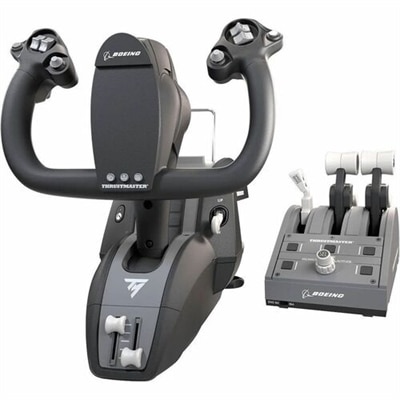
A flight stick typically replicates the controls of fighter jets or smaller aircraft, offering precise pitch and roll control. A yoke, on the other hand, mimics the steering wheel found in commercial airliners and general aviation planes, providing a different feel and control style suited for those aircraft types.
Yes, many users enhance their setup with accessories such as rudder pedals, throttle quadrants, and instrument panels. These add-ons provide more realistic control and a comprehensive cockpit experience. For a selection of compatible upgrades, visit the Flight Simulator Cockpit Accessories page.