Flight Simulator Cockpit Accessories
Flight simulator cockpit accessories transform your virtual flying experience by adding realism and immersion to every session. Whether you're a seasoned pilot or an aviation enthusiast, the right accessories can help you create a more authentic cockpit environment at home. Explore a wide selection of flight simulator cockpit accessories designed to enhance your setup and take your simulation adventures to new heights.
This product is not available
Check out the following recommendations.




Flight Simulator Cockpit Accessories
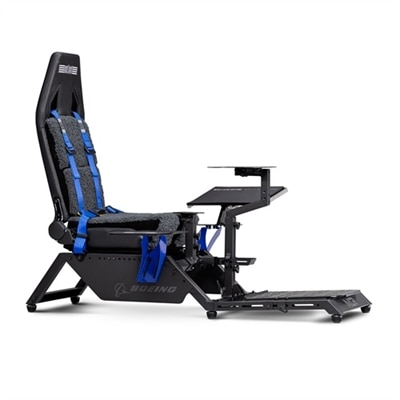
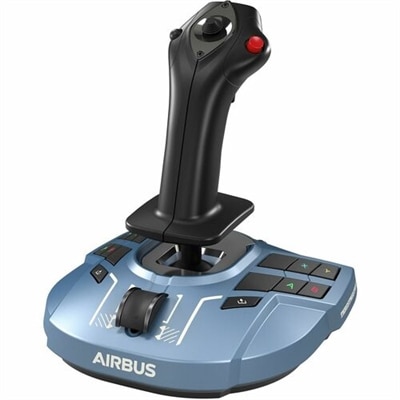
Flight simulator cockpit accessories bring the physical side of flying to a home computer setup, giving virtual pilots familiar places to reach, adjust, and respond as a flight unfolds. The category spans control mounts, throttle quadrants, rudder pedals, instrument panels, flight seats, and supporting accessories that help turn a desk or dedicated frame into a more coherent cockpit. Each serves a different purpose: mounts keep controls steady, pedals add foot-operated input, and tactile switches reduce the need to manage every command with a mouse. Together, these accessories can make a simulated departure, cruise, and approach feel more connected, especially when the control layout matches the aircraft on screen. Someone flying a small propeller aircraft may prefer a yoke positioned directly ahead of the seat, with engine controls close to one hand. A virtual helicopter pilot may need a different arrangement, with space for a central stick and a side-mounted collective control. Airliner enthusiasts often value separate throttle levers and accessible autopilot controls, while other simulation fans prefer a compact stick-and-throttle layout that moves easily between flying and everyday computer use. The distinction is less about filling every surface than about giving frequently used functions a comfortable, predictable location. During a simulated landing, for example, a stable throttle and securely positioned pedals allow small adjustments without the distraction of equipment shifting across the desk or floor. Cockpit accessories also support different levels of immersion, from a few physical controls beside a monitor to a seated enclosure with multiple displays. A thoughtfully arranged setup can make short evening flights as satisfying as longer sessions spent following a route and managing changing weather. These accessories appeal to aviation enthusiasts, simulation gamers, and people who enjoy building a personalized computer environment. For a gift recipient, the most meaningful addition is often one that complements the controls and space already in use rather than introducing a completely different layout.
Materials and mounting design influence how cockpit accessories feel over time, particularly where repeated movement places stress on clamps, joints, and adjustment points. Metal mounting plates and frames can provide rigidity under control inputs, while molded housings can keep desktop components lighter and easier to reposition. Neither material alone establishes durability; plate thickness, reinforcement, fastener quality, and the way moving parts are supported all contribute to a solid feel. A lever should move as intended without its base rocking, and a pedal assembly needs enough grip or secure attachment to resist sliding during use. Desk-mounted accessories depend on more than the width of the desktop. Surface thickness, edge shape, underside clearance, and the location of drawers or support rails can determine whether a clamp sits properly. Glass surfaces, curved edges, and lightweight furniture may have restrictions that make a different mounting approach necessary. Dedicated cockpit frames introduce their own fit considerations, including mounting-hole patterns, plate dimensions, seat adjustment, and clearance for entering or leaving the setup. A comfortable arrangement leaves room for knees beneath a yoke, allows feet to rest naturally on pedals, and keeps frequently used controls within reach without requiring a hunched posture. For a shared office, removable mounts and manageable cable runs can preserve the desk’s everyday function. In a permanent simulator corner, adjustable brackets can help accommodate different users or future changes to the control layout. Care is usually straightforward but should follow the accessory manufacturer’s directions. Dust can collect around switches, lever slots, and pedal mechanisms, while skin oils build up on grips and frequently touched surfaces. Gentle cleaning with appropriate materials helps protect finishes without introducing moisture into electronics. Mounting hardware also benefits from periodic inspection, especially after repositioning equipment. Secure cables with enough slack for adjustment reduce strain on connectors, and routing them away from pedal travel and chair wheels helps protect both the equipment and the space around it.
Electronic compatibility matters just as much as physical fit. A cockpit accessory may connect to a computer through USB, yet its supported functions can still depend on the operating system, simulator software, drivers, and aircraft configuration. Some controls provide assignable buttons and axes, while others rely on software integration to display information or operate particular cockpit functions. A physical switch may work differently across aircraft, and a display designed for one instrument arrangement may not reproduce every detail of another. Connection requirements, power needs, and software support therefore shape how smoothly an accessory fits into an existing setup. For layouts centered on tactile instrument control, Flight Simulator Panels can complement primary flight controls by placing selected cockpit functions on dedicated hardware. Depending on their design and software support, panels may provide knobs, buttons, or displays for functions such as radio tuning, autopilot settings, and aircraft systems. Their usefulness often comes from placement: a clearly visible display and a reachable adjustment knob can make routine changes feel more natural than searching across a crowded screen. Monitor positioning, lighting, and seating further affect that experience. A display at a comfortable viewing distance keeps instruments readable, while controlled room lighting can reduce distracting reflections. Head-tracking accessories may support looking around a virtual cockpit without moving the view manually, although compatibility and positioning requirements vary. Virtual reality introduces another consideration, since controls must be easy to locate by touch when the physical room is no longer visible. Distinct lever shapes, consistent spacing, and an uncluttered layout become especially valuable in that setting. Even without an elaborate enclosure, a stable seat, well-positioned controls, and clear sightlines can create a convincing sense of place. The result might be a compact desktop arrangement for relaxed sightseeing or a dedicated cockpit for practicing simulated procedures and longer routes. Across these uses, the accessories that feel most rewarding are those that suit the aircraft, the room, and the person at the controls, making each session comfortable enough to settle in and focus on the flight.
FAQs:
Accessories such as articulating keyboard and mouse trays, custom seat risers, dedicated rudder pedal plates, and multi-function panels can significantly improve the realism and comfort of your flight simulator cockpit. These upgrades help replicate the layout and feel of an actual aircraft, making your virtual flights more immersive.
Flight simulator cockpit accessories are ideal for aviation enthusiasts, student pilots, and gamers who want to experience a more authentic and engaging simulation. They also make thoughtful gifts for individuals interested in aviation or those training for pilot certifications.
Using cable management solutions, monitor stands, and specialized mounts for your devices can help keep your cockpit tidy and efficient. These accessories not only improve the aesthetics of your setup but also make it easier to access controls and maintain focus during flights.
Yes, modular accessories are a great choice for beginners because they allow you to start with a basic setup and expand as your needs and interests grow. This flexibility makes it easy to customize your cockpit over time without needing to replace your entire system.
Spring is an excellent time to refresh your flight simulator setup, as the longer days and renewed energy can inspire new projects and hobbies. Upgrading your cockpit accessories during this season can help you make the most of your free time and enjoy a more comfortable and immersive flying experience as you head into the warmer months.