Flight Simulator Accessories for Xbox
Flight simulator accessories for Xbox elevate your gaming setup, bringing a more immersive and realistic experience to every flight. Whether you're a seasoned pilot or just starting your aviation journey, the right gear can make all the difference in control and comfort. Explore a wide selection of flight simulator accessories for Xbox designed to help you take off, navigate, and land with confidence. Find everything you need to enhance your virtual cockpit and enjoy every moment in the skies.
This product is not available
Check out the following recommendations.




Flight Simulator Accessories for Xbox
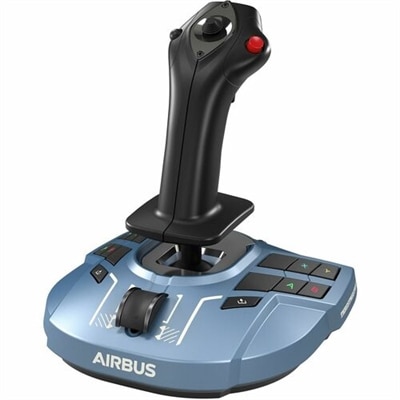
Flight simulator accessories for Xbox can transform a standard controller setup into a more engaging cockpit experience, giving each movement a greater sense of purpose and helping virtual flying feel more intuitive. A flight stick is often the simplest place to begin. Designed around the shape and motion of an aircraft control column, it can provide more precise pitch, roll and yaw input than thumbsticks, while an attached or separate throttle lets you manage engine power with a steady hand. Many compatible sticks include multiple axes, programmable buttons and a twist function for rudder control, making them useful for a wide range of aircraft. An ambidextrous design can suit different hand positions, while an adjustable resistance setting may help the controls feel comfortable during a short hop or a longer simulated journey. Some models include trim wheels, status displays or other dedicated controls that reduce the need to reach for an on-screen menu. Before choosing an accessory, confirm that it is designed to work with Xbox consoles and the intended flight simulation software, since PC-only peripherals may require drivers or connections that are not available on a console. Cable length, USB connectivity, desk space and button mapping support are also practical considerations. Exploring the broader selection of XBOX Flight Simulators can help place the accessory in context, especially when building a setup around the type of flying you enjoy most.
A yoke and throttle quadrant create a different style of experience, particularly for general aviation and larger civilian aircraft. Instead of moving a central stick, a yoke is held with both hands and pushed or pulled to control pitch, closely matching the layout found in many training aircraft. A separate throttle quadrant can provide dedicated levers for power, propeller control or mixture, depending on the design and the available software mappings. Some yoke systems also include a built-in trim wheel and rudder controls, allowing more of the essential flight inputs to remain within reach. Rudder pedals add another layer of control by translating foot movement into yaw and, in some setups, differential braking. This can make taxiing, coordinated turns and crosswind landings feel more deliberate, though pedals require additional floor space and a stable position. A modular setup may be appealing for someone who wants to begin with one control and add components over time, while an integrated unit can be easier for a shared entertainment area. Check the available ports, console compatibility and mounting requirements before purchasing. A sturdy base helps prevent unwanted movement when the controls are used, and a compact footprint is valuable when the simulator needs to be stored between sessions. For households with limited room, a flight stick with a detachable throttle may offer a practical balance of control and convenience. For dedicated enthusiasts, a yoke, throttle and rudder combination can create a more immersive arrangement that encourages slower, more methodical flying. These accessories can also make thoughtful gifts for an Xbox player who enjoys aviation, exploration or learning the procedures behind a virtual flight, particularly when the recipient appreciates equipment that adds physical interaction rather than simply improving visual performance.
The best choice depends on the aircraft types, play style and amount of space available. Players who favor fighter aircraft or fast, responsive maneuvers may prefer a compact joystick with an integrated throttle, numerous programmable inputs and a responsive twist axis. A civilian aviation enthusiast who spends time in small propeller planes may value a yoke, trim wheel and foot controls that support smooth takeoffs, coordinated turns and careful approaches. Someone interested in airliners may want a broader throttle arrangement and controls that can be mapped to flaps, landing gear, autopilot functions and other frequently used commands. An Airbus-style side-stick layout can appeal to users who want a control shape associated with modern commercial aircraft, while a traditional yoke may feel more natural for training aircraft and many business planes. Ergonomics matter as much as features: a palm rest, reachable buttons and manageable resistance can reduce fatigue during extended sessions. It is also worth considering how the accessory will be used in the room. A clamp or weighted base can keep controls secure on a desk, whereas a lightweight design may be easier to put away when the space serves multiple purposes. During cooler months or rainy afternoons, a well-organized home cockpit can turn a quiet stretch of indoor time into a scenic flight over coastlines, mountains and cities, with the physical controls adding texture to every leg of the journey. Whether the goal is casual sightseeing, instrument practice or a more detailed recreation of the cockpit, Xbox-compatible flight accessories can make virtual aviation feel more personal, controlled and rewarding.
FAQs:
Flight sim accessories for Xbox typically include joysticks, yokes, throttle quadrants, rudder pedals, and switch panels. These devices are designed to replicate real aircraft controls, providing a more immersive and realistic flying experience. Many users also add headsets and mounting solutions to complete their setup.
Flight sim accessories are great for a wide range of users, including aviation enthusiasts, gamers looking for a more authentic simulation experience, students interested in learning about flight, and even families who want to explore virtual travel together. They also make excellent gifts for anyone passionate about aviation or simulation games.
By providing tactile feedback and precise control, flight sim accessories help create a more authentic cockpit environment. Features like force feedback, customizable buttons, and ergonomic design allow users to perform realistic maneuvers and enjoy a deeper level of immersion compared to using a standard controller.
Most modern flight sim accessories are designed for easy plug-and-play compatibility with Xbox consoles. They often connect via USB or wireless technology, and many come with clear setup instructions, making it straightforward for both beginners and experienced users to get started quickly.
Yes, many flight sim accessories are versatile and can be configured for a variety of aircraft, from small single-engine planes to large commercial airliners. Some devices offer programmable buttons and adjustable controls, allowing users to tailor their setup to match the specific requirements of different aircraft and flight scenarios.