Flight Simulator Games
Flight simulator games offer an immersive experience for aviation enthusiasts and gamers alike, delivering realistic environments and detailed aircraft controls. Whether you're interested in exploring new destinations, mastering aerial maneuvers, or simply enjoying the thrill of flight from your desktop, these games provide endless opportunities for adventure. Enhance your setup with the right accessories and technology to bring every takeoff, landing, and mid-air challenge to life. Discover how flight simulator games can elevate your home entertainment and transport you into the skies.
This product is not available
Check out the following recommendations.




Flight Simulator Games
Flight simulator games recreate aspects of flying through a combination of aircraft controls, simulated aerodynamics, cockpit instruments, and virtual environments. Their appeal ranges from the simple pleasure of seeing a coastline from above to the satisfaction of bringing a large passenger aircraft onto the runway after a carefully planned descent. Civil aviation simulations typically emphasize navigation, aircraft operation, and travel between airports, while combat flight simulations add tactical flying and mission objectives. More approachable flying games may simplify aircraft behavior so that players can concentrate on exploration or action rather than detailed procedures. The distinction matters because visual realism and operational realism are not the same thing: a beautifully rendered landscape does not necessarily mean every cockpit switch functions, and a highly detailed aircraft may require considerable practice even in clear weather. Depending on the software, experiences can include light aircraft, airliners, helicopters, gliders, or other aircraft types, each with different handling characteristics. A small propeller aircraft makes a short trip over farmland feel intimate, with roads and rivers serving as recognizable landmarks. An airliner shifts attention toward instruments, route management, and the timing of each phase of flight. Helicopter flying introduces the challenge of hovering and controlling movement close to the ground. Some games include tutorials, adjustable assistance, or simplified startup options that make these experiences more accessible to beginners. Others put greater emphasis on checklists, realistic systems, and the consequences of changing wind or aircraft weight. For aviation enthusiasts, these differences give flight simulation its staying power: the same airport approach can feel very different at dusk, in rain, or with a crosswind pushing across the runway. Flight simulator games can support an interest in aviation and familiarity with basic concepts, but entertainment software does not replace formal flight instruction or qualify someone to operate an aircraft. They are equally suited to players who enjoy a quiet evening of sightseeing and those who prefer structured goals, repeated practice, and the rewarding precision of a well-flown landing.
The experience of a flight simulator game depends on both its design and the device running it. Desktop and laptop versions can differ in system requirements, supported controls, and compatibility with optional content, while console and browser-based experiences have their own capabilities and limitations. A game's supported platform and operating system are therefore more useful starting points than scenery screenshots alone. Processor performance helps support demanding simulation tasks, and graphics hardware influences how comfortably a system can display detailed terrain, clouds, shadows, and busy airport environments. System memory and room for installation also matter, particularly when software includes substantial scenery files or allows additional aircraft and regions. Some titles rely on an internet connection for scenery streaming, changing weather, multiplayer sessions, or other connected features; offline behavior varies by game. Screen resolution and graphical settings affect performance, so a higher-resolution monitor does not automatically produce a better flying experience if the computer struggles to keep motion smooth. Consistent responsiveness can be especially noticeable during a low-altitude turn or the final seconds before touchdown, when small control inputs need clear visual feedback. Display size and readability matter for a different reason: cockpit instruments often contain small numbers, labels, and indicators that players consult repeatedly. A larger screen can make those details easier to see, while an adjustable monitor position helps keep the view comfortable during a longer session. Multiple displays or virtual reality may add immersion where supported, but they introduce additional compatibility and performance considerations. The software itself also shapes how much preparation a session requires. Saved flights, quick-start scenarios, and assistance settings can suit someone with half an hour to spare, while longer routes and detailed aircraft procedures appeal to players who enjoy settling into an uninterrupted evening. Multiplayer features may create opportunities to fly alongside friends, although communication tools, participation rules, and account requirements differ. For a gift recipient, matching the game to an existing device and preferred style of play is more meaningful than choosing solely by the number of aircraft or the scale of the virtual world.
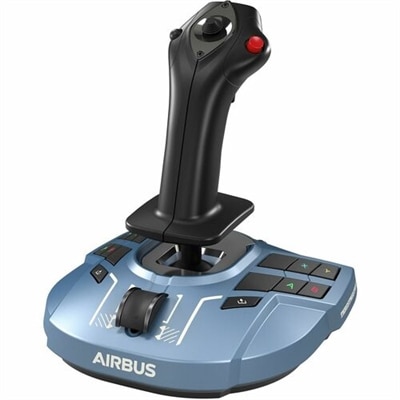
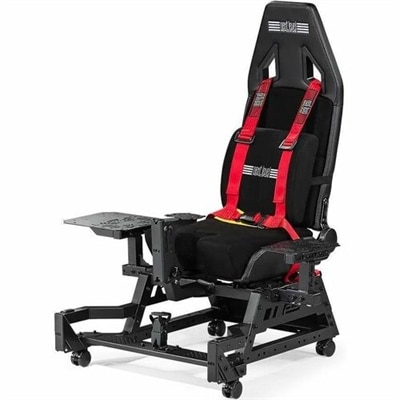
Flight simulator games can be enjoyed with different control arrangements, from a keyboard and mouse or compatible game controller to dedicated flight peripherals. The feel of those controls affects how naturally a player can make a gentle correction, hold a steady climb, or reduce power during an approach. A joystick combines several inputs in a compact footprint, while a flight yoke offers a control style associated with many general aviation aircraft and airliners. Separate throttle controls and rudder pedals can add more direct input for supported functions, although neither is essential for every player or every game. Compatibility remains specific to the software, operating system, and connection type; a peripheral designed for one platform should not be assumed to work on another. For players building a dedicated space around their software, Home Flight Simulators offers a related category to explore. Physical fit deserves attention in a home setup, especially when a desk also serves as a work surface. A clamp needs a suitable desktop edge, a controller base needs adequate clearance, and pedals need enough floor space to move without sliding into a chair or wall. Materials and construction influence everyday use as well. Molded plastic housings can keep equipment relatively light, while metal components may add rigidity in heavily handled areas; overall durability also depends on the mechanism, mounting arrangement, and care. Smooth movement, secure attachments, and comfortable hand placement matter more than appearance during repeated landings. A stable chair, supported forearms, and reachable controls help make longer sessions more comfortable without forcing the player to stretch for routine inputs. Dust removal and cleaning according to the manufacturer's directions help protect surfaces and moving parts, while careful cable routing reduces snagging when equipment is moved. Shared desks often benefit from controls that are straightforward to detach and put away between sessions. These practical details make flight simulation appealing across different routines: an aviation hobbyist might value precise control, a scenery enthusiast might favor a clear panoramic view, and a newcomer may prefer a compact setup with forgiving assistance settings. The most satisfying combination supports the flying experience the player actually enjoys, whether that means an unhurried circuit above a familiar landscape or a demanding approach that takes several attempts to get right.
FAQs:
Flight simulator games are video games that replicate the experience of piloting aircraft. They range from realistic simulations used for pilot training to more casual, arcade-style games designed for entertainment.
Most flight simulator games can be played with a standard keyboard and mouse or a game controller. For a more immersive experience, many players use specialized hardware like flight sticks, throttle quadrants, and rudder pedals.
While flight simulator games can help users become familiar with cockpit controls and basic aviation concepts, they are not a substitute for professional pilot training. However, some advanced simulators are used as supplementary tools in pilot education.
Yes, many modern flight simulator games offer multiplayer modes where players can fly together, participate in cooperative missions, or compete against each other online.
Flight simulator games often feature a wide variety of aircraft, including commercial airliners, private jets, helicopters, military planes, and even historic or experimental aircraft.