Full Size Keyboards
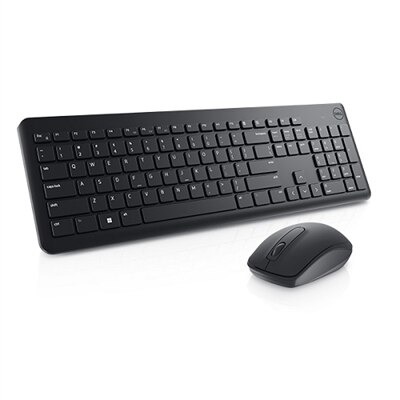
Full size keyboards deliver a comfortable and efficient typing experience, making them a popular choice for both work and play. With a spacious layout and dedicated number pad, full size keyboards are ideal for those who value convenience and productivity at their desk. Whether you're setting up a home office or upgrading your gaming setup, explore our selection of full size keyboards designed to meet your needs. Find the perfect balance of style and functionality to enhance your daily computing tasks.
This product is not available
Check out the following recommendations.




Full Size Keyboards
Full size keyboards provide the familiar, complete layout many people prefer for everyday computing. A standard full size keyboard, sometimes called a 100% keyboard, typically includes between 104 and 108 keys: the main alphanumeric section, a row of function keys, dedicated arrow keys, a navigation cluster, and a separate numeric keypad. Measuring roughly 17 inches from end to end, this format gives each key a clearly defined position and avoids the need to combine functions through layers or shortcuts. That straightforward arrangement can make a noticeable difference when moving between documents, email, spreadsheets, creative applications, and websites throughout the day. The dedicated number pad is especially useful for entering prices, quantities, addresses, measurements, or long strings of figures, while the navigation keys make it easy to move through pages, select text, and edit documents. Students, home office users, administrative professionals, accountants, programmers, and anyone who spends extended periods typing may appreciate the consistency of a full size layout. It can also be a practical gift for a family member setting up a study area, refreshing a home office, or replacing a worn keyboard with a familiar arrangement. Before choosing one, consider the available desk space. A full size keyboard places the mouse farther to the right than a compact design, and its longer footprint may leave less room for notebooks, a phone, or other desk accessories. Measuring the intended workspace and checking whether the keyboard can sit comfortably in front of the monitor helps create a more organized setup, particularly during the cooler months when home workspaces may see heavier daily use.
Typing feel is one of the most personal considerations when comparing full size keyboards. Membrane designs generally offer a soft, quiet press that suits shared rooms, libraries, reception areas, and bedrooms. They are often a comfortable choice for people who prefer gentle resistance and a quieter sound while composing messages or working late. Mechanical keyboards use individual switches beneath the keycaps, creating a more defined feel and, depending on the switch design, a light, tactile, or more pronounced response. Some users enjoy the audible rhythm and clear feedback of mechanical keys, while others prefer a quieter switch for video calls or a shared workspace. Key travel, actuation force, keycap shape, and spacing all affect comfort, so a keyboard that feels excellent to one person may not suit another. Look for a layout with legible legends, stable larger keys, and a familiar arrangement if the keyboard will be used by several people. Backlighting can help identify keys in a dim room and may be useful for evening gaming, writing, or study, while adjustable brightness allows the lighting to remain subtle when needed. Full size keyboards designed for gaming may include programmable controls, responsive input, media functions, or customizable illumination, whereas office-focused options often emphasize quiet operation and uncomplicated controls. Wired connection is dependable and avoids charging, making it well suited to a permanent desk. Wireless models reduce cable clutter and make it easier to move the keyboard between a desktop, laptop, or other compatible device, but battery life, charging methods, pairing, and connection range deserve attention. Confirm operating system compatibility and check whether the keyboard supports the devices and ports in the intended setup before making a selection.
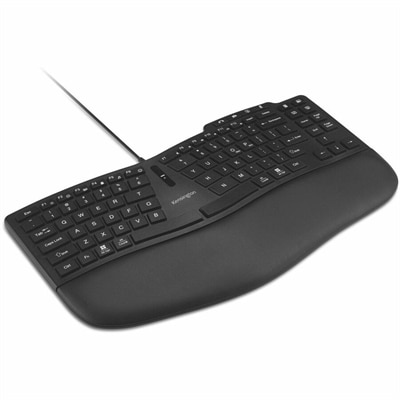
Comfort depends on more than the keys themselves. A keyboard should allow the shoulders to relax, the elbows to remain near the body, and the wrists to stay as straight and neutral as possible. Place it so the hands are not reaching upward or stretching forward, and adjust the chair and desk height so the forearms can rest comfortably while typing. A low-profile design may reduce the need to bend the wrists, while an adjustable tilt can help users fine-tune the angle; however, raising the rear edge too high may increase wrist extension for some people. A separate wrist rest can provide support during long sessions, but it should cushion the heel of the hand rather than press into the wrist while keys are being used. Those who find a traditional full size layout too wide can explore Ergonomic Keyboards for alternative shapes and arrangements that place the hands in a more natural position. Keep the keyboard surface clean by turning it off or disconnecting it before removing dust, and follow the manufacturer’s care instructions rather than applying liquid directly to the keys. When selecting from full size keyboards, think about the actual rhythm of the day: entering figures in a spreadsheet, drafting a report, navigating a long webpage, enjoying a game after work, or sharing a desk with someone nearby. The best fit balances complete key access with sound level, connection type, typing feel, desk dimensions, and long-term comfort, giving each task a familiar place and keeping the workspace ready for productive days and relaxed evenings.
FAQs:
A full size keyboard provides a comprehensive key layout, including a dedicated number pad, function keys, and navigation cluster, which enhances efficiency for tasks like data entry, spreadsheet management, and document editing. The spacious design allows for comfortable typing over long periods, making it ideal for professionals, students, and anyone who spends extended time at the computer.
Many gamers prefer full size keyboards because they offer additional keys for macros and shortcuts, as well as a numeric keypad for customizable controls. Features such as anti-ghosting and N-key rollover are often included, ensuring that every keystroke is registered accurately during fast-paced gameplay.
Yes, several full size keyboards are designed with ergonomics in mind, offering features like adjustable tilt legs, integrated wrist rests, and contoured key layouts. These enhancements help reduce strain on the wrists and hands, making them suitable for users who type for extended periods.
Absolutely. Creative professionals benefit from the expansive layout and customizable keys found on many full size keyboards. These features streamline workflows in design, video editing, and music production software, improving overall efficiency and comfort during creative projects.
To keep your full size keyboard in optimal condition, regularly remove dust and debris using a soft brush or compressed air. For deeper cleaning, gently wipe the keys and surface with a slightly damp microfiber cloth. Avoid using harsh chemicals, and always unplug the keyboard before cleaning.