$1699.99
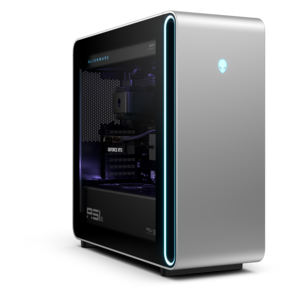
A powerful desktop featuring advanced graphics and expansive upgradeability for creative workloads, gaming, and demanding tasks.
Gaming computer systems are designed to deliver an immersive and responsive experience for players of all levels. With a focus on performance and reliability, these systems provide the power needed to handle today’s most demanding titles. Whether you're building your ultimate setup or upgrading your current rig, gaming computer systems offer the versatility and capability to elevate your gameplay. Explore a range of options tailored to meet the needs of competitive gamers and casual enthusiasts alike.
A powerful desktop featuring advanced graphics and expansive upgradeability for creative workloads, gaming, and demanding tasks.
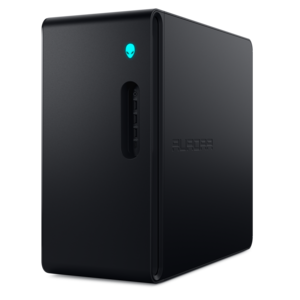
A purpose-built gaming desktop featuring efficient airflow and improved acoustics for immersive play in any setting.
A flagship gaming desktop featuring AMD Ryzen 9000X3D series processors, advanced design, and high-performance hardware.
A powerful gaming desktop featuring an advanced design for a legendary, high-performance gaming experience.
Gaming computer systems bring together the processing power, graphics capability, memory, and cooling needed to turn a collection of games into a responsive, immersive experience. These systems range from portable gaming laptops to full-size desktops designed for a dedicated desk, with configurations suited to everything from relaxed building games to fast competitive matches and richly detailed adventures. A balanced configuration matters more than any single specification: the processor handles game logic and background tasks, while the graphics processor renders environments, effects, and animation. System memory keeps active applications supplied with working space, and a solid-state drive helps reduce startup and loading times. The right balance depends on the games being played, the display resolution, and the visual settings selected. Competitive players often prioritize consistent frame rates and low input latency, while players exploring cinematic worlds may place greater emphasis on fine textures, realistic lighting, and higher resolution. For many gaming workloads, 16GB of memory is a practical starting point, while 32GB provides additional headroom for demanding titles, voice chat, browser tabs, and creative applications running together. A 1TB solid-state drive can accommodate a mix of applications and games, although large game libraries and recorded footage may make additional capacity useful. These specifications describe capacity rather than guaranteed performance; game requirements, component generations, cooling, and power settings all affect the result. Graphics memory also deserves attention, especially when high-resolution textures and more demanding visual effects are part of the experience. A system used for evening matches on a 1080p display has different demands from one driving expansive scenery at 4K. Beyond play, a capable gaming computer can support school assignments, everyday productivity, photo editing, and video projects, making it a versatile addition to a bedroom, shared home office, or multipurpose family space. For someone receiving a gaming computer as a gift, familiar games, existing accessories, and the space where the system will live provide more meaningful context than impressive specifications alone.
Desktop and laptop designs serve different routines, even when both are built for gaming. A desktop generally offers more room for cooling components, a broader range of internal configurations, and easier access for compatible upgrades, although expandability varies by chassis and design. For a permanent setup, Prebuilt Gaming Desktop Computers bring the core components together in an assembled system, with the exact configuration determining performance, connection options, and future flexibility. Full-size towers need enough clearance around their intake and exhaust vents, while compact desktops can make better use of a smaller work area. Actual dimensions matter as much as appearance, particularly when a computer will sit beside a monitor, beneath a desk, or near shelving. An enclosed cabinet can restrict airflow, and thick carpet may obstruct vents located near the bottom of a chassis. Gaming laptops trade some of that physical flexibility for an integrated screen, keyboard, and portable form. They suit players who move between rooms, spend time away from home, or need one computer for both daily tasks and recreation. Screen size, system weight, hinge construction, and power-adapter size all influence how comfortable a laptop feels in regular use. Gaming performance on battery can differ substantially from plugged-in performance, so access to an outlet remains relevant during demanding sessions. Across both formats, metal panels, molded plastics, and, on some desktops, glass side panels contribute different combinations of rigidity, weight, and appearance. Material choice alone does not determine durability; assembly quality, ventilation, careful handling, and the conditions around the computer also matter. Lighting and transparent panels can make a setup more expressive, but quieter operation or a restrained exterior may be a better fit for a shared room. A student balancing assignments with multiplayer sessions may appreciate portability and a comfortable keyboard, while a player with a dedicated desk may prefer a larger display and accessible peripheral connections. Either format works best when its physical design supports the way it will actually be used.
The surrounding setup shapes the experience just as much as the computer itself. A high-refresh-rate monitor can display motion more smoothly when the system produces enough frames, while adaptive synchronization can reduce visible tearing with compatible hardware. Resolution and refresh rate place different demands on graphics performance, so a display and computer should complement each other rather than simply feature the highest numbers. At a smaller desk, a carefully positioned monitor can preserve room for broad mouse movements; on a larger surface, a wider screen can make detailed environments feel more expansive. Adjustable monitor height, a comfortable viewing distance, and a keyboard position that allows relaxed shoulders help make longer sessions more comfortable. Headsets support voice communication and private listening, while speakers can suit a room where game audio will not disturb others. Port placement and connection types affect how easily a keyboard, mouse, controller, headset, and external display fit into the arrangement. Multiplayer responsiveness also depends partly on the internet connection and conditions beyond the computer, so strong graphics performance alone cannot eliminate online latency. Cooling influences sustained performance and everyday comfort, particularly during extended play or demanding creative work. Fan sound varies with workload, room temperature, and the cooling design; a system that is quiet during browsing may become more audible during an intense match. Routine care helps keep that cooling system working as intended. Clear vents, a stable surface, and periodic dust removal according to the manufacturer's directions support reliable operation. Computers should be powered down and unplugged before exterior cleaning, with liquids kept away from openings and cleaning products never sprayed directly onto the device. A padded carrying sleeve can help protect a laptop during everyday travel, while desktop glass panels require careful handling when access is needed. Operating system updates, compatible graphics drivers, and backups of important files support dependable use over time. With an appropriate combination of performance, physical fit, display quality, and thoughtful care, gaming computer systems can remain useful for competitive play, creative hobbies, shared entertainment, and the ordinary tasks that happen between gaming sessions.
Add the products you would like to compare, and quickly determine which is best for your needs.