GDDR6 Memory

GDDR6 memory offers advanced performance for a wide range of computing needs, providing the speed and efficiency required by gamers, creators, and professionals alike. Ideal for enhancing graphics capabilities and supporting demanding applications, GDDR6 memory is designed to keep systems running smoothly and efficiently. Explore options that help elevate your device’s potential and deliver a seamless digital experience with the latest in memory technology.

Filters

$835.99

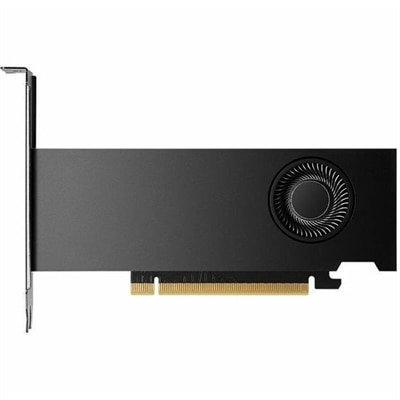
A professional graphics board with 16GB GDDR6 memory, 2,816 CUDA cores, AI acceleration, and ray tracing.

$835.99

GDDR6 Memory

GDDR6 memory supports the fast-moving visual work behind immersive games, detailed creative projects, and responsive graphics applications. Commonly paired with discrete graphics processors in laptops and desktop computers, it provides dedicated video memory, often called VRAM, for information the graphics processor needs to access quickly. That information can include game textures, rendered frames, lighting data, and the visual assets used in a three-dimensional scene. Unlike general system memory, GDDR6 is designed around the high bandwidth requirements of graphics workloads, helping move substantial amounts of data between the graphics processor and its memory. Its role becomes especially noticeable when a scene contains intricate surfaces, distant scenery, reflections, or multiple layers of visual effects. A game set in a rain-soaked city, for example, may combine detailed building textures with illuminated signs, moving traffic, and reflections across the pavement. A creative application may need similarly rapid access to materials, geometry, and image data while an artist rotates a model or adjusts a complex composition. Computers with GDDR6 graphics memory can suit players, design students, photographers, video editors, and people working with supported visualization tools. The memory type alone, however, does not determine how quickly a computer completes those tasks. Graphics processor architecture, memory capacity, memory bandwidth, application support, and cooling all contribute to the experience. Two systems with GDDR6 can therefore perform quite differently, even when their listed video memory capacities match. For everyday documents, email, and straightforward web browsing, dedicated graphics memory may be less important than other aspects of the computer. For visually demanding work, it becomes part of a broader configuration that should reflect the applications, display resolution, and level of detail involved. This makes GDDR6 most meaningful as a feature of the complete graphics system rather than an isolated specification. Its benefits depend on how effectively the surrounding hardware and software put that memory to work.

Capacity and bandwidth describe different aspects of GDDR6 memory, and both matter when comparing computers or graphics cards for a particular purpose. Capacity determines how much graphics data can remain close to the processor at once. Higher-resolution textures, complex three-dimensional assets, large image compositions, and certain effects can increase that requirement. When a workload exceeds the graphics memory capacity, performance may become less consistent as the application moves data through slower paths elsewhere in the system. That can appear as pauses during navigation, uneven frame delivery, or delays when working with demanding scenes, although other hardware limitations can produce similar symptoms. Bandwidth describes how quickly data can move, with the memory’s transfer rate and the width of its connection to the graphics processor contributing to the total. A larger capacity does not automatically mean higher bandwidth, and neither specification can compensate for every limitation of the graphics processor itself. Intended use provides useful context: a player seeking smooth motion at a moderate resolution has different requirements from an editor handling layered, high-resolution footage or an artist previewing a richly detailed model. Display resolution and quality settings can also change the workload substantially. A sharper image generally requires more rendering work, while demanding texture settings may increase memory use without affecting every other graphics setting in the same way. For creative applications, compatibility with the application’s graphics acceleration features matters alongside the hardware specifications. Certain functions may benefit strongly from a supported graphics processor, while others depend more heavily on the main processor or system memory. Multiple displays add another consideration, but the number and resolution of supported screens depend on the computer’s graphics capabilities and physical display connections, not simply its GDDR6 capacity. Together, these details explain why a balanced configuration is more informative than a single large memory figure, whether the computer is intended for an evening of gaming, a semester of digital design, or regular creative work.

Physical design also shapes how GDDR6-equipped hardware fits into daily use. In many laptops and desktop graphics cards, the graphics memory chips are mounted on the circuit board rather than installed as removable system-memory modules. A memory upgrade is therefore generally not a matter of adding a standard RAM stick; a different graphics card or computer configuration may be required. GDDR6 and DDR5 are not interchangeable, despite both being memory technologies. DDR5 system memory, represented by Dell DDR5 RAM: High-Speed Upgrade, supports the main processor and general application activity, while GDDR6 serves the graphics processor’s dedicated workload. For desktop graphics cards, physical fit includes card length, thickness, expansion-slot clearance, and space for power connectors and airflow. Electrical compatibility also matters, including the system’s power capacity and the connectors required by the card. Laptop graphics configurations require a different perspective because the processor, memory, cooling system, and enclosure are closely integrated. A thin chassis favors portability, while sustained graphics performance depends partly on how effectively that particular design manages heat and power. Common cooling assemblies use metal heatsinks, heat pipes, fans, and thermal interface materials to carry heat away from components; their design and operating conditions influence temperature and noise. GDDR6 itself is not an exterior material that needs polishing or special surface treatment. Routine care instead centers on the surrounding device: keeping ventilation openings clear, using a laptop on an appropriate firm surface, and following the manufacturer’s instructions for dust removal and cleaning. Clear airflow supports consistent operation during long rendering sessions or extended play. For a shared household computer, a student’s creative workstation, or a dedicated gaming setup, practical details such as desk space, portability, display connections, and fan noise deserve attention alongside graphics specifications. A well-matched GDDR6 configuration brings those considerations together, supporting the intended visual workload within a computer that fits comfortably into its everyday environment.

FAQs:

Add the products you would like to compare, and quickly determine which is best for your needs.

Add the products you would like to compare, and quickly determine which is best for your needs.