Graphics Card Upgrades
Elevate your computing experience with top-tier graphics card upgrades that transform ordinary visuals into extraordinary displays. Whether you're a dedicated gamer seeking smoother frame rates, a content creator in need of enhanced rendering capabilities, or simply looking to boost your system's performance, the right graphics card upgrade can make all the difference. Explore our diverse selection designed to meet various needs and budgets, ensuring you find the perfect match for your setup. Unlock the full potential of your PC and enjoy a seamless visual journey with cutting-edge graphics technology.
This product is not available
Check out the following recommendations.




Graphics Card Upgrades
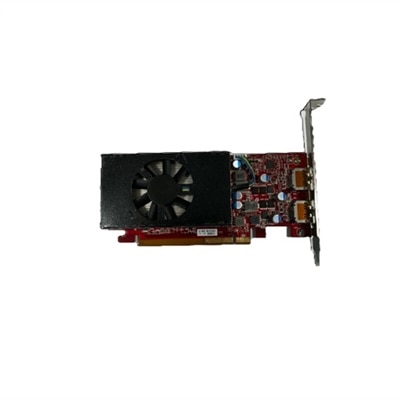
Graphics card upgrades can give a compatible desktop a noticeable new lease on life, improving image quality, frame rates, creative application performance, and the smoothness of demanding visual work without replacing every component at once. A stronger graphics processing unit, or GPU, is often useful for people who play visually rich games, edit high-resolution video, work with 3D models, create digital art, explore design software, or connect a high-resolution monitor. It can also be a thoughtful gift for a PC enthusiast who enjoys fine-tuning a system, provided the recipient’s desktop has the right supporting hardware. Before choosing a card, identify the experience you want to improve: smoother play at 1080p, sharper detail at 1440p, or more expansive 4K visuals each place different demands on the graphics subsystem. Creative users should also consider the software they rely on, since some applications benefit from particular memory capacities, acceleration features, or supported rendering technologies. Graphics memory, often called VRAM, helps the GPU handle detailed textures, large projects, multiple displays, and higher resolutions. More is not automatically better for every computer, though; the best fit balances performance with the monitor, processor, power supply, case, and motherboard already in place. Reading the technical specifications alongside your desktop’s documentation can prevent an ambitious upgrade from becoming an awkward fit.
Physical compatibility deserves careful attention before placing an order. Measure the open space inside the case, including the distance from the rear expansion slots to nearby drive bays, front fans, or liquid-cooling components. A graphics card may occupy two or more expansion slots, and a large heatsink or multi-fan design can require more room than the original card. Confirm that the motherboard includes an available PCIe x16 slot, the long expansion slot normally used for a desktop graphics card, and check whether adjacent slots or internal components could obstruct installation. The power supply is equally important. Review its total wattage, available PCIe power connectors, and age, rather than relying only on the card’s physical dimensions. A system that starts normally with a lower-power card may become unstable if the replacement draws more power than the supply can reliably provide. The processor matters as well: pairing an especially powerful GPU with an older CPU can limit performance in some games and applications, particularly at lower resolutions where the processor has more influence. Cooling and airflow should be part of the decision, too. During long rendering sessions or extended play, heat builds inside a compact enclosure, so clear vents, functioning case fans, and sensible cable routing can make a meaningful difference. Check monitor connections before selecting an upgrade, especially when using multiple screens, high refresh rates, or newer display standards. Someone who is also refreshing the rest of a mobile setup may want to explore Laptop Upgrades, while desktop owners can focus on a graphics card that complements the existing system instead of duplicating capabilities they already have.
Installing a graphics card is manageable for many desktop owners when approached patiently and methodically. Back up important files first, shut down the computer completely, disconnect the power cable, and press the power button briefly after unplugging to discharge residual power. Remove the side panel and note how the existing card is connected before taking it out. If the old card uses dedicated drivers, remove or prepare to replace them according to the operating system and manufacturer instructions; a clean driver transition can help avoid display conflicts after the new hardware is installed. Release the slot latch, remove the retaining screw or bracket, and lift the card straight out without forcing it. Seat the replacement evenly in the PCIe x16 slot until the latch engages, secure it to the case, and connect every required power lead firmly. Keep fingers away from exposed contacts, support a heavy card while fastening it, and avoid bending cables sharply against the connector. Once the case is closed, reconnect the monitor to the new graphics card rather than the motherboard display output, start the desktop, and install the appropriate current driver from a trusted source. Check device recognition, display resolution, refresh rate, fan behavior, and application performance, then run a sensible stability test while watching temperatures. A gradual, observant approach is especially helpful during the cooler months, when a new component may encourage longer gaming sessions, creative projects, or time spent learning a new visual tool. Whether the upgrade is intended for a home office, a family desktop, a student’s design coursework, or a dedicated entertainment setup, the most satisfying choice is one that fits the case, power system, display, and everyday habits as carefully as it fits the performance goal.
FAQs:
Upgrading your graphics card in a Dell desktop can significantly enhance visual performance, allowing for smoother graphics in gaming, faster video rendering, and improved support for creative applications. It can also extend the usable lifespan of your system by keeping it compatible with the latest software and games.
Many Dell OptiPlex and Inspiron desktops support graphics card upgrades. Before upgrading, it's important to check your system’s specifications for compatibility with the new card, including available PCIe slots and power supply requirements.
Yes, upgrading to a more powerful graphics card can provide better support for multi-monitor setups, enabling higher resolutions, smoother transitions, and the ability to run multiple applications simultaneously with improved performance.
Yes, updating to the latest graphics drivers after installing a new card ensures optimal performance, compatibility with your applications, and access to the latest features and security updates.
A graphics card upgrade can greatly improve gaming performance by delivering higher frame rates, enhanced visual effects, and support for higher resolutions and refresh rates, resulting in a more immersive and responsive gaming experience.