$16.99
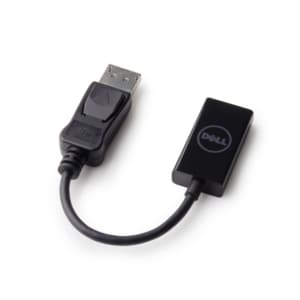
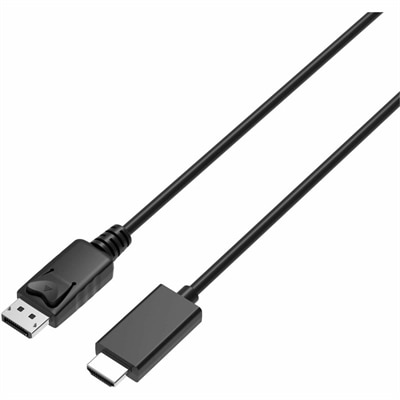
A 2-meter DisplayPort-to-HDMI cable delivering 4K resolution at 60Hz with backward-compatible HDMI support and plug-and-play connectivity.
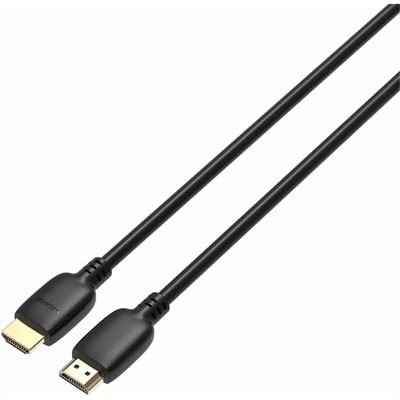
Upgrade your home entertainment or office setup with high-quality HDMI 2.0 cables designed to deliver reliable connectivity for all your devices. Whether you're connecting monitors, gaming consoles, or streaming equipment, HDMI 2.0 cables support seamless data transmission to enhance your viewing and audio experience. Explore a wide selection of options to find the right cable length and configuration for your needs, ensuring compatibility and convenience across your digital workspace or entertainment center.
A 2-meter DisplayPort-to-HDMI cable delivering 4K resolution at 60Hz with backward-compatible HDMI support and plug-and-play connectivity.
HDMI 2.0 cables, often identified through Premium High Speed HDMI certification, are a practical choice for connecting many home entertainment and computing devices. They support bandwidth of up to 18 Gbps, which is enough for 4K resolution at a 60 Hz refresh rate when the connected equipment and content are also compatible. This makes them well suited to a 4K television paired with a streaming device, Blu-ray player, cable or satellite receiver, desktop computer, laptop dock, or previous-generation gaming console. They can also carry high-dynamic-range content, multichannel digital audio, 3D video, and Audio Return Channel (ARC) signals through a single connection. In a living room, that may mean sending a sharp picture from a media player to a television while returning television audio to a compatible soundbar or audio receiver over the same cable. In a home office, an HDMI 2.0 cable can connect a computer to a 4K monitor for detailed spreadsheets, crisp text, creative applications, and standard media playback. The cable does not improve the resolution of a source or display on its own, but it helps provide the connection required for features that the devices are designed to support. A 4K display set to 60 Hz, for example, still depends on the computer, graphics hardware, source content, and display settings being capable of producing that signal. For shoppers comparing options, the most useful starting points are the specifications of the devices being connected, the desired resolution and refresh rate, and the features that need to pass through the cable. A cable labeled for HDMI 2.0 use is generally appropriate for 4K/60 Hz viewing, everyday productivity, home streaming, and many gaming setups. Those shopping across connection types may also want to browse High Speed HDMI Cables for additional options that support common HDMI connections.
Length is another important consideration, especially when a cable must run behind furniture, along a wall, through a desk, or between components placed on opposite sides of a room. Choose a length that reaches comfortably without pulling on the ports, but avoid excessive slack that can become tangled behind a television stand. A short cable can keep a monitor or laptop setup neat, while a longer cable may be helpful when a television is mounted away from a media cabinet or when a desktop computer sits beneath a standing desk. For longer runs, look for clear performance claims and appropriate certification, since signal reliability can become more important as distance increases. A well-made cable should have connectors that fit securely without forcing the port, durable strain relief near each plug, and a flexible jacket that can be routed without sharp bends. Gold-colored connector plating is not a guarantee of better picture quality, so it is more helpful to focus on supported specifications, build quality, return policies, and the right length. HDMI connections are designed to be backward compatible, allowing newer HDMI cables to work with older HDMI ports, while an HDMI 2.0 cable can connect many earlier HDMI devices. Compatibility is determined by the least capable device in the chain: connecting a 4K/60 Hz source and display through an older display or adapter will not create 4K/60 Hz output. Adapters, switches, docks, and audio equipment can also affect the final signal, particularly when they do not support the same resolution, refresh rate, HDR format, or audio features. Before ordering, check the shape and number of available HDMI ports and confirm whether the setup requires a standard HDMI connector rather than a different connector paired with an adapter. A simple port check can prevent the common frustration of opening a new cable only to discover that the source device is already using its only HDMI output or that the cable is not long enough to follow the planned route.
These cables are useful for a wide range of people because they solve a familiar connection problem without requiring a complicated installation. Someone arranging a comfortable movie area during the cooler months may use one to connect a streaming device to a television, while a student or remote worker may use one to extend a laptop display to a larger monitor for clearer documents and more room for multitasking. Families can use HDMI connections to bring console gaming, home videos, and streamed entertainment to a shared screen, and a person setting up a guest room may appreciate having an extra cable available for visitors who bring a compatible computer or media device. HDMI 2.0 cables can also make thoughtful practical gifts for someone moving into a new apartment, refreshing a home office, organizing a gaming corner, or replacing a cable that has become worn after years of being moved between rooms. They are especially useful when paired with a known need, such as connecting a 4K monitor to a desktop or routing audio from a compatible television to a soundbar. For a setup focused on very high refresh rates, such as 4K gaming at 120 Hz, or on newer 8K displays, shoppers should review whether a higher-bandwidth cable and compatible equipment are required; HDMI 2.0 is intended for up to 4K at 60 Hz rather than those more demanding signals. For ordinary 4K streaming, office work, television viewing, Blu-ray playback, and many previous-generation gaming systems, however, a properly specified HDMI 2.0 cable can provide a straightforward, dependable connection. Keeping one spare in a desk drawer or media cabinet can also simplify future rearrangements, particularly when a new monitor, television, laptop, or entertainment device arrives and the existing cable is already routed behind furniture.
Add the products you would like to compare, and quickly determine which is best for your needs.