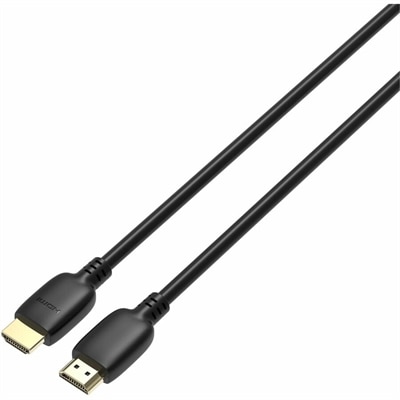
High Speed HDMI Cables

Elevate your entertainment experience with high speed HDMI cables, designed to deliver superior audio and video quality for all your devices. Whether you're connecting your new 4K TV, gaming console, or home theater system, these cables ensure seamless transmission of high-definition content. Perfect for both professional setups and home use, high speed HDMI cables provide the reliability and performance you need for an immersive viewing experience. Explore our selection and find the perfect cable to meet your needs today.

Filters

$29.99

A high-speed HDMI cable delivering 8K at 60Hz, 4K at 120Hz, 48Gbps, HDR, and eARC.

$29.99

High Speed HDMI Cables

High-speed HDMI cables carry digital video and audio between compatible source devices and displays through a single connection. They connect equipment such as desktop computers, laptops, game consoles, and disc players to televisions, monitors, and projectors, reducing the need for separate picture and sound cables. In a home entertainment setup, that can mean one cable running from a console to a television; at a desk, it can mean a connection between a computer and an external monitor with built-in speakers. The high-speed HDMI cable category is designed for bandwidth up to 10.2 Gbps and commonly supports 1080p video, along with certain higher-resolution formats such as 4K at 30 Hz. Actual performance depends on the source, display, selected resolution, refresh rate, color settings, and any equipment between them. Resolution describes image detail, while refresh rate describes how often the display updates each second, so two connections labeled 4K may have different bandwidth requirements. For a Full HD television or monitor, 1080p HDMI Cables provide a related category for setups centered on 1920-by-1080 resolution. Higher-bandwidth formats require closer attention to the cable category: premium high-speed HDMI cables are tested for up to 18 Gbps, while ultra high-speed HDMI cables support up to 48 Gbps. Those categories accommodate more demanding combinations, including certain 4K formats at 60 Hz or 120 Hz, respectively, when connected equipment also supports them. A cable does not add resolution, refresh rate, or display features that the connected devices lack. Its role is to carry the supported signal reliably. For everyday streaming, presentations, movies, and computer use, matching the cable’s documented capabilities to the intended setup matters more than broad descriptions such as “advanced” or “professional.” Clear specifications make it easier to distinguish a connection suited to a familiar Full HD screen from one intended for more bandwidth-intensive video. Digital audio can travel alongside that picture, although supported audio formats depend on the source and receiving equipment.

The physical details of a high-speed HDMI cable matter just as much as its signal specifications, particularly when space behind a screen is limited. Standard HDMI connectors are common on televisions, monitors, consoles, and many computers, while some compact devices use mini or micro HDMI connections. These connector sizes are not interchangeable, and a cable with different connector types at opposite ends serves a different purpose from one with two standard HDMI plugs. Connector housing size also affects fit: a bulky grip may crowd neighboring ports, while a slim housing can be easier to accommodate on a thin laptop or closely spaced display inputs. Right-angle connectors can help with certain wall-mounted screens, provided their orientation matches the port and leaves room for the cable to exit naturally. Inside the cable, conductors, insulation, and shielding work together to preserve signal integrity. Outside, a smooth jacket can slide readily through an open desk cable tray, while a braided covering may offer added protection against everyday abrasion. Neither appearance alone nor jacket thickness establishes a cable’s supported bandwidth. Gold-plated contacts resist corrosion, but they do not automatically create a sharper image than another properly functioning connection. Length introduces another practical consideration. A cable should reach comfortably along its actual route, including the distance around furniture and enough slack to avoid pulling on ports. Excess length can create clutter, while a tight span can put strain on connectors whenever a monitor moves. Longer runs may use active electronics or optical construction, and some have designated source and display ends. There is no single maximum distance that applies to every HDMI cable and video format. For permanent routing inside a wall, the cable’s jacket rating must suit the installation and applicable requirements; an ordinary external-use cable should not be assumed appropriate. Across different constructions, sturdy strain relief and a manageable bend radius help support a secure, less stressed connection.

High-speed HDMI cables fit a wide range of everyday spaces, from a quiet study corner to a shared living room or a meeting area with a large display. A student connecting a laptop to a monitor may value a flexible cable that packs neatly beside a charger, while someone with a fixed desktop setup may prefer a length that follows the back edge of the desk without coiling on the floor. In a living room, the route may pass behind a media cabinet before reaching a television, making connector clearance and gentle bends especially important. For gaming, the intended resolution and refresh rate deserve attention together; support for a particular screen resolution does not establish support for every refresh rate at that resolution. Features such as variable refresh rate and high dynamic range also depend on compatible equipment and sufficient connection bandwidth. A monitor’s HDMI input capabilities may differ from those of its other inputs, and a computer’s output can have its own limitations. Adapters, docks, switches, and receivers add further connection points, each with specifications that can affect the complete signal path. A straightforward HDMI cable also cannot turn a port intended only for video output into a video input. For television audio systems, Audio Return Channel and enhanced Audio Return Channel require the appropriate ports, supported equipment, settings, and cable capabilities rather than an assumption based solely on connector shape. Once installed, simple handling habits help preserve the connection: gripping the connector housing instead of tugging the cord, keeping the cable away from pinch points, and avoiding sharp bends immediately behind the plug. Dust can be removed from the exterior with a soft, dry cloth while the cable is disconnected, without introducing liquid into the contacts. For someone assembling a home office, refreshing an entertainment space, or receiving useful computer accessories as a gift, a cable matched to the right ports, distance, and video requirements can be a practical addition that keeps everyday connections uncomplicated.

FAQs:

Add the products you would like to compare, and quickly determine which is best for your needs.

Add the products you would like to compare, and quickly determine which is best for your needs.