$24.99
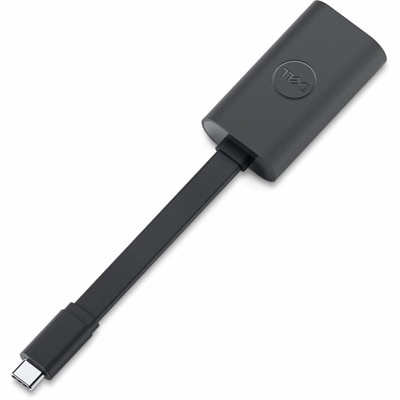
A compact USB-C to Ethernet adapter supporting transfer speeds up to 2.5Gbps anywhere.
Elevate your connectivity with our high performance networking solutions, designed to meet the demands of today's fast-paced digital world. Whether you're upgrading your home office, optimizing a corporate environment, or enhancing a gaming setup, our selection offers the latest in cutting-edge technology to ensure seamless and reliable network experiences. Explore options that cater to both wired and wireless needs, providing robust support for all your devices. Dive into the world of high performance networking and discover how you can achieve superior speed, enhanced security, and unparalleled efficiency in every connection.
A compact USB-C to Ethernet adapter supporting transfer speeds up to 2.5Gbps anywhere.
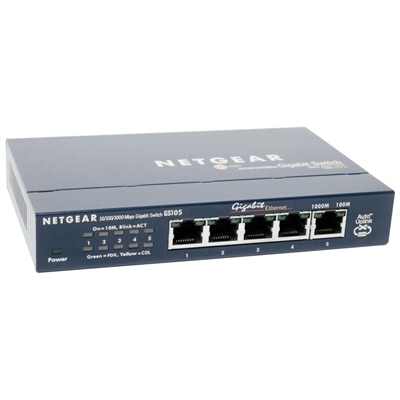
A compact, fanless five-port Gigabit Ethernet switch with a durable metal chassis for quiet, reliable networking.
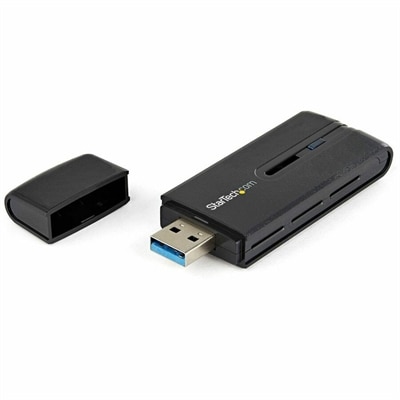
A dual-band USB 3.0 Wireless-AC adapter delivering up to 867 Mbps with WPS and backward compatibility.
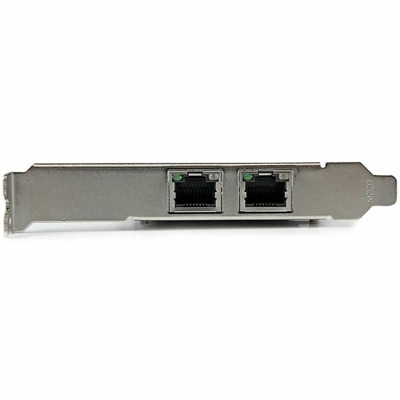
A dual-port PCIe x4 Gigabit Ethernet adapter featuring Intel i350, VLAN tagging, link aggregation, low-profile support.
High performance networking supports fast, responsive connections for people and teams moving substantial amounts of data between compatible computing devices. In practical terms, performance is shaped by three closely related measures: bandwidth, latency and CPU utilization. Bandwidth describes how much information can move over a connection during a given period, while latency measures the delay before that information reaches its destination. CPU utilization reflects how much processing power a computer must devote to handling communication tasks instead of running creative applications, analytical workloads or other demanding software. A connection can offer impressive throughput yet still feel sluggish if latency is high, and a low-latency setup may not deliver the desired experience when large files exceed its available capacity. When comparing products in this category, consider the type of work they will support, the number of connected devices involved and the performance of the computers at each end. A powerful laptop or desktop, a sharp monitor and dependable accessories can help users take better advantage of a responsive connection, especially when they regularly work with large media files, collaborate through cloud applications, stream high-resolution content or access shared resources from different locations. Compatibility matters as well. Check available ports, supported standards, operating system requirements and cable specifications before purchasing, since every part of the connection must work together to deliver the expected experience.
High performance networking is especially relevant to professionals who transfer large design files, review detailed video, operate specialized business applications or coordinate work across multiple offices. Engineers may use responsive connections while viewing complex models and exchanging revisions; architects and creators may move large project assets without turning every file handoff into a long interruption; financial, scientific and analytical teams may depend on quick access to live information and distributed applications. It can also benefit households with several people working, studying, streaming and playing online at the same time. The right combination of computer hardware and accessories helps reduce the small delays that accumulate throughout a busy day: a document that opens more quickly, a collaborative presentation that updates with less hesitation or a high-resolution call that stays clear while other applications remain active. For a home office, look for a computer with sufficient processing capability, memory and modern connectivity options, then pair it with a monitor that gives you enough room to keep communication tools, reference material and active work visible together. For a shared workspace, consider how far devices sit from one another, how many users need access and whether wired connections are practical. A compact setup near a desk may call for short, well-organized cables and a small selection of adapters, while a larger room may benefit from longer, carefully routed accessories that keep walkways clear and reduce accidental disconnects. During the cooler months, when more work and entertainment often move indoors, thoughtful placement can make a noticeable difference: keeping equipment ventilated, avoiding tightly coiled cables and leaving room around ports can help maintain consistent operation during long sessions.
For demanding technical environments, performance discussions may include technologies such as kernel bypass and Remote Direct Memory Access, which are designed to reduce the work a computer’s operating system and processor perform while moving information. Kernel bypass allows certain applications to communicate more directly with a compatible interface, helping reduce processing overhead and delay. Remote Direct Memory Access, often called RDMA, enables data to move between the memory of compatible computers with limited processor involvement. Specialized interconnects such as InfiniBand are associated with very low-latency, loss-aware communication in highly specialized installations, while high-speed Ethernet remains a familiar choice across many business and professional settings. These capabilities are not necessary for every home or office, and they depend on compatible software, hardware and configuration. For most buyers, the more useful starting point is identifying the applications that matter most, estimating typical file sizes and reviewing the performance specifications of the computer and accessories being considered. If uninterrupted operation is the primary concern, explore High Availability Networking for related considerations. When selecting products for a colleague, student or family member, focus on the experience they want to improve rather than a single specification: a mobile professional may appreciate a lightweight computer with flexible connectivity, a designer may value a high-resolution display and convenient access to peripherals, and a remote learner may benefit from a dependable setup that makes video meetings, research and file sharing feel straightforward. A well-matched collection of devices can turn a crowded desk into a capable workspace, helping information move smoothly from one task to the next without distracting interruptions.
Add the products you would like to compare, and quickly determine which is best for your needs.