$1144.99
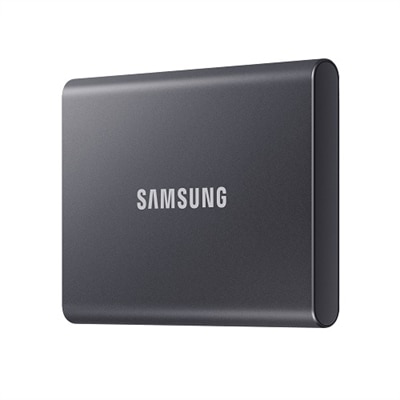
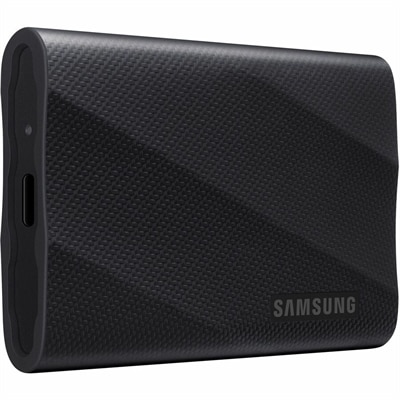
A rugged black 4TB portable NVMe SSD delivering read/write speeds up to 2,000MB/s and thermal control.
Upgrade your storage experience with a high-speed SSD and enjoy seamless performance for all your computing needs. Whether you're looking to boost your system’s responsiveness, reduce load times, or enhance overall efficiency, high-speed SSD options offer an ideal solution for both personal and professional use. Discover a range of reliable choices designed to help you get the most out of your devices, ensuring quick data access and improved productivity every day.
A rugged black 4TB portable NVMe SSD delivering read/write speeds up to 2,000MB/s and thermal control.
High-speed solid-state drives (SSDs) are designed to make everyday computing feel more immediate, from launching applications and opening large folders to loading games and moving media projects. Unlike traditional hard disk drives, SSDs store information on memory chips rather than spinning platters and moving read/write heads. That absence of moving parts helps deliver fast access times, quiet operation and improved resistance to the bumps and movement that can come with a laptop or portable setup. Many of the fastest options use the NVMe protocol and connect through a PCIe interface, allowing them to transfer data at far higher rates than older SATA-based SSDs. PCIe 3.0, PCIe 4.0 and PCIe 5.0 represent different generations of that interface, with newer generations generally offering greater bandwidth when the computer supports them. A high-end PCIe 5.0 NVMe SSD can advertise sequential read speeds approaching 15,000 megabytes per second, while a capable PCIe 4.0 model can still provide excellent responsiveness for gaming, creative work and everyday multitasking. Those headline figures describe sequential transfers under specific conditions, so practical performance also depends on the computer, software, file sizes, drive capacity, cooling and workload. Web browsing, email, office applications and streaming may feel similarly quick on several generations of SSDs, while large game installations, high-resolution video files, three-dimensional projects and frequent file transfers are more likely to reveal the benefits of additional bandwidth. This makes compatibility the first consideration when comparing high-speed SSDs. Check whether a desktop or laptop accepts an M.2 2280 drive, whether the slot supports NVMe and which PCIe generation it provides. A newer drive can often operate in an older compatible slot, but it may run at the lower interface speed. Some desktops provide more than one M.2 slot, while many laptops have limited internal expansion space, and some systems require a particular drive thickness or a manufacturer-approved configuration. Before purchasing, review the computer’s documentation and confirm that the operating system, mounting hardware and heat-spreader clearance are suitable. A drive with a built-in heatsink may be useful in a desktop, but it may not fit inside a slim laptop. For systems with limited internal space, an external enclosure can offer a practical way to use an NVMe SSD, provided the enclosure and connecting port support the desired transfer rate.
Capacity matters just as much as speed. A smaller drive may suit a simple productivity computer, a boot upgrade or a secondary library of documents, while larger capacities provide room for modern games, raw photographs, downloaded media and project files without constant cleanup. It is wise to leave some free space available because an SSD may maintain more consistent performance when it is not nearly full. Shoppers comparing High Capacity SSDs can weigh additional room against their budget and the way they expect the drive to grow over time. Speed ratings should also be considered alongside endurance, warranty coverage and the type of memory used. Drives built with TLC memory are often a balanced choice for demanding general use, while QLC-based models can provide substantial capacity and good everyday performance; sustained write workloads may differ between them, especially after a cache is filled. A professional editing video on location, an engineer working with large datasets, a photographer sorting a full memory card or a student carrying multiple creative projects may value fast sustained writes and dependable endurance. A PC gamer may appreciate shorter load times and quicker updates, particularly when a large game library is stored on the same drive, although the rest of the system still influences frame rates and in-game performance. For regular home and school work, an SSD can make an older-compatible desktop or laptop feel more responsive, and a fast secondary drive can separate applications or games from personal files for a tidier setup. It can also be a thoughtful gift for someone building a computer, refreshing a work-from-home station or preparing for creative projects during the cooler months, when more time is often spent indoors organizing photos, editing video or enjoying games. Installation should be approached carefully: back up important files first, confirm the correct slot and screw or mounting mechanism, and follow the computer manufacturer’s instructions. A clean operating-system installation can make the most of a new boot drive, while cloning software may help preserve an existing setup when supported. Performance can be affected by heat, so airflow and thermal management deserve attention, especially in compact systems or during long transfers. With the right interface, capacity and cooling, a high-speed SSD can provide a responsive foundation for work, play and personal projects, turning the wait for a large application or file transfer into a brief pause rather than a recurring interruption.
Add the products you would like to compare, and quickly determine which is best for your needs.